
Sascha Feider

Forum Replies Created
-
AuthorPosts
-
You could utilize the notes function on each video to mark important sections. It let’s you add a timestamp too.
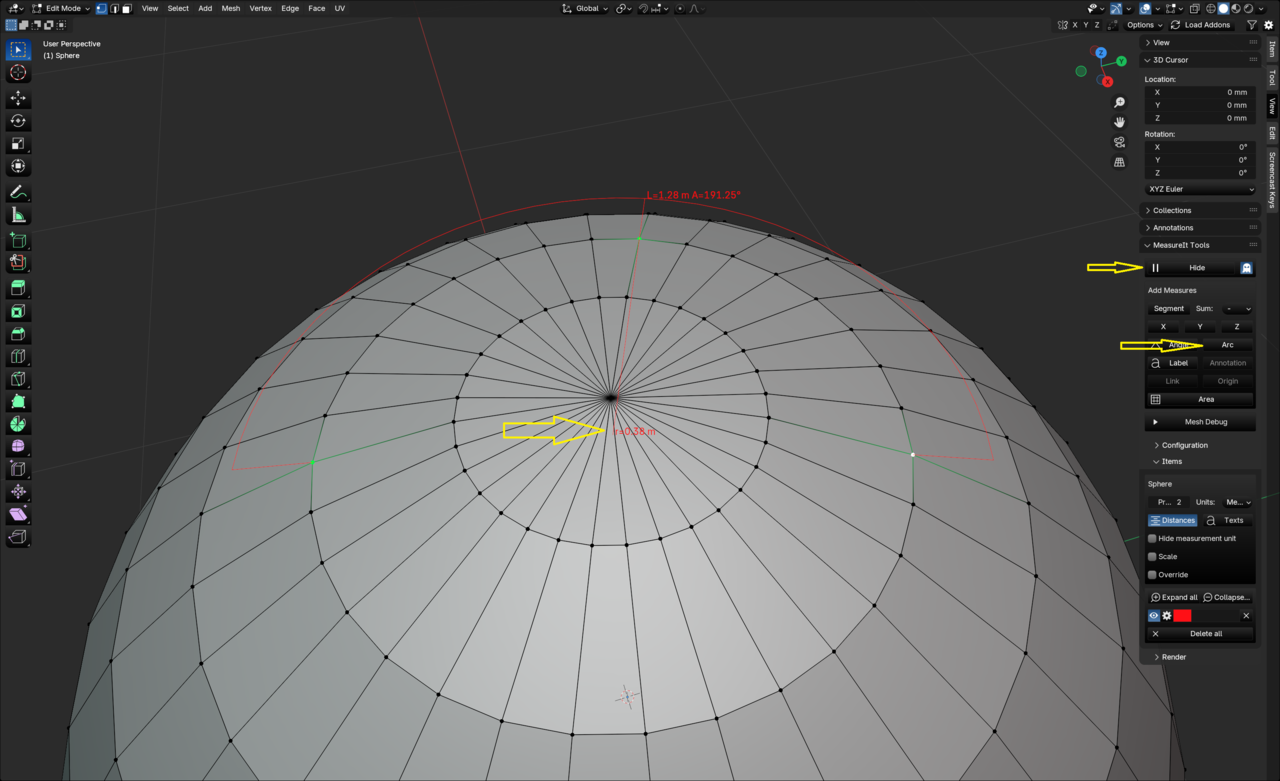
If you want the radius of a ring like that you can use the MeasureIt extension:
You’ll have to go into vertex mode and select three vertices on the ring you want to measure and then in the extension (under view in the n-panel) click on “Arc”. It will the show the radius, length and angle of the arc. Make sure you click on “show” in the extension, otherwise you won’t see anything.
That’s okay. If I have to watch the news to realize that it can’t be too bad. lol As long as it turns off auto-merge.
Wish auto-merge had a similar warning option as the one for auto-keying. It’s just so easy to forget to turn it back off.
You could also try the relax function of the loop tools extension. It will try for a nicer curvature.
Select a loop and right click -> loop tools -> relax and play with the iterations in the last operations panel on the bottom right.
You won’t have total control over what the curve will look like, but if you’ve already established a base curvature it will smooth it out.Reading this here: https://projects.blender.org/blender/blender/issues/123956 and the links in the thread and subsequent ones it might be another one of those rabbit holes. 😀 And also engine dependent. Curious about your test results.
As far as shader nodes go I’m pretty sure Blender looks at the output node and then calculates backwards. So anything that doesn’t have a connection that eventually leads to the output node, should not matter for performance and is like space dust – just floating around not doing anything.
I remember something where it was talked about that you can have complete node setups within one material and only the connected one gets calculated. Looking at some of my pro assets I use it makes sense, where for example you have different node setups for different flooring patterns and can just plug in whatever you desire, the rest is just there.I would assume the same is valid for the compositor. Geo-nodes I don’t know for sure, but I would guess it’s similar.
Glad you got it figured out. Enjoy the ride on the learning curve 😀
Looks like you have a bunch of overlapping faces (the red specks in the second image) and on the far right indent something is very wrong with the faces where you can’t see the lower edge. You definitely have some double vertices, possibly happened during an extrude operation. In edit mode switch to vertex mode -> A to select everything -> M -> Merge by distance.
Looking at some of the faces and edges though, this might not solve all your problems. In that case your best bet would probably be to start and redo this section over from scratch.
Since you are in edit mode and the faces with the x on it are not part of the mesh you’re editing in this shot, you should try to go to object mode and select whatever that is again. I also see a boolean_cutters collection there, which tells me you’ve used bool tools. I’m not sure what’s been changed in that addon, but since 4.2 it creates that collection and cutter often stay visible, where they would just be bounds before. That might be a cause for this too. Try deactivating that collection and see what happens.
These things are where I would start to troubleshoot.Nice colour scheme, well done.
The front could have used a little more light, so we can see the details there. 🙂
December 20, 2024 at 5:14 pm in reply to: Game Character Modeling with Blender Course Question #92145CORE is a superb choice to start your journey into Blender. Once you’ve done the basics series it’s a perfect choice. It will give you a very good introduction and fundamental knowledge in every aspect there is in Blender (except geo-nodes) and once you have that basis you should be able to pick your battles after that. You’ll learn the tools on a deeper base than in any free resource out there. And if you can get it on sale right now, that’s a great deal.
With that you’ll get more out of free resources afterwards, in my opinion, because you’ll understand why things are done, not just see that they are done, which is the case in most (not all) YT tutorials for example. Plus the community here and on the discord is always there to help.Awesome compilation, so many great artworks! Thanks for including mine.
Now I’m wondering why I never made any shots like that out of it, only one still. Need to learn more. *heads back to the dungeon and locks the door*
Good start, looks nice and clean. Keep at it 🙂
Great result. Nice addition with the handles on the sides. Keep it up 🙂
-
AuthorPosts
