
Shawn Blanch

Forum Replies Created
-
AuthorPosts
-
EASIER ENGRAVING 3D TEXT (TAPERED TEXT)
While working on the Horrific Habitation Challenge of Oct 2022 I was making Tombstone Engraving Text and went through a rather painful process after watching this awesome video: Sculpting a Spooky Gravestone with master sculpter Kent Trammell
I am glad I watched it and went through the pain because I discovered a much less painful and more streamlined approach that has saved me loads of time. And now I have a template for all Engraving workflows / 3D text boolean workflows.
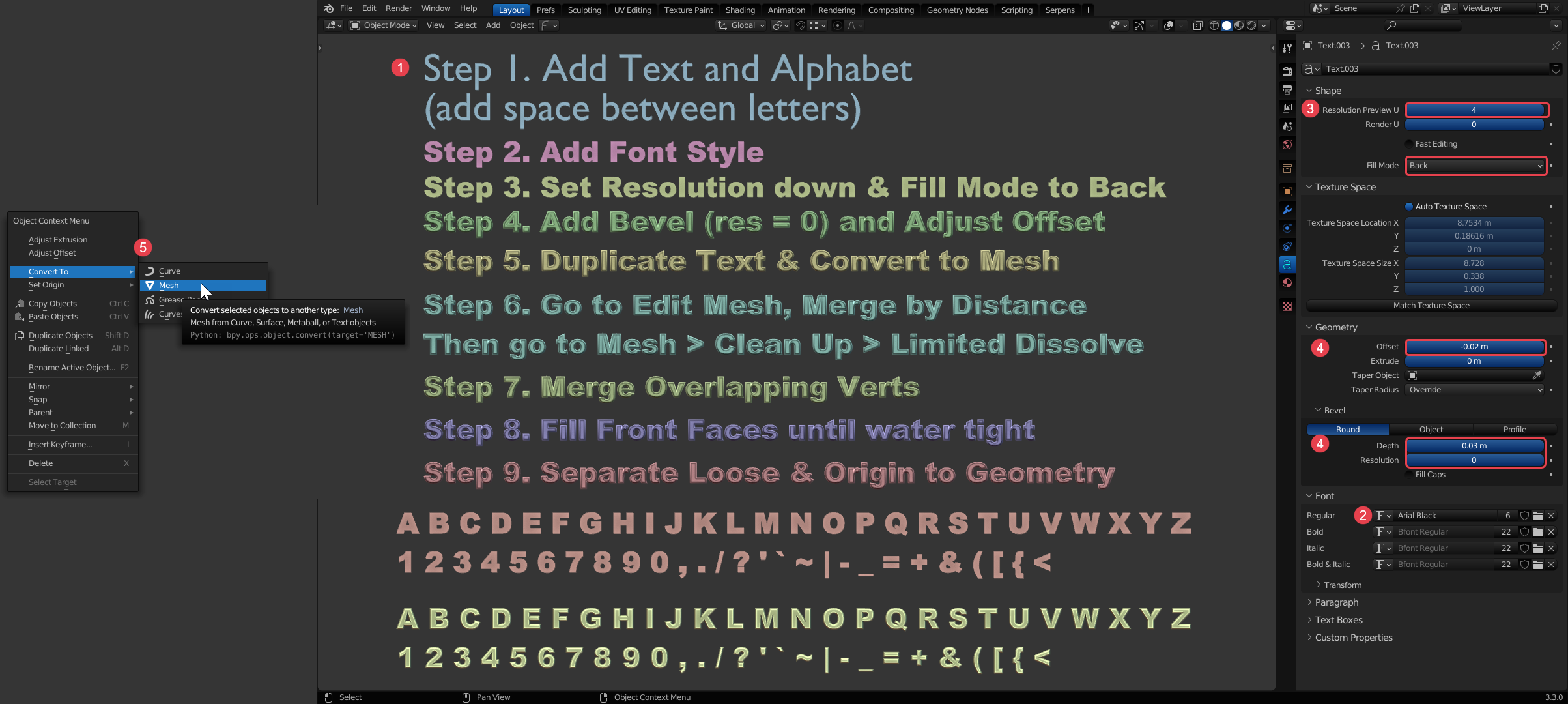
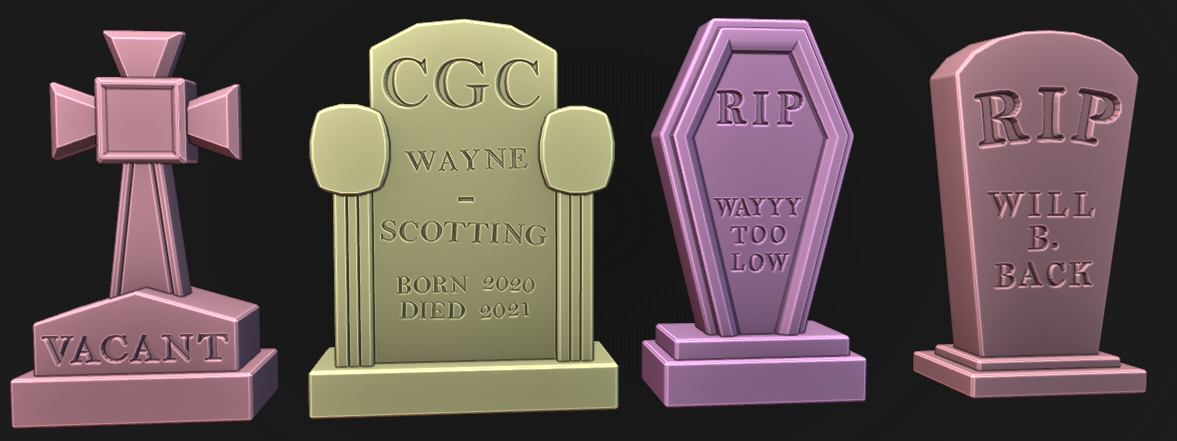
The results were far more enjoyable and I am getting to iterate quicker on the concepts. After getting the 3D tapered text water tight I just extruded the front edge straight back a little and then moved individual letters to form words.
Then I used a Boolean modifier and pushed the backside-tapered text into the tombstone until I liked the depth. I had to turn on Self Intersection on the modifier sometimes.
That is great @spikeyxxx. I didn’t know that either!
Hey @beefkeef What happens if you load from cgcookie.mavenseed.com?
https://cgcookie.mavenseed.com/u/beefkeef
or
https://cgcookie.mavenseed.com/projects?context=selfThey look awfully great.
Love to see your magic sculpting at work Keith. Looking abominable in the best way.
Hey Kevin, without seeing maybe this workflow would help. Use project from view, set the cursor to the middle of the UV space and then snap to cursor and you should be able to scale almost perfectly.
Yes, it came out looking good. I am excited to see where you go from here. Keep up the great work!
That’s awesome! Nice work.
Ah wonderful. You are making killer progress in the intro coursework
Hey @jaybee did you end up getting this resolved or did you need a hand still?
July 7, 2022 at 8:39 pm in reply to: When linking materials 1 is good,1 is black, the other is white #74807Yeah I second the comment by Omar. When you reference atttributes by name make sure spelling and case match exactly. Blender python attributes are type and grammar sensitive. Even if that wasn’t the whole issue it’s good to remember.
Don’t sweat making mistakes! You did the right thing by taking a break and coming back. Sometimes we are literally too close to these trees to see the forest (nailed that pun!)
Yeah the wagon wheel effect looks like it is happening in the recording.
You’re animation is really coming along though. Despite the issues you are facing it is definitely coming together and the wheels turn and shocks behave well.
When the camera orbits around it can sometimes be hard to judge everything that is going on. You might try to stabilize the camera movement while troubleshooting (or just add another camera for troubleshooting purposes only).
@pohrerhub That python console error is referring to a collection that may have been deleted. There is a variable named `widget_collection` that is being assigned to the first parent collection of the widget. That parent collection was either cleared or has been deleted. If you send me the file I can probably help you troubleshoot it. I haven’t gotten to that point in the course but check your collections and collection parenting for the widgets. I hope that makes sense.
I actually learned something so I am just glad to see this question. Copy Attributes for the win when needed.
It kinda depends on the issue. From what I see in your picture your bones all moved during apply scale and not just the mesh. I’d probably have to see this live to see the other potential issues going on.
But here’s some thoughts:
Unparenting and applying scale on the armature should do the trick in some cases then simply re=parentIf the rest position changes for the armature then this should help instead:
Unparent the child object (keep location if needed)Then, before applying scale on the armature, select the unparented-child object and add a Copy Transforms Constraint to the armature bone. If needed you can apply visual transforms from the constraint at any point in this process.
Apply scale on the armature and reparent the mesh as a child of the armature.
Great job everyone! I love using these in the discord.
-
AuthorPosts
