My references disappeared from the viewport

Forum Archive My references disappeared from the viewport

Viewing 6 posts - 1 through 6 (of 6 total)
  • Author
    Posts
  • #15279
    jay bee
    Participant

      I was about to start the button side when the concept art suddenly vanished. Everything is unhidden/enabled to my knowledge but I’m not sure why it’s not visible. Thanks! screenshot

      #74791
      Martin Bergwerf
      Participant

        Hi Jay @Jaybee ,

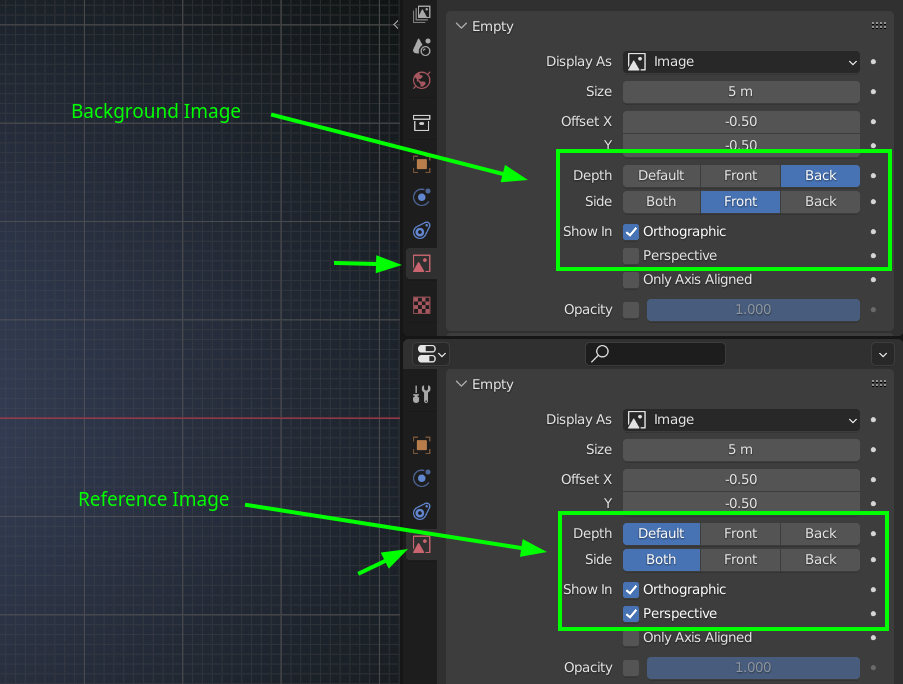
        You may have added the Images as Background Images in stead of Reference Images. That can’t be seen in Perspective Mode, because of different default Settings. But you can easily change those Settings, so they can be seen in Perspective as well:

        Background.png

        Especially the Perspective checkbox is important for you.

        The other possibility is, that it is, because you are in Local View.

        #74792
        Omar Domenech
        Participant

          Or maybe you do have it as a reference image in the viewport, but since the plane is paper thin, from the front is visible but when looked at in side view it seems as if it disappears. That happened to me once, I’m like where did it go? so I just duplicated the plane and rotated it 90 degrees so I can also have it as a side view. 

          #74793
          Shawn Blanch
          Participant

            Hey @jaybee did you end up getting this resolved or did you need a hand still?

            #74794
            Adrian Bellworthy
            Participant

              Looks like you are in local view, press the / key on the numpad to exit local view.

              #74795
              Jonathan Lazaro
              Participant

                Adrian Bellworthy thx this old post saved a lot of frustration

              Viewing 6 posts - 1 through 6 (of 6 total)
              • The topic ‘My references disappeared from the viewport’ is closed to new replies.