
2.8 Hurdles and Roadblocks
Forum Archive › 2.8 Hurdles and Roadblocks
- This topic has 254 replies, 19 voices, and was last updated 6 years, 6 months ago by
Matthew Fricker.
-
AuthorPosts
-
August 22, 2019 at 10:25 am #47689
How do you maximize a window? In Blender 2.79 it was shift-space, but now it plays the animation.
August 22, 2019 at 12:51 pm #47690ctrl-space in 2.8.
August 22, 2019 at 2:56 pm #47691Hey guys, here’s a new course where we address as many of these little issues as we could find!
https://cgcookie.com/course/transitioning-from-blender-2-7-to-2-8
We’ll add a few more in the coming week, and will do our best to keep it updated as 2.81 rolls around. If we missed anything, let us know in this thread!
August 22, 2019 at 3:00 pm #47692Sounds like temporary things – cycling through selection, selecting in wire frame, and box selecting are all working normally for me in 2.80. You can also turn off the tab pie menu in the user preferences under Keymap.
August 22, 2019 at 6:20 pm #47693@jlampel Yes it was Jonathan. I did as spikeyxxx suggested and uninstalled and re-installed the latest version and everything works fine now. Thanks for your help guys.
August 22, 2019 at 8:31 pm #47694There is an error in one of the videos.
In Chapter 3: Animation…. The first video, Animation Tools, it says it is 1 minute long, when in fact if you watch it is almost 10 minutes long and it encompass all the other videos that follow. So it’s almost the whole chapter 3 in just that video.
EDIT: Also the Hide vs Disable from Viewport says it’s 2 minutes long when it’s actually more than 6 minutes.
August 22, 2019 at 9:17 pm #47695I was watching the Hide vs Disable from Viewport video, it talks about how when linking a rig it kinda duplicates it when you make a proxy and the wires both fight for space at the same time. In 2.79 it wasn’t a problem because of the Dupli Visibility, but now we don’t have that in 2.80
So what you have to do is in the original file, turn the whole thing off in the viewport with the TV Icon but then it can be confusing since why wouldn’t you want to see all your stuff in the original file. Ideally we’d want to see our rig and all and when we link it and make a proxy not have it duplicated.
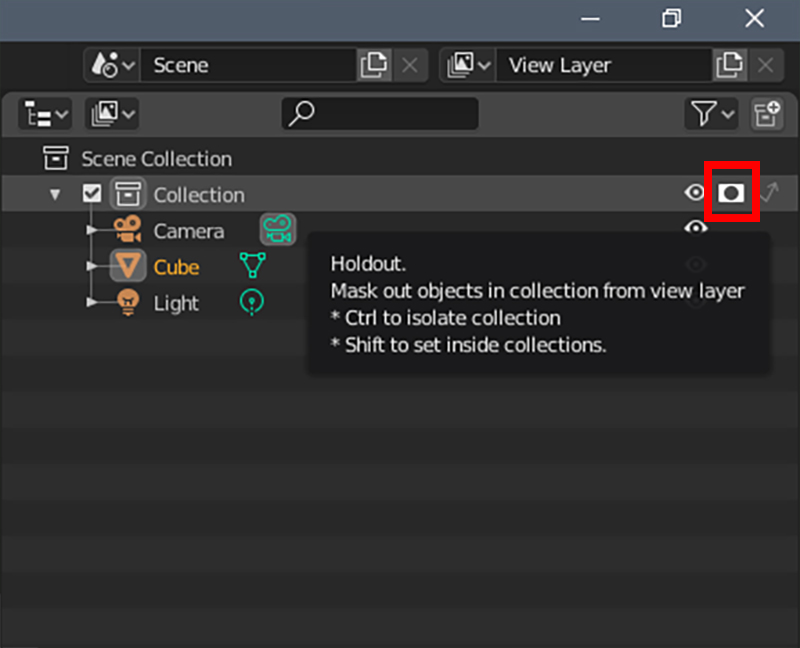
I don’t know if I’m doing something wrong and I just got lucky, but it worked for me to use the Holdout Mask in the filters… I turned it ON for the Rig Collection and I could still see my rig in my original file, no need to turn it off entirely with the TV icon, and then when I linked everything in another file and made the proxy, the Rig wasn’t showing until I made the proxy, only then the rig showed and it wasn’t duplicated. I don’t know if I explained that right.
 August 23, 2019 at 10:53 am #47696
Another thing, I was doing some weight painting in 2.8 to get an armature to deform, and in 2.79 while weight painting I used to be able to select a bone of an armature while holding control, I think, and it would select the bone and imidiatley I could see it’s weights. Now in 2.8 I can’t seem to be able to do that. I want to select any bone while in weight paint but it wont let me, I have to go to the Vertex Groups and select the group and that is very uncomfortable and even worst when you don’t have things properly.
August 24, 2019 at 3:13 am #47697@dostovel Hi Omar, go to Edit and just above Preferences you’ll find Lock Object Modes. Un-check that.
(It’s on by default, so as not to confuse new users…)
Now it works!
August 24, 2019 at 6:47 am #47698@spikeyxxx Yep tried it, it works, thanks Spikey, I can select bones while in weight paint now. That is so unnecessary for them to do that, it’s 2.8 biggest blunder.
August 24, 2019 at 1:57 pm #47699This maybe nothing, but I am unable to install blender as a package in Linux as standard, and have to add a link to the desktop through the actual file install, that still does not allow me to open a file unless I open blender first then the file. Maybe just a standard linux issue, not sure?
August 25, 2019 at 6:13 am #47700@john2244 I do not know what distro you are using, but doesn’t right clicking on a file give you the option to ‘Open with’?
Did you go to Blender.org and downloaded the tar? Then you can install it wherever you like, I don’t understand what problems you are having…
August 25, 2019 at 9:16 pm #47701yeah the linking this is a massive pain in the butt in 2.8
That issue is explained in the next batch of videos which will hopefully be released this week, along with the “lock object mode”. Sorry we didn’t get to it last week for the initial release.
I’ll double check that holdout function on the linked rigs. When I tested it last, it didn’t do what you suggested, maybe it does now! I am recording a video this week about all the limitations with the current linking rigs (and duplicating multiple copies of the same rig still doesn’t work).
I’m hoping it will be working with the “static overrides” that are meant to be coming in 2.81 (officially Nov).
Hope that all makes sense.
August 26, 2019 at 1:42 pm #47702@dostovel Thanks for the catch, I’ve fixed those videos!
That’s really interesting about the holdout – I’m not sure why that would be intended behavior but I couldn’t duplicate it. The collection with the holdout still showed up in the other file.
Hi Omar, go to Edit and just above Preferences you’ll find Lock Object Modes. Un-check that.
@spikeyxxx Good one!
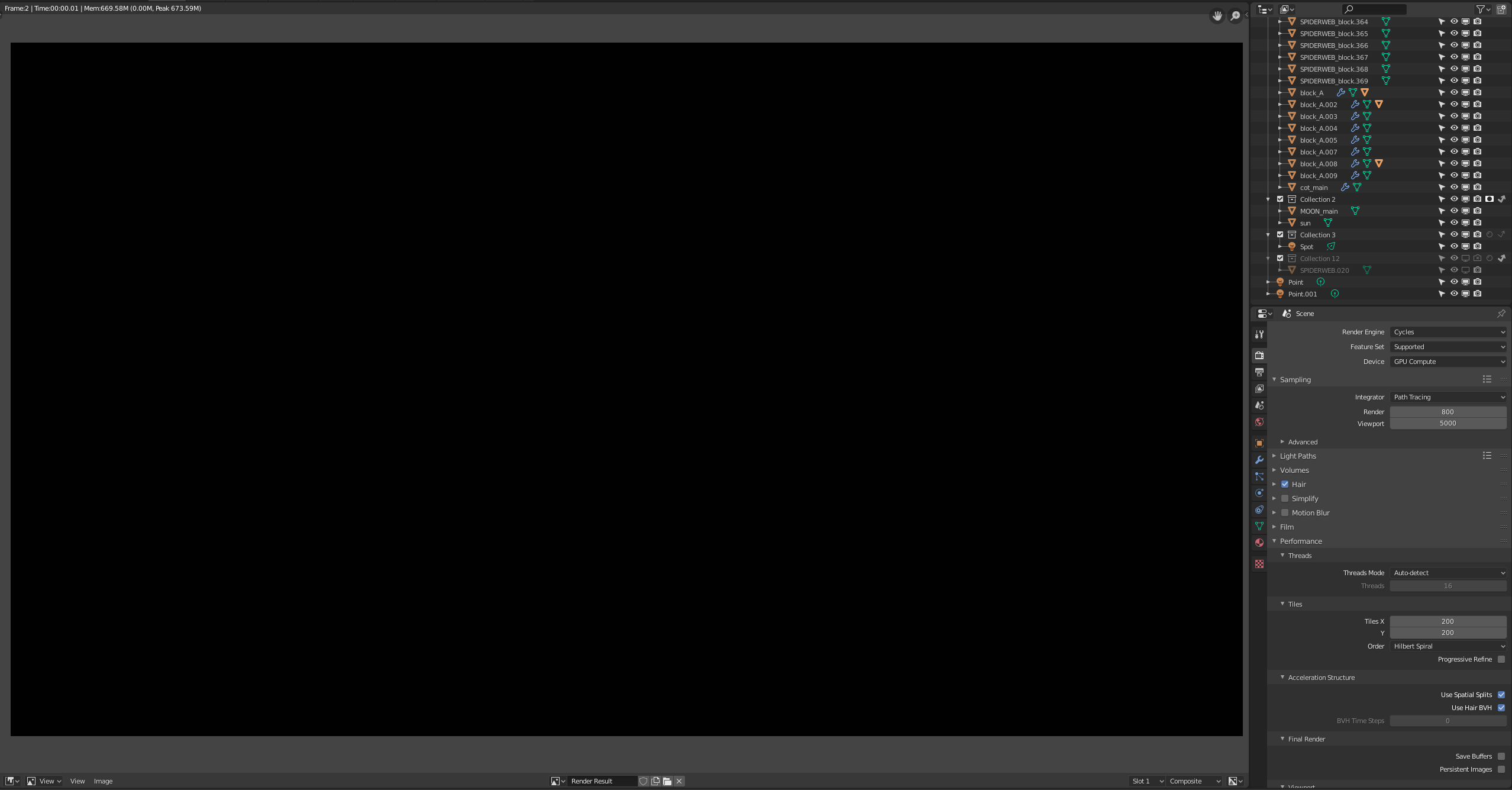
August 27, 2019 at 3:20 pm #47703I have an old project that was created in 2.79 that I am rebooting and it opens fine in Blender 2.8. All the objects , textures and lighting are there , and it even renders out perfectly in cycles viewport rendering. However , as soon as I run a proper render, it renders out a black image instantly.
I am assuming this may have something to do with render layers , as the original file was set up to render with several , but I may be wrong. From what I understand from reading back on this post , render layers have now changed to the icons that are available in the outliner/collections panel. You can see below the image I get when I render , and some of the render settings. Also , the few items in the outliner at the bottom with the holdout and indirect logos are the only ones that seem to have this setting.
Can anybody think why it renders a blank black image?
-
AuthorPosts


- The topic ‘2.8 Hurdles and Roadblocks’ is closed to new replies.