
n647

Forum Replies Created
-
AuthorPosts
-
thats quite a great job so far 😀 , you really did a lot of work in quite a short time
Ok starting homework for week 2, tryng to build mostly using mods, I decided for a spiral staircase so I can test using different mods to do the heavy lifting.
My first goal is getting the basi shape of the stair right, after that to start adding detail to the steps and then build a simple scene around it.
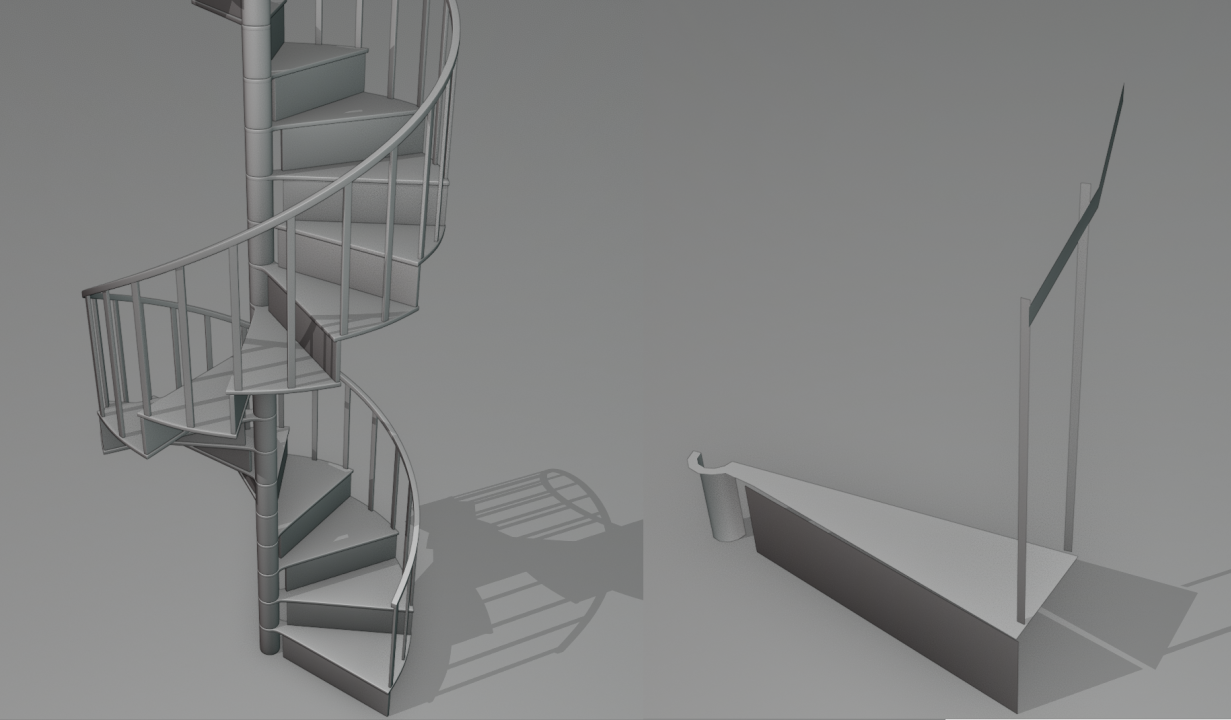 Here is a viewport render using matcaps of the stair with modifier ON, and on the left with the modifiers turned OFF
Here is the blender file for this version: spiral Staircase V00
The modifiers used where, mirror, solidify, bevel, subdivision surface, array
For the handrail I has no mirror modifier and had to change the order a bit so the array could merge the segments properly, turning on the merge option in the modifier.for the array I used a empty as a target object, this empty was raised in the Z axis the height of the step, and rotated 30degrees in z to rotate the steps accordingly.
By putting the bevel modifier before the subdivision surface and setting it to angle, I could procedurally create holding edges, is not ift for every situation but can help sometimes
May need to use a curve for the handrail to improve the shape, since it has no vertexs before startings to guide it is does not follow the curve that well
Being unable to see the effect of the modifier on edit mode made htings quite difficult to work with, as did the lack of a proper wireframe mode.
@nekronavt thanks, hmm yea that may be the problem, never occured ot me to that could be it, will check that out :Dthanks,
@theluthier Thanks, this is a great chance to start getting used to 2.8 and be ready for the switch when it releases, also to refresh some stuff, hope the tips I post are of some help to some.
Locking nice, the shingles looks great and give it quite the nice look
For the collections I find easy to assign them by selecting o nthe viewport and then pressing M to move them to the desired collection, even gives you the option to create a new one.
Also under view menu you can find open GL render, this will render the 3D view as an image if you need to.nice garden, yea modifiers can save so much time in those fences and the like 😀
Thanks, I m very glad it was to your liking, it really does not compare to some of the more complex entries I have seen, this one looks good because is a basic shape so was easy to make with primitives, one thing I forgot to note was the use of the autosmoth to let some parts look sharp or flat, that really helped.
Wonder if they will have the matcap as materials set ups too, that comic like matcap one looks like it has potential for osme nice stuff combined with the outlines option.
As for 2.8 it still too unstable the program crashed on me 2 times by doing very simple stuff, and was not even able to add a torus, is good to start getting used ot the new one, it has some very nice tools, but I would not do any serius work on it yet.
yea agree sometimes one want to rotate and still stay in orto view, would be good to have an easy to access toggle for that.
the alt A also not sure why the change there, but is not that hard to get used to it.Nice work o nthe hsip and the sea
Really remind me of some airships desing from warhammer 40K, nice job, you may want to check the thunderhawk form warhammer 40K for inspiration.
great work really, love the architecture and how you used the buildings, tons of detail and looks great 😀
Great work there, is good to hear it helped you learn a lot abotu the progrram, specially like how the caterpie came out and how it looks with the light there
really would recomend to use the greae pencil to daw the main curves on the reference drawing, that will give you a much better idea of the shape you have to follow
-
AuthorPosts
