
BC1-1808 homework, n647
Forum Archive › BC1-1808 homework, n647
- This topic has 63 replies, 15 voices, and was last updated 8 years ago by
silentheart00.
-
AuthorPosts
-
August 13, 2018 at 12:33 pm #40554
@theluthier Thanks, this is a great chance to start getting used to 2.8 and be ready for the switch when it releases, also to refresh some stuff, hope the tips I post are of some help to some.
August 13, 2018 at 12:41 pm #40555@n647 It sure does! Learned some things by reading your detailed description of how you made this 😊 especially about the reflections that you have to turn on screen space reflection.
August 15, 2018 at 8:37 pm #40556Ok starting homework for week 2, tryng to build mostly using mods, I decided for a spiral staircase so I can test using different mods to do the heavy lifting.
My first goal is getting the basi shape of the stair right, after that to start adding detail to the steps and then build a simple scene around it.
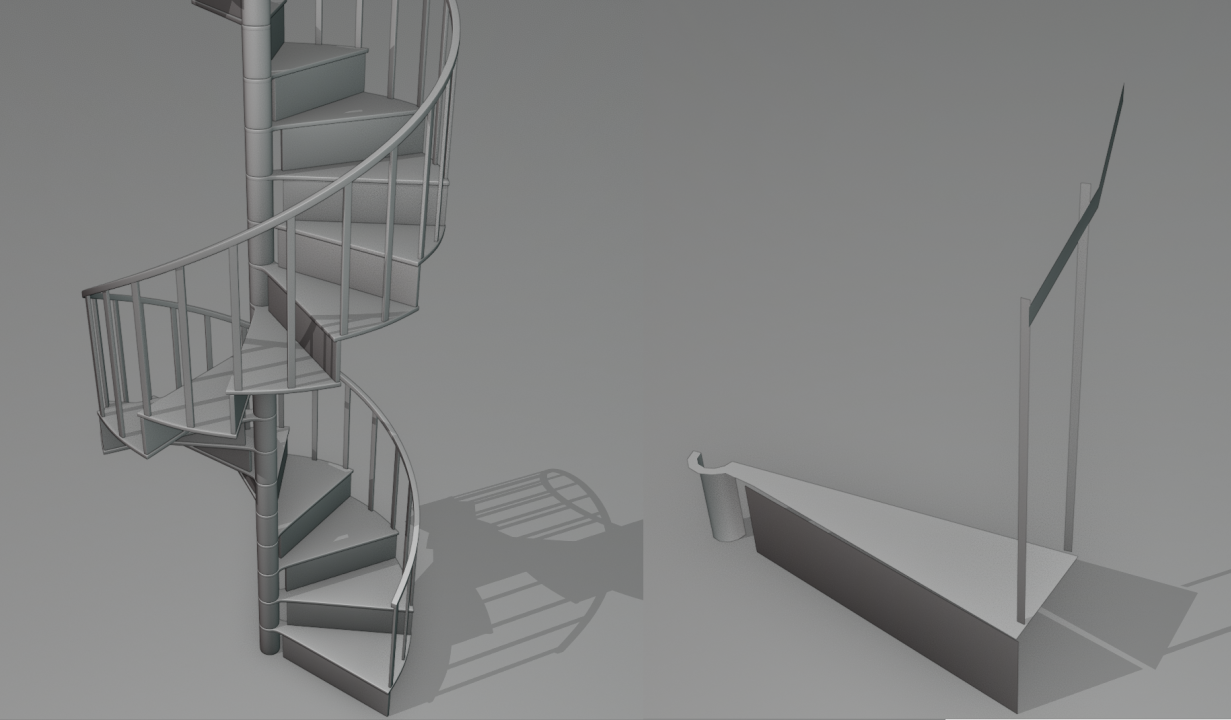 Here is a viewport render using matcaps of the stair with modifier ON, and on the left with the modifiers turned OFF
Here is the blender file for this version: spiral Staircase V00
The modifiers used where, mirror, solidify, bevel, subdivision surface, array
For the handrail I has no mirror modifier and had to change the order a bit so the array could merge the segments properly, turning on the merge option in the modifier.for the array I used a empty as a target object, this empty was raised in the Z axis the height of the step, and rotated 30degrees in z to rotate the steps accordingly.
By putting the bevel modifier before the subdivision surface and setting it to angle, I could procedurally create holding edges, is not ift for every situation but can help sometimes
May need to use a curve for the handrail to improve the shape, since it has no vertexs before startings to guide it is does not follow the curve that well
Being unable to see the effect of the modifier on edit mode made htings quite difficult to work with, as did the lack of a proper wireframe mode.
August 15, 2018 at 9:17 pm #40557@n647 Good work! I feel you on the no modifier preview and wireframe fronts. Hopefully that’ll get ironed out soon, but it’s kind of a fun challenge to predict what’ll happen to your mesh before you tab out. Looking forward to the end result.
August 16, 2018 at 1:59 am #40558@n647 Thank you for explaining your process with the modifiers! It’s so helpful to learn more about how they work, most of them are still a mystery to me. Gonna dig through your blend file throughout the week to see for myself. Last but not least, looks very good so far! Very curious to see how this will evolve 😄
August 16, 2018 at 1:34 pm #40559@n647 Fantastic example of modifier-based modeling! I had to open your file and snoop around. Awesome job. I find modifier wizards to be particularly clever modelers 🤘
August 16, 2018 at 1:36 pm #40560@n647 That’s a real clever use of modifiers, goodness knows how long this’d take without them, looking forward to the finished result!
August 17, 2018 at 12:02 pm #40561@theluthier @thecabbagedetective Thanks, my goal here was to do modifier heavy work to get used to them see the changes and see how far could go with them in 2.8 at the moment.
Sadly no spiral curve atm and could not convert a spiral I did to curve for the handrail so could not use that, the model there with mods was specially good to set up the volumes I was going to use and the position, and then worked o nthe detail, going to update the first post with the current updateAugust 17, 2018 at 12:42 pm #40562@n647 Wow, this is awesome! I really love the details, it probably took a very long time to make them. Fantastic work so far!! 👏
August 17, 2018 at 12:56 pm #40563@n647 Such amazing details!
August 17, 2018 at 4:29 pm #40564@bsdwerbeagentur Thanks, the thing that took longer was doing the pattern on the step, the rest was quicker, still it was mroe time than what I had planned, but te result I think is worth it
@smurfmier1985 Thanks, I m glad the planning and skethcing worked well, the array helps a lot to adjust things on the fly, since I could do adjust to a single mesh, if I had o do a change and then copy it by hand it would be so much more work.
August 17, 2018 at 4:39 pm #40565@n647 I think you are smart with using all these modifiers, learning a lot by reading about your process 😊
August 17, 2018 at 5:10 pm #40566wow this is beautifull did you modeled the partern by keep extruding from just a square or is there a modifier that could make that easier ? I really wish i could saw you model this would loved to watch it 😀 trully amazing work here
August 17, 2018 at 7:36 pm #40567@smurfmier1985 Thanks I m glad if this has been of any help to you, part of my goal was to make examples on how to use the different modifiers and stack them, but also note the part of first planing, I blocked out the main shape withouth detail, then I sketched up the detail I wanted, and then I started modeling that out.
@yukinoh1989 I m very glad to hear that, I looked at several references to try emulate a victorian style that is in my opinion looked very nice for this project, it seems I managed to emulate it properly, as for the modeling of the patern, it was done by extruding edges on a plane, and scaling and rotating these, a solidify modifier was used then to give it volume, no modifier to do the pattern for you, but you could do something similar with curves and defining a cross section and a taper.
August 18, 2018 at 2:47 am #40568got to take a look at certain modifiers i love that twist too 🙂
-
AuthorPosts


- The topic ‘BC1-1808 homework, n647’ is closed to new replies.