
Omar Domenech’s Demo Reel
Forum Archive › Omar Domenech’s Demo Reel
- This topic has 413 replies, 25 voices, and was last updated 6 years, 7 months ago by
Omar Domenech.
-
AuthorPosts
-
June 19, 2019 at 8:46 am #46889
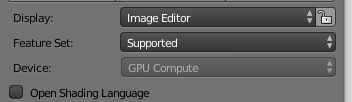
@dostovel I never rendered with gpu, because I thought it wasn’t available (greyed out) . My drivers are updated for the video card
 June 19, 2019 at 9:42 am #46890
@sheila5 I was looking info on the internet on your video card because I remembered Pablo saying some video cards are having problems in Blender, but I think it had to do with 2.8. But I assume you are rendering in 2.79b?
But 1 hour of render time with a CPU for one of those scenes is quite good. That’s what my laptop hits with the CPU, with the GPU it was down to 25 minutes. Kent super Linux Luke computer was doing 45 minutes on the CPU and 6 minutes on the GPU I think it was, if I remember correctly.
Neither the Toyota scene or this black car one would do 15 minutes on the CPU I guess, that’s some GPU power there.
The Center rendering thing makes no difference at all, that just decides the direction of the render buckets.
The only mistery remaning is why your GPU is grayed out. Do you have any other version of Blender installed? like 2.78 or something and see if that one recognizes your video card?
June 19, 2019 at 12:08 pm #46891@dostovel I rendered your scenes with 2.79
I’m using 2.79 for most lessons but I do have 2.8 beta in a folder on another drive, it is not an install though, just a folder with a bin file
June 19, 2019 at 2:45 pm #46892Project 2 – Scene 1 is finished
Here’s to you 🍻
Thanks everyone!
 June 19, 2019 at 3:18 pm #46893
The test video of the result is on the folder with the other ones on Google Drive.
I’ll delete from Drive the EXR from scene 1 and delete the .blend as well. Tomorrow here is a holiday so I’ll leave the computers at work doing the renders for scene 2. Hopefully it’ll turn out ok because there will be no way to stop them until friday.
We’ve been rendering non stop for a week, if someone wants go ahead and take a break.
In the mean time, I’ve got some frames to catch
 June 19, 2019 at 4:55 pm #46894
These scenes are looking muy fuego 🔥🔥🔥
June 19, 2019 at 5:04 pm #46895@dostovel Woohoo!
June 19, 2019 at 7:33 pm #46896@theluthier You mean muy caliente, unless you mean very fire. 🤣
Kent tell me something… I’ve notice another quirk of Google Drive. I leave the laptop turned on here at home so it keeps syncing when I’m not here. So when I get home I see the Drive Icon and it shows as if it’s up to date, but it’s really not, and it’s not until I enter the folder to see if all the files are there that it begins to sync. I can be hours on the laptop but it start to sync WHEN I enter the folder to look at files. It’s like a bad employee that falls asleep on the job and gets startled when the boss enters the room and pretends he’s been working all along.
So my question is, does Drop Box do all these things we’ve notice Google Drive does? cuz this is the source of all the duplicate files we encounter.
June 19, 2019 at 7:44 pm #46897@sheila5 I google the problem. I found this:
“You have to make sure to not only select CUDA but also the correct video card. In the Settings in the “Cycles Compute Device” section it displays (if CUDA is selected) the available video cards. These appear to be able to be selected, so if one is selected the background gets darker. If I select my video card, the rendering device option inst grayed out anymore and the rendering process, if GPU Compute is selected, speeds up by a noticeable amount”
According to what I’ve read, in the compute devices in system under system preferences, you have your card connected to a monitor, so it should give you two drop downs, and you have to make sure you select the card that is also not using that reads (Display) at the end.
June 19, 2019 at 7:52 pm #46898@dostovel This is the first render-syncing project I’ve done with Google Drive and I’m starting to think it (and its apps) aren’t as polished as Dropbox. CGC uses dropbox for syncing all our files, including crew render sessions like we’re doing with your reel scenes, and we never have these issues.
But it’s also 15 free GB on Google Drive vs 2 GB on dropbox. So I guess the quirks are more of an annoyance than a show-stopper.
June 19, 2019 at 8:24 pm #46899@theluthier Yes, it’s not a deal breaker since the amount of gigabytes has been enough so far, but now I know for whatever may come in the future that Drop Box is better. Though shame on you Google because I could’ve been paying for the service and it would’ve been very disappointing then.
June 20, 2019 at 5:30 am #46900@theluthier What happened to the files? there’s no .blends anywhere to render and the first 38 EXR are gone? was there an error and everything had to be deleted?
Now I wonder what’s going to happen with the computers at my work place, I left them rendering and I can’t access them until tomorrow.
June 20, 2019 at 7:02 am #46901@dostovel Hey Omar, mine is still rendering even though the blend file is gone. I think so long as the computer had it open it is still rendering. Do you want me to save the blend file I have open into the correct folder?
June 20, 2019 at 7:12 am #46902@phoenix4690 Thanks Phil, I thought of copying them back, but then I figured I’d wait for Kent, maybe he deleted them for some reason, maybe he saw a mistake or something, like they had the mark of Saruman in them and had to be sacrificed.
June 20, 2019 at 8:31 am #46903@dostovel @phoenix4690 Yikes..I did not delete anything. Could have been an accidental deletion by anyone sharing the folder I guess. I checked the Activity log on Google Drive and no one is listed as having deleted it, at least not in the amount of activity it records (stops around 1am my time).
I did notice this weird entry though:
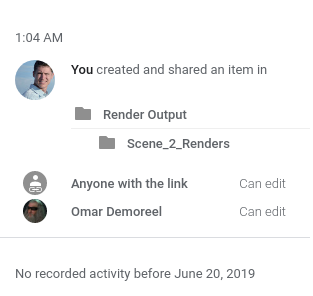
I certainly didn’t created these folder…so something could have hiccuped I guess. And surprisingly, Google Drive doesn’t maintain version histories of folders for deleted files from folders. It only keeps a version history of *existing files*. That’s a major strike against Google Drive since Dropbox does keep versions of a folder’s files (even the ones that have been deleted).
That’s a bummer. Go ahead and restore what you can, Omar. Did you happen to transfer 1-38 EXR’s before Saruman stole them?
-
AuthorPosts


- The topic ‘Omar Domenech’s Demo Reel’ is closed to new replies.