
Omar Domenech’s Demo Reel
Forum Archive › Omar Domenech’s Demo Reel
- This topic has 413 replies, 25 voices, and was last updated 6 years, 7 months ago by
Omar Domenech.
-
AuthorPosts
-
June 20, 2019 at 8:48 am #46904
Wait, I don’t think that’s saying I created those folders like I initially read. It’s saying I created *an item* in that folder. Still kinda weird since all other entries say “Person created [name of specific file]”.
June 20, 2019 at 9:11 am #46905@theluthier No, I didn’t get the chance to copy 1-38 EXR files 🙁
What in the world? Drive does keep a long log in the Activity tab, but what seems to have happened is that the whole folder got deleted and then added back again, that’s why the history resets at 1:04 AM. If you’re feeling kinda bummed out by the Activity Log pinning your user in the ordeal, don’t think about it, who knows what crazy thing went wrong. It could’ve easily been my user or anyone else there. Plus, I’m glad it was this and not than it was deleted because there was a mistake, like I first thought it had been.
@phoenix4690 Phil, I thought you could copy paste the file in, because the one I have here on my home laptop isn’t the latest one with the mistake of the vanishing piece corrected. But now I see the folder of the Assets Files is also gone, which has the car and environments models linked in. So that’s a no go. I’ll just make the corrections here and upload them.
June 20, 2019 at 9:13 am #46906@theluthier You’re right, now that I read it correctly, I thought it said those folders were created again, but no, it says An Item. This is getting weirder and weirder. I say it’s Google Drive being all glitchy and buggy.
June 20, 2019 at 10:00 am #46907@theluthier Well good news I think, the files that are still being rendered are ok, I loaded the EXR’s and the PNG sequence seems to be working. I thought they were going to be black or pink frames or something.
I think now I really get it when I see Blender loading everything into RAM, it copies all and holds it and they still exist in there until it has to be unloaded, it’s like a memory, something that it isn’t there anymore but still exists on a recollection…. Random Access Memory, genius.
EDIT: The short video is in the Results folder.
June 20, 2019 at 2:55 pm #46908@dostovel Yikes. I didn’t do anything this time. I think lol.
June 20, 2019 at 3:15 pm #46909@dostovel The motion-blurred shots turned out great! I was a little concerned seeing one frame at a time. Can’t believe I’ve never rendered with true Cycles motion bur 😅
RAM is pretty amazing! Easy to take for granted but it came through big in this situation.
June 20, 2019 at 9:43 pm #46910@silentheart00 Maybe your powers are growing.
@theluthier I wanted to have scenes ready as the rendering was still active, you know to keep the momentum alive. But I’m afraid rendering was quicker than I could finish scenes up, even with the small inconveniences that have happened. I’m afraid I only have one more ready, the default Heli one, I still have to prepare the other Heli scenes I had in mind.
June 21, 2019 at 2:37 am #46911June 21, 2019 at 2:44 am #46912O that didn’t go well, I have to reload the files else it’s giving errors
 June 21, 2019 at 5:13 am #46913
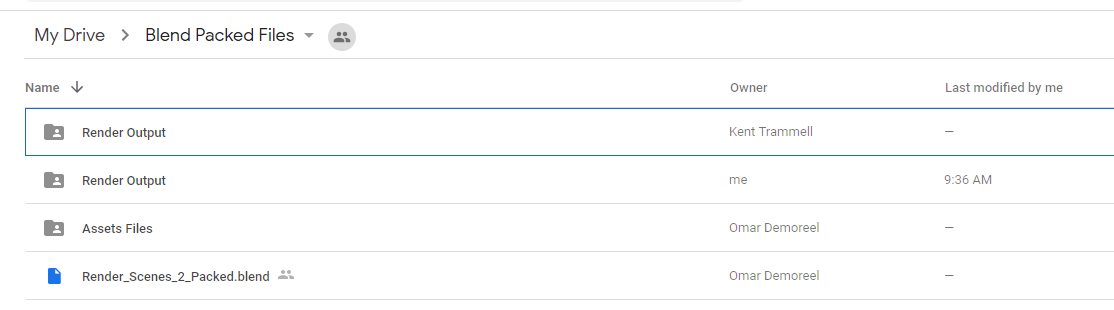
annoying, I rendered a few files and then I saw one of them was deleted. Someone else had rendered the same file and my double was removed. I thought the files we were busy with were locked?
June 21, 2019 at 8:05 am #46914@sheila5 They are supposed to be locked, in a manner of speaking, the placeholder file is supposed to prevent us from rendering the same file, in other words prevent it from being duplicated. But Google Drive is kinda wonky and doesn’t synchronize well so Blender isn’t seeing the file as being there therefore it goes ahead and renders it anyways. That plus other little glitches here and there makes Drive a little annoying, but it’s ok, it is getting the job done fairly well.
June 21, 2019 at 8:30 am #46915A small video test is in the results folder.
June 21, 2019 at 8:40 am #46916@dostovel These are turning out so good! Its a bit of a bummer on the glitchy nature of Google Drive.
@theluthier In the future if one was to do this using Drop Box. Would everyone need to purchase the same amount of space or would just one person buy the render folder and can share it to those who want to participate?
June 21, 2019 at 11:14 am #46917@phoenix4690 I still have almost 2 gb space left in my dropbox. if you want we could try if the sharing feature works
June 21, 2019 at 11:16 am #46918Oh wow just checked the Results so far folder, it looks so cool!
Another glitch when duplicated data occur is when it happens to the folder, I got a (1) in the name, and then Blender can get confused and star from frame 1. Just double check and update the output folder (without saving the blender file!) so it exports it correctly.
And double check on the browser version of drive that you’re saving what it should where it should.
-
AuthorPosts


- The topic ‘Omar Domenech’s Demo Reel’ is closed to new replies.