
BC1-1808 Homework, Yukino Hatake
Forum Archive › BC1-1808 Homework, Yukino Hatake
- This topic has 347 replies, 19 voices, and was last updated 8 years ago by
galledark.
-
AuthorPosts
-
August 29, 2018 at 3:39 pm #39445
@yukinoh1989 looks spot on Yukino, can’t think of any critique 😊
August 29, 2018 at 10:06 pm #39446@smurfmier1985 yay that is good to hear gonna hey to finish her today. hope i make it
August 30, 2018 at 12:42 am #39447@yukinoh1989 Yukino I just meant with cautious that you seem sculpting carefully, not changing in big ratios and producing very smooth results. So definitely in positive term 🙂
August 30, 2018 at 1:20 am #39448@csehz ok thanx . didnt really understand. tought i took someting too easy. trough it was not as easy as i tought but turner out pretty well so far
August 30, 2018 at 1:19 pm #39449Hey guys i have been trying today to learn a bit more about colloring (texture painting) . i like the way but at first i didnt really understand about the uv’s and node editor but then i got it worked. the collorring way is really fun but i have some problems.
in the picture you see that some triangles arent getting the collor good . no mather how many times i go over or how big the brush or how hard the pressure its not changing. so i hope someone can help me and explain what is wrong with my colloring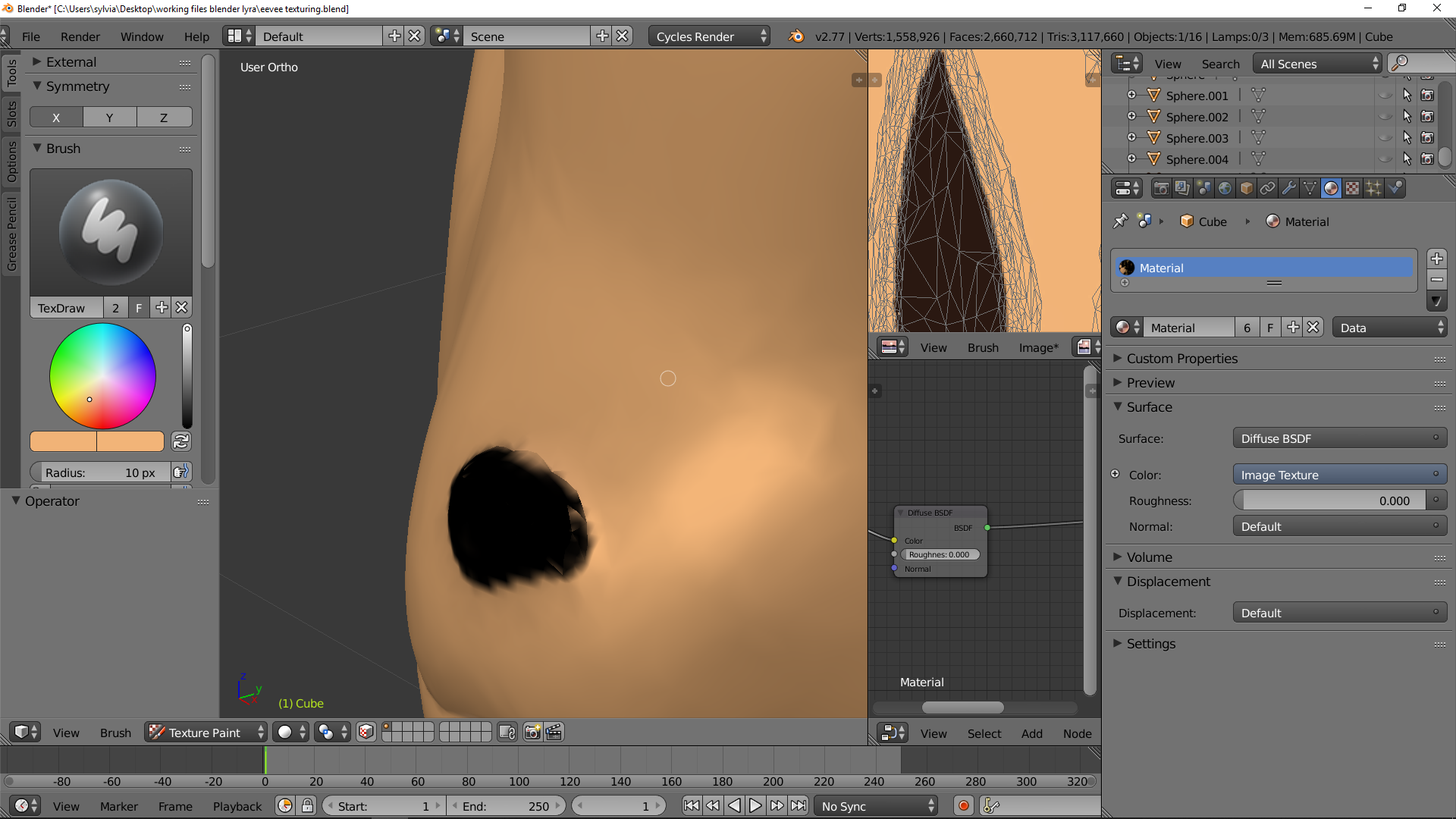 August 30, 2018 at 1:24 pm #39450
@yukinoh1989 I haven’t ventured down texturing as much as I should, so I don’t know what the problem is. I’d be interested to know, too.
August 30, 2018 at 1:59 pm #39451@yukinoh1989 I’m afraid I am not much of a help here either , this is an area where my knowledge is almost non existing.. very curious about the answer too though.
August 30, 2018 at 2:13 pm #39452@silentheart00 @smurfmier1985
Thanx both to take a peak . hope someone can help . maybe @theluthier would know more what the cause is ?
also some update to what i have. still now finished but i hope it somehow already start to look good. August 30, 2018 at 2:17 pm #39453
@yukinoh1989 Looks really good! The colored point of its tail improved the look of it a lot 😊
August 30, 2018 at 2:24 pm #39454@smurfmier1985 Thank you trough i cant detail the model perfect because of the problem that i mentioned above with the nose(have that at several places) that texturing on the tail took a bit of time . but most of the time went to learning more about texturing. and still when i tryed i was like what am i doing no Uv’s and missing nodes how i get them here . The uv looks extreamly rare and complicated xD good i dont need to paint on that since that would be impossible .
for people who would like to try help solve the problem above this is the file .eevee.blend
not sure if you need the texture png too but here it is (i noticed the second time i had to save and load the image again. (first time i lost the texturing T_T) ) August 30, 2018 at 11:18 pm #39455
@yukinoh1989 I’m not expert but if I remember correctly this is sometimes caused by either the resolution of the image texture being too low or the UV islands being too far apart. Maybe try rearranging your image texture a bit? Assuming that you’re trying to paint on two islands at once that is.
Actually (didn’t want to delete what I wrote because it may be helpful to others) is your model consisting exclusively of triangles? If so I’m assuming you haven’t retopologized it, and in that case that could be the cause (again though, not an expert, but retopo-ing your sculpts is usually good practice anyways).
August 31, 2018 at 2:03 am #39456@thecabbagedetective hey thanx with rearange how i do that? it are indeed triangles. i sculpted it first and then painted
August 31, 2018 at 4:10 pm #39457guess i made things worser. tryed to recollor again after sculpting again but it became far worse. gonna redo tomorrow the eyes and finish the eevee. really have to learn more about the colloring after class
August 31, 2018 at 7:23 pm #39458@yukinoh1989 You can simply click on and move around the verts as you would the mesh itself, at least in 2.79.
August 31, 2018 at 8:51 pm #39459@yukinoh1989 Ahh I’m sorry I missed your question. I’ve got so many notifications, things are falling through the cracks.
I appreciate the .blend files but I can’t see any textures unless you pack them with the file. My guess is that your texture resolution is low and causing blurring around the nose? What is the resolution of your texture?
Aside from the texture artifacts, Eevee still looks great. No critique honestly. Just excited to see how the texture turns out!
-
AuthorPosts


- The topic ‘BC1-1808 Homework, Yukino Hatake’ is closed to new replies.