
BC1-1808 Homework, Yukino Hatake
Forum Archive › BC1-1808 Homework, Yukino Hatake
- This topic has 347 replies, 19 voices, and was last updated 8 years ago by
galledark.
-
AuthorPosts
-
August 10, 2018 at 5:45 am #39175
@yukinoh1989 The camera acts a bit funny when it’s so far away. If you move it closer and rotate it then the dissapearing effect doesn’t occur anymore (at least not on my laptop). Your scene was pretty huge, you couldn’t see your cute little weedle anymore it was so far away. You can still put a lot of stuff in it while keeping it more compact, so that would be my tip for you 😊
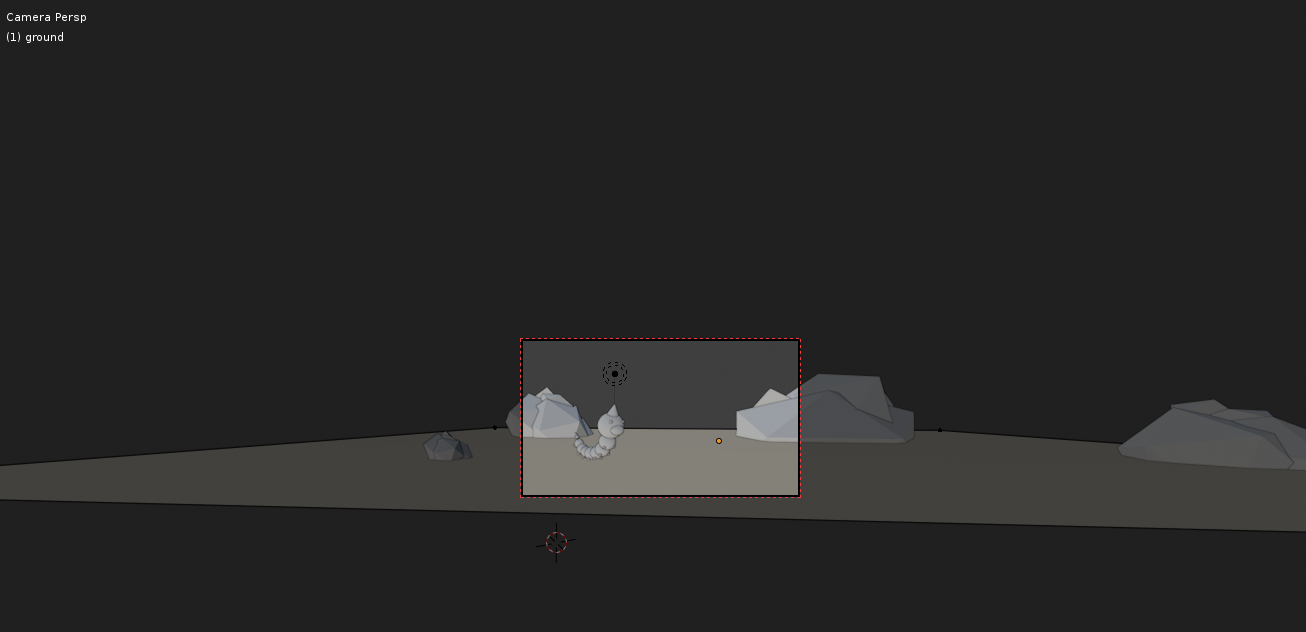
I put your file I changed on dropbox so you can see what I’ve done with it, you can download it here.
August 10, 2018 at 6:28 am #39176@smurfmier1985
Thank you . this indeed is better (i guess i did a few wrong things since at a certain moment my objects that where selected where not orange highlighted. How you fixed that ? also for example i made a collection map with the parts of the weedle. If i want to scale him is there a way to completly select him witout clicking all his bodyparts ?August 10, 2018 at 7:03 am #39177@yukinoh1989 The effect you see in the camera is called clipping. You can set the clipping for the view and for the camera. For the view you can set it in the side bar – on the right of your 3dView. Under the header ‘view’ you can set the start and the end clipping values.

For the camera you can also set the clipping values. When you select the camera you can set the clipping values in the camera settings in the properties bar on the right on your screen. See screenshot #2:

As you can see there’s also a start clipping value. This means that if you com to close with your camera of view it will start clipping too.
I hope this helps you a bit. 😉
August 10, 2018 at 7:09 am #39178@yukinoh1989 The orange selection will become visible again when you click the button to the left of the Overlays button. You must have clicked it by accident . This button turns on/off all overlays you can set in the Overlays menu. This will bring back your selection outline.
 August 10, 2018 at 7:20 am #39179
If i want to scale him is there a way to completly select him witout clicking all his bodyparts ?
You can select all members of a collection by right clicking on the collection name and choosing “select objects’. Btw. Did you know you can have Collections in Collections? This way you can give each rock it’s own collection and put those collections together in a new collection (called ‘Rocks’ for example).
August 10, 2018 at 8:23 am #39180@carrotnl Oh that’s why it acted so funny! Learned something today 🙂
August 10, 2018 at 9:31 am #39181thanks so much everyone i am learning so much . what is of course good 🙂
i didnt knew we could make collections in a collection map? i guess ill have to the this put tonight when i get home.
again thanx so much for all the help you guys are the best
August 10, 2018 at 9:39 am #39182@yukinoh1989 Another thing to keep in mind is the focal length of the camera. To edit this select the camera you wish to edit and then go to the camera symbol on the right side (may need to drag the panel out to see it):

Now on the right you can see the “Focal Length” setting, and this basically determines how “zoomed in” your camera is (50 is the default). The lower the focal length, the wider the FOV and therefore making it seems zoomed out. Here it is at half the size:

And here it is 50% larger than the default:

This coupled with the tips @carrotnl and @smurfmier1985 gave should be very useful. For reference if I remember correctly, most real world cameras have a focal length of 50-60 but hey this is the CG world, we’re not bound by those laws!
August 10, 2018 at 2:31 pm #39183@thecabbagedetective @yukino1989 The 50-60mm focal length on a real world camera comes closest to what the human eyes sees, that’s why this is a very commonly used focal length, especially for portrait photo’s (sorry, hobby photographer over here 😛). But you can put all kind of lenses on a real world camera, so why not change it up in blender right? 😉 go crazy and try out what works best!
August 10, 2018 at 3:34 pm #39184@yukinoh1989 nice start on Week1 and you can see that can ask anything, there are tons of resources here in the class for advice
August 10, 2018 at 3:57 pm #39185@csehz
Thank you i am happy to hear its looking good .
Indeed this community is amazing. never had any community before who where having such helpfull people and active.
For sure i never gonna regret comming here . this is the best place to be and amazing to learn.
Hope tomorrow and sunday i get enough time to finish what i was thinking about 🙂August 10, 2018 at 4:54 pm #39186
I am getting happy with the progress
But this would not be possible without all of you guys (the instructors and the community)
if anyone got suggestions to try to make things look better let me know .
Gonna try to add some more pokemons and add some collors if i can manage to understand that in timeEdit : got a question when you add a primitive you get to change the segments etc(the add panel).But once i move it that change and i dont know how to get that panel back . I am wondering if you can only change the amount of segments in the start of later on too ?
August 10, 2018 at 5:11 pm #39187@yukinoh1989 Yeah for some bizarre reason once you move an object you can no longer get that menu back, so you’ll need to make your decisions right away.
August 10, 2018 at 5:19 pm #39188@yukinoh1989 The Operator panel opens when you create a new object. But also when doing certain actions, like move, rotate, etc. As soon as you perform any action on it, the Operator panel disappears, or is replaced by new options, depending on what you do. Also going to edit mode is going to make the panel disappear.
I heard that in the future they want to make it possible to change those settings, even after you edit the object, but I don’t know how certain these plans are.
August 10, 2018 at 5:32 pm #39189thanks Aaron and Wilco. good to know. sometimes i try someting but redo it several times because i am not satisfied with the result i took with the segments etc. But for now what i have went pretty good . tommorow i try to model some more pokemons to make it more lively and nice looking.
-
AuthorPosts


- The topic ‘BC1-1808 Homework, Yukino Hatake’ is closed to new replies.