
Omar Domenech’s Demo Reel
Forum Archive › Omar Domenech’s Demo Reel
- This topic has 413 replies, 25 voices, and was last updated 6 years, 7 months ago by
Omar Domenech.
-
AuthorPosts
-
July 31, 2019 at 6:04 am #47039
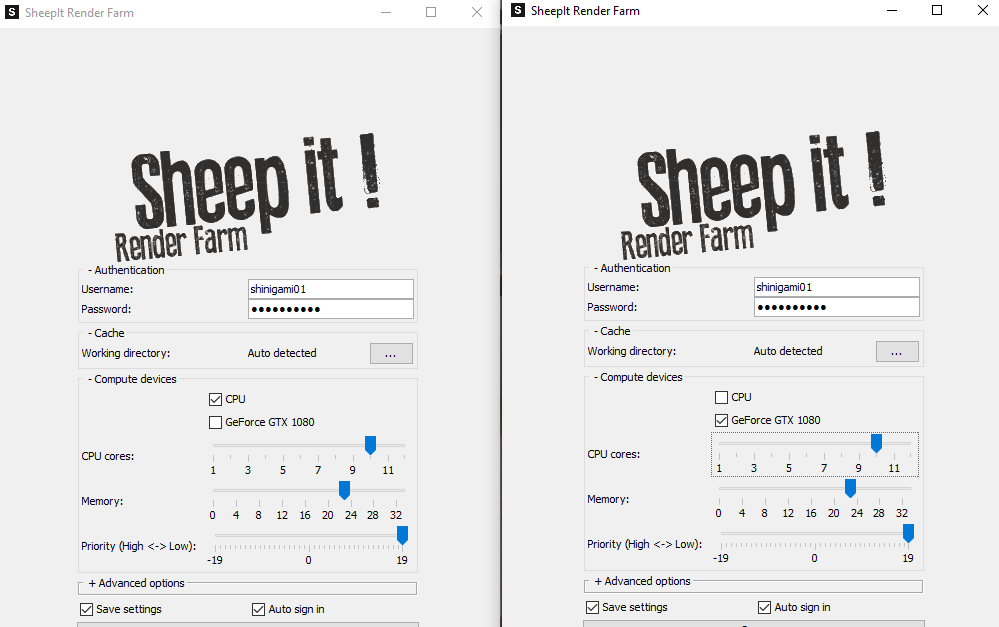
@sheila5 if you use GPU for rendering it always lags, because GPU always render with 100% and her are no resources left for the display. You also can open 2 instances of sheep it to render with CPU and GPU at the same time. In this case you need to reduce the CPU cores at least at 2 because the CPU have to put the data to the GPU. So you can pause the instance from GPU sheepit if you want to work and have more control.
July 31, 2019 at 8:03 am #47040@cruento 2 instances? you mean you opens sheep-it twice, one with cpu enabled and one with gpu? and then it renders the same thing? I reduced the cores now see how it goes
July 31, 2019 at 9:05 am #47041@sheila5 yes thats it 🙂
 July 31, 2019 at 9:23 am #47042
@cruento that completely crahsed sheep-it. zillion error messages and nothing works
July 31, 2019 at 9:40 am #47043@sheila5 hm….ok I render with these settings since half year and never have troubles. Do you render with laptop?
July 31, 2019 at 9:48 am #47044Ok, finally back to this thread. I agree that this project was a weird one. It started off quick with 4 random people rendering (as in not part of our team) but promptly dropped to just me rendering for the first few hours. Then mostly plateaued for a day before bolting to the finish line. The progression graph from SheepIt presents it well:
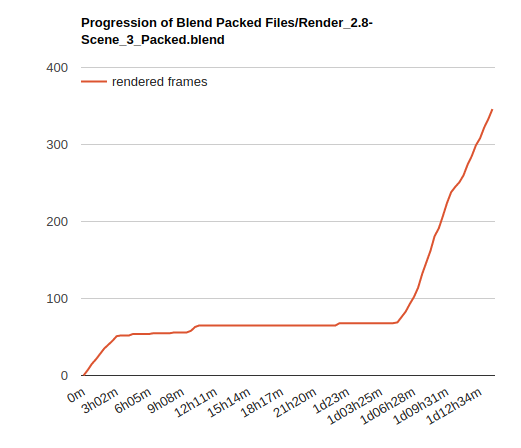
Very odd that @sheila5 and others weren’t able to contribute despite enabling “Render my team’s projects first”. It made me wonder if the scene was too heavy for most computers, especially non-GPU-capable ones. I did a test with the current settings (1000 samples + denoising + 256 px tiles) and simply switched to CPU. My computer slowed way down after 15-20 minutes of rendering at which point I killed the render because I had to do other stuff. I just did another test dropping the settings (250 samples + denoising + 32px tiles) and it rendered in 9m 26s.
My theory is that the scene I uploaded took too long and too many resources to render on most people’s computers, thus SheepIt kept it waiting till more powerful machines were available. More and more I think 1000 samples is [always] too high but also the 256 px tiles is a potential problem. Even though it’s optimal for GPU, it’s less so for CPU. My test results:
- GPU 256 px tiles = 1m22s
- GPU 32 px tiles = 1m32s
- CPU 256 px tiles = 11m51s
- CPU 32 px tiles = 9m26s
So I’m thinking 64 tiles is the optimal middle ground for GPU and CPU renderers. Also I’m going to try setting to CPU in the .blend file and see if that’s better than GPU. I feel like currently these scenes are GPU by default with CPU being optional. Maybe if we switch that around sheepit won’t keep it waiting (?)
@dostovel I just saved a new version of Scene 3 (and zipped it with “optimized-1” suffix) with CPU as the device, 256 samples, and 64px tiles. Can you submit that as a project to Sheepit? Note that sheepit will detect both .blend files in the .zip and you only need to submit the render-ready one.
July 31, 2019 at 10:32 am #47045I found it easier to send the .blend file. So I don’t need to care about correct /path of all my files.
Important is to pack all images at the .blend file!
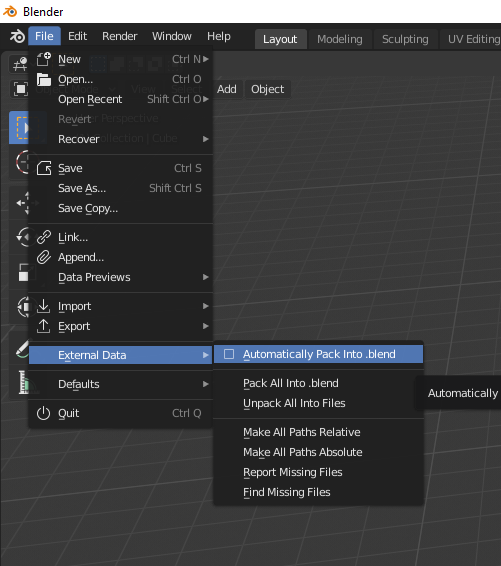
The maximum upload is limited to 500mb.
July 31, 2019 at 10:36 am #47046@theluthier Yeah I learned the lesson and started at 256 samples as we have been doing, but renders were coming out very very muddy and noisy, so I bumped it to 1,000 samples and it was kinda ok… but now that I think about it, that was when it had clouds with volume scatter shader, when I changed to the asteroid I didn’t change the sample numbers.
But man that volume scatter thing is very noise heavy. I had to abandon the clouds since Blender was acting out very weird, crashing and killing the render all the time.
Are the renders coming out ok at 256 samples with the asteroid? I didn’t test that.
Yes, I will submit the zip with the optimized sufix. I don’t understand what this means though…
“Note that sheepit will detect both .blend files in the .zip and you only need to submit the render-ready one.”
I’m guessing I’ll understand that better once I see how submitting to Sheepit works. I think what you mean is that Sheepit will enter the Zip and in there there are two .blends, one is the Heli model and the other is the scene ready with the linked models .blend and that is the one to submit? Lets see.
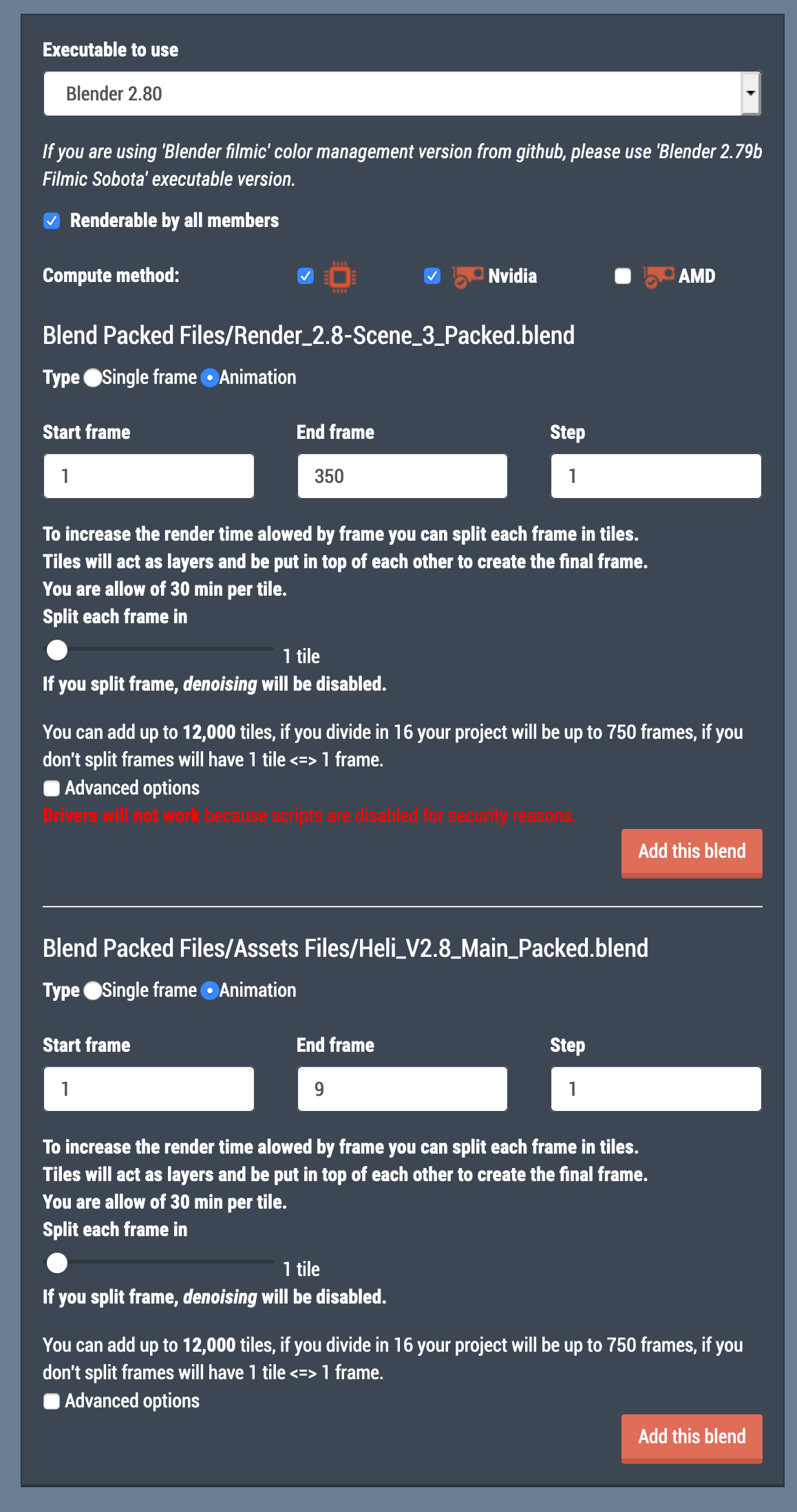
July 31, 2019 at 11:02 am #47047@theluthier OK yeah I see what you mean, there were two “Add This Blend” for each .blend. I only added the first one.
And I unchecked NVidia so it only searches for CPU’s. All the other setting I left as is.
Where are the rendered files dropping at? Do they stay at Sheepit until the whole thing is done?
 July 31, 2019 at 11:20 am #47048
@dostovel Asteroid renders came out fine at 256 samples for me. Volumetrics makes sense to render at 1000 samples. Confession: I’ve never rendered Cycles volumetrics 😬 I’ve always assume I wouldn’t have the patience for it lol.
That screenshot is exactly what I was talking: Giving you the option to add both blends, but you only need to add the render-ready one.
And I unchecked NVidia so it only searches for CPU’s.
I don’t think you need to uncheck NVidia. I would leave it checked as an option but the .blend file being set to CPU by default should ‘favor’ that in a way (that’s my theory at least).
Yes, I will submit the zip with the optimized sufix. I don’t understand what this means though…
Optimized just means “more efficient”.
Where are the rendered files dropping at? Do they stay at Sheepit until the whole thing is done?
Yes, SheepIt stores all the finished frames and allows you to download them after the render finishes. In fact I’m not sure how important the output directory is in the .blend file…all I know is setting one within the project directory seems to work fine.”
That reminds me – I will download the previous rendered frames to Google Drive.
July 31, 2019 at 11:42 am #47049@cruento desktop, but I guess seeing your stats you have like a 10000 time better pc than I have. Mine has 6 cores i7-8700K cpu 3.7ghz
my graphic card is a bottleneck with 970 gtx. Will soon have a 2070rtx but that will take a while
July 31, 2019 at 11:46 am #47050@theluthier it is now doing the file of Kraska, I haven’t been able to contribute anything to the team yet 🙁
Tonight is again raid night so I’ll try for just a little bit longer
July 31, 2019 at 12:41 pm #47051July 31, 2019 at 12:57 pm #47052@theluthier Jesus christ it is almost done. This is incredible!
So the problem was that not everyone has a video card powerful enough to render the scene? mine could barely handle it.
 July 31, 2019 at 1:14 pm #47053
Lots of questions remain but the main one is, what are the collective points of the whole team for? I don’t know how many points I had before I submitted the scene, I should’ve checked because I don’t know if it used my points or the team’s. I imagine it used mine but then what are the Team points for?
-
AuthorPosts



- The topic ‘Omar Domenech’s Demo Reel’ is closed to new replies.