
Omar Domenech’s Demo Reel
Forum Archive › Omar Domenech’s Demo Reel
- This topic has 413 replies, 25 voices, and was last updated 6 years, 7 months ago by
Omar Domenech.
-
AuthorPosts
-
July 9, 2019 at 10:10 am #46964
@theluthier Ok I updated Scene 3. I didn’t do anything with the .zip. I guess you’ll delete it and zip it again.
We are Code green, I repeat we are Code Green, you can Sheepit.
Can I say I’m not happy with that space scene. The background is lacking in art stuff, it feels dull. Again and again I feel backgrounds are a different animal to tackle. You focus on your model, but then when you want to make a good composition for it to live in, then environment comes into play and other elements such as lighting, camera angles, focus lines, DoF, etc. I guess I’ll try to make up to it with the “Flying” and “Car-Mode” scenes of the Heli.
July 9, 2019 at 10:22 am #46965@phoenix4690 Cool Phil, come and join the list. Linux Luke is unstoppable though, there’s no way we’re getting Kent out of that first place.
 July 9, 2019 at 10:46 am #46966
Can I say I’m not happy with that space scene
@dostovel Well there’s no need to rush it. One thing I just realized when test-rendering your updated version is that there’s a sun object coming over the horizon and a spec highlight on the ocean that doesn’t match; it suggests two sun objects. I think some adjustments to the lighting + lens flare + would take this scene from “not happy with it” to “wow!”. Like this artwork for example:

Notice how the glare + flare + shadow can hide (or at least draw attention aware from the earth.
I’d prefer you be happy with this shot. You’re really close to that “wow!” factor after all 🙂
July 9, 2019 at 11:57 am #46967@theluthier Alright. Thanks for the encouragement. I have been trying to rush it afraid that the momentum of rendering would go away. But it is better to invest the time to try and take renders to a level one is happy with.
Two things, the sun is not orange nor yellow, it is actually white. The colors are an illusion of our atmosphere. And since the sun is the only light available, objects have a really hash shadow. You can see it on videos of Elon’s Musk Spaceman car in orbit. But if you stick to physically accurate, the render is not going to look appealing, so I guess it is better to take creative licences.
And lastly, I need to learn how to use Render Layers in 2.8. to achieve the lens flares and bloom needed. I have no idea how the system works now with the Collections. Lets hope YouTube has an answer for now.
July 9, 2019 at 3:11 pm #46968Join the CGC SheepIt Render Team!
I really want to see how viable SheepIt can be for rendering our projects, like we’ve been doing with Omar’s reel. So if you’re willing, go sign up for a SheepIt account (free), grab the applet from the “Get Started” page, then ask to join the CG Cookie Render Monsters team and I will add you.
Once we have a handful of people on the team, I will submit (or ask @dostovel to submit) a scene file for rendering. If you go to your SheepIt profile page under Options, you can enable “Render my team’s projects first” to prioritize them. Then all you have to do is launch the applet on your computer, sign in with your credentials, choose your preferred settings, and SheepIt will do the rest.
I didn’t have any problem finding answers to my questions from the site’s FAQ page, but don’t hesitate to ask me questions here!
July 9, 2019 at 7:53 pm #46969Why does the cardioid keep changing color?
July 9, 2019 at 9:16 pm #46970@williamatics Tis but the color of your dreams, William. Some colors exist in dreams that are not present in the waking spectrum. So does follow the heart.
July 9, 2019 at 9:25 pm #46971@theluthier Kent, perhaps we should replace the old instructions in the top text of the thread with this one now? No need to have so much clutter up there? or is it too soon to replace Google Drive with Sheepit?
I was looking at the FAQs of Sheepit, they say they don’t support Open EXR. How does the rendering work then? I thought that it was like Google Drive that the rendered files just landed on a folder on your computer, no matter the type of file.
I was looking for an explanation for this

What does it really mean? is it a priority for me for what? or a priority that people set? That slider isn’t clear to me.
July 10, 2019 at 8:25 am #46972they say they don’t support Open EXR
Wait…what? I saw someone say they didn’t support 32 bit EXRs but I didn’t realize no EXRs at all. That could be a big deal.
Personally I only do EXR’s for maybe 25% of my animation rendering. Most of the time I’m able to include my compositing tricks at render time and output PNGs.
@dostovel Can your compositing be applied to your earth scene at render time for outputting PNGs? You can still do some compositing with PNGs after the fact like color corrections, adding vignette, and/or adding lens flares. But vector-pass motion blur and fake DoF can’t be composited with PNGs, though it looks like you’re doing those 2 things true with Cycles anyway.
The priority slider isn’t clear to me either. I just leave it at the normal 0 value. Though I just realized one of my machines was set all the way to low. Maybe that explains why that machine is making notably few points despite being active much longer…
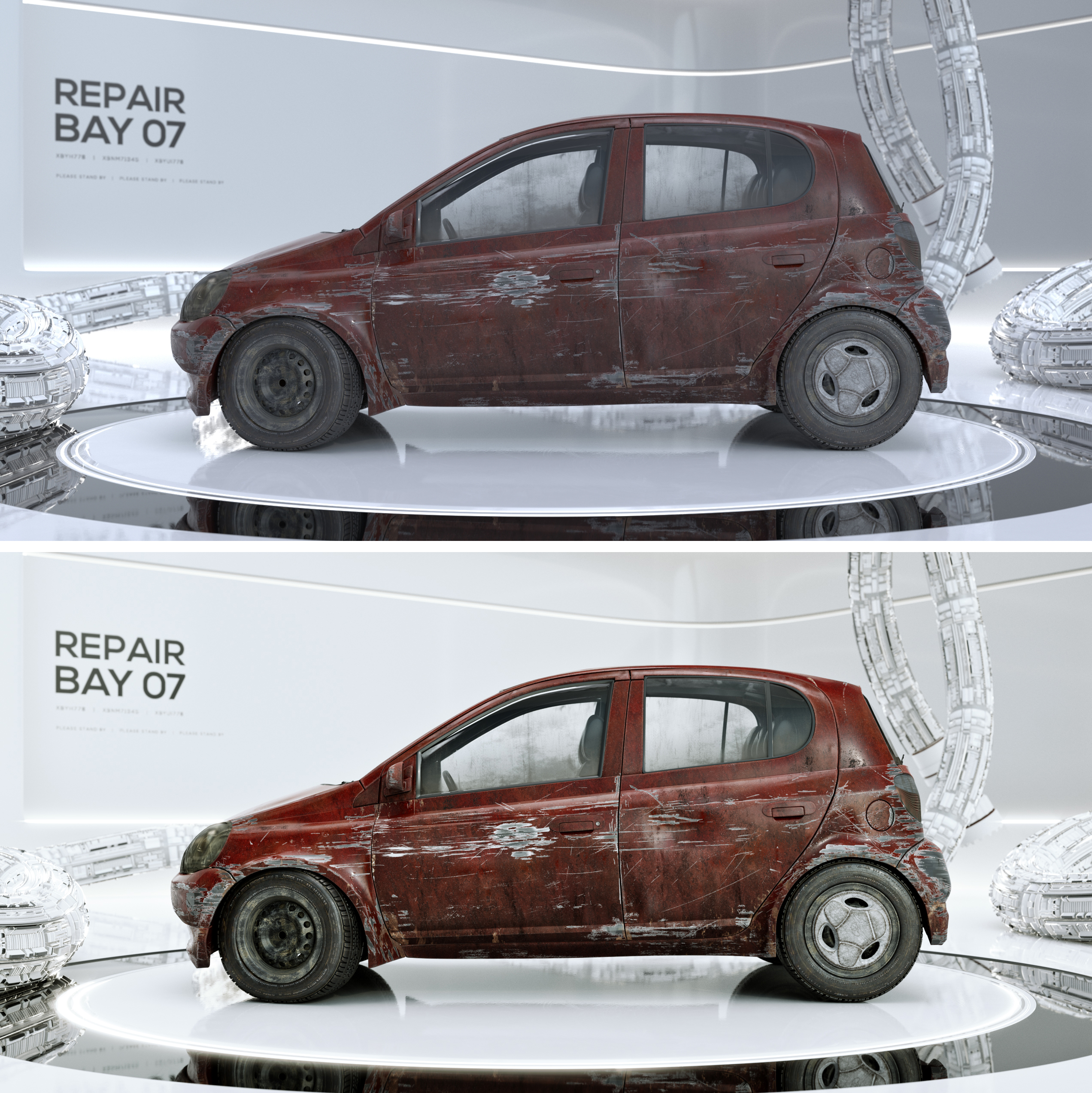
July 10, 2019 at 9:24 am #46973@theluthier It’s a bummer they don’t support EXR. I always think compositing doesn’t get the love it deserves. One never notices it, but I think renders really come out of the oven very crude, you only get a glimpse of it once you’ve put salsa on them and look back at it, you know some dressing and spices, a little oregano here and there.
There’s this thing you can do with High Dynamic Ranges that tends to really make them pop I think, the only problem is I don’t know how to do that in Blender’s compositor. But yeah, I think I can set up the compositing nodes so that Sheepit spits out composited ready images. I’ll dig around and see what I can do.
Some comparison of before and after. Raw render straight out of blender and then after some cooking.
 July 10, 2019 at 9:33 am #46974
@dostovel A few days ago, the cardioid in the title of this thread was green. Now it’s yellow.
July 10, 2019 at 3:21 pm #46975@williamatics I just wanted a way to quickly color-code the status of this render thread. Red being CANCELLED, Yellow being PENDING, and green being READY TO RENDER. Btw thanks to you I learned what a “cardioid” is.
@dostovel Oh yeah, the ability to fine tune renders with the compositor is crucial to my workflow. Your comps are looking great! Really pushes it that extra little bit.
One note: I can see the vignette very distinctly in the last image (heli). I’d blur that more if it were me.
Update on our SheepIt Team: We currently have 7 members closing in on a combined total of 200K points. That was fast! Thanks to those of you who joined. I’m thinking I will post a separate thread inviting the broader community to join, when I find the time..
July 10, 2019 at 9:01 pm #46976@theluthier Yikes yes, that vignette really needs to be less noticeable.
Dudes, Phil and Jack Bauer really have powerful machines, they ranked up really quick.
Also noticed CG Cookie Render Monsters jumped Rank from 133rd to 95th, right on, only 94th’s to go.
July 11, 2019 at 2:27 pm #46977@dostovel hey omar i would like to help but i have some problems with the steps .is there like a place where its shown with pictures of small clip how it work? dont want to do it wrong :p
July 11, 2019 at 3:54 pm #46978not sure i did good but i saved it onto my computer and put in the settings you suggested then hit render animation.
how i know when things are working ? he went back to render 0% after he reached 100% is that normal?
-
AuthorPosts


- The topic ‘Omar Domenech’s Demo Reel’ is closed to new replies.