[ENDED] BC3-1806 – June 2018 Class Homepage – Vehicle Modeling with Blender

Forum Archive [ENDED] BC3-1806 – June 2018 Class Homepage – Vehicle Modeling with Blender

Viewing 15 posts - 646 through 660 (of 1,277 total)
  • Author
    Posts
  • #35701
    Darren McBain
    Participant

      @adsb2035 cheers for the encouragement Adam and definitely what I needed to give myself a shake, ive took a step back or a period today before work, and gave myself a kick up the rear and got back on the horse….

       gotta love this community 😉
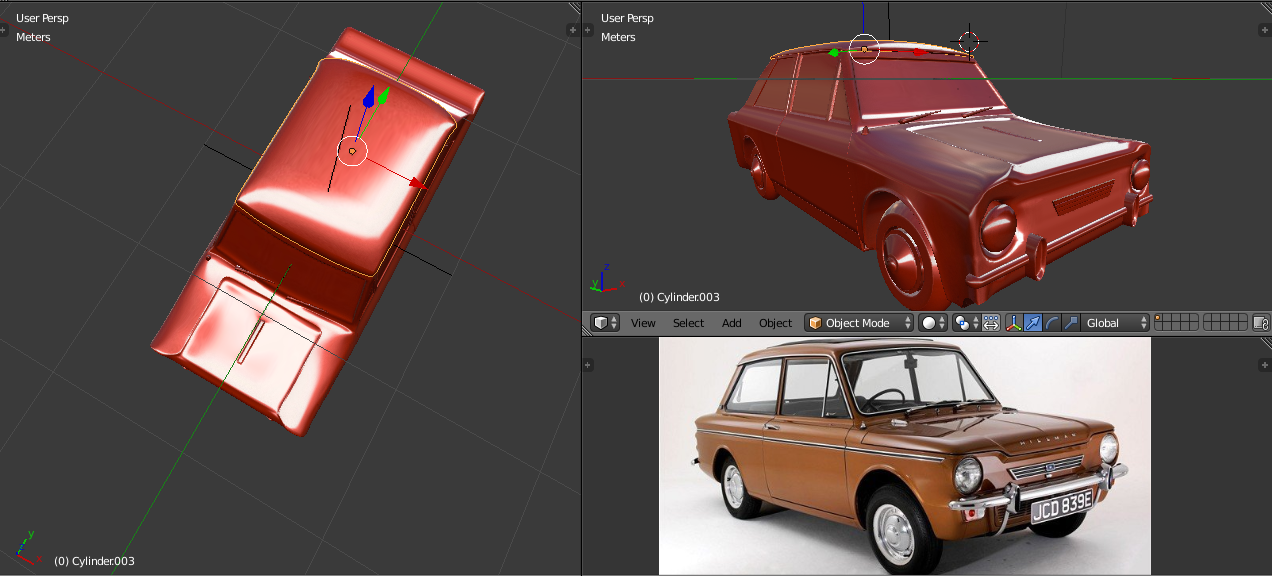
      so on that note, Ive spent my T breaks and lunch breaks and a little time inbetween when work was slow to come up with this.  not exactly on par with others but, im getting there, and im sure with more practice it will become less frustrating 😉

      its by no means complete, but its a shell and filled in to a workable state.

      for me one of the hardest things for me to get my head round was making the subsurf work for me, and not against me when getting the parts to line up and cutting out holes.  Another thing was, just how involved a project it actually is, which is really quite deceiving from the outset. got a bit carried away with loops all over the shop, and tried to go back and get my head round the quad junctions for some, not all parts.

      but, practice, practice and a bit more practice….. ill get there 😉 

      #35702
      Greg McKim
      Participant

        @silentheart00

        Okay thanks, whew that’s a lot for me right now. Maybe I’ll tackle all that after this course.

        🙂

        #35703
        silentheart00
        Participant

          @doulos4iesou Yeah, no prob.  I’m figuring it out, too, so you’re not alone =]

          #35704
          Zsolt Cseh
          Participant

            @theluthier Kent thanks for the objective grade, yes the proportional editing was a try to make more curves, going to continue that on different way.

            One small useful shortcut is my lesson after these adventures with proportinal editing -> Shift + H that hides everything else what is selected, not touching any other area.

            #35705
            Jere Haapaharju
            Participant

              @michallis I can totally recommend the shader forge

              #35706
              Matt Dickun
              Participant

                BC3-1806-Week 2 Homework

                Here is my progress so far. I haven’t worked on it too much yet, but I got the basic form started.

                https://sketchfab.com/models/67f92c5f614e4fa0afc60c3bf664d0ea

                #35707
                silentheart00
                Participant

                  @theluthier I’d rather you have lots of assignments planned and scale back than have to figure out how to add more.

                  #35708
                  Matt Dickun
                  Participant

                    @silenthans That looks good for only the first week.

                    #35709
                    Matt Dickun
                    Participant

                      @doulos4iesou Do you know about the Sketchfab Exporter Blender add-on. Just search for it in user prefences/add-ons.

                      #35710
                      Michallis Pashidis
                      Participant

                        @michallis @theluthier I’ve added also the wireframes with subsurf 1 (optimal display)

                        #35711
                        Jere Haapaharju
                        Participant

                          @csehz I red your post and figuratively RAN to Blender and tried out that that shift + H and it’s perfect! After using so many times ctrl + I to invert selection and then hiding it this hint was priceless,. Thanks.

                          #35712
                          Jack
                          Participant

                            @silentheart00 @doulos4iesou  You don’t have to bake anything to get a good looking material for a vehicle, you only have to choose metalness workflow, change the color, metalness and roughness in Sketchfab’s 3D properties. You only have to bake something if your model uses maps and textures, which at this point in the class shouldn’t be used yet. For example, I did my airplane this way.

                            #35713
                            silentheart00
                            Participant

                              @az93 I’m pretty sure the exporter doesn’t support Cycles materials unless you bake them out.  It’s convenient to upload geometry, though.

                              #35714
                              Zsolt Cseh
                              Participant

                                @jack07 Jack that is brilliant advice so setting the material straight on Sketchfab! Thanks a lot

                                #35715
                                silentheart00
                                Participant

                                  @jack07 Yeah, that’s fair if you want to use the simple built in material support, but I plan to have complex shaders, if I ever get this model done.  Things like adding paint flecks to give it that extra sparkle and stripes.

                                Viewing 15 posts - 646 through 660 (of 1,277 total)
                                • The topic ‘[ENDED] BC3-1806 – June 2018 Class Homepage – Vehicle Modeling with Blender’ is closed to new replies.