
[ENDED] BC1-1801 – January Class Homepage – Getting Started with 3D Modeling & Blender
Forum Archive › [ENDED] BC1-1801 – January Class Homepage – Getting Started with 3D Modeling & Blender
- This topic has 662 replies, 53 voices, and was last updated 8 years, 7 months ago by
LJ Simpson.
-
AuthorPosts
-
January 17, 2018 at 11:19 pm #32625
Thank you, that will be my next course!
January 18, 2018 at 12:25 am #32626I use them a lot. It’s basically a “quick” way to access various features. For example, with just a press of the z key and a move to the upper right, you can go into rendered view mode or by pulling down with the mouse, you can go to solid shading mode. Or after you press the Z key, you can wait and see which view mode you want to be in. Same thing with the tab key and switching between Edit, Sculpt, Object, etc. There are others, but these are the two I use the most.
January 18, 2018 at 7:44 am #32627Hi…
Finally I watched recorded video to the last. Next, course videos.
By the way, I have two questions.
1.
Kent encouraged using a pen-tablet.
But, when I use my pen-tablet, I cannot use my mouse at the same time.
So, I don’t understand whether to use pen-tablet or to use mouse at that time.
2.
I noticed that I don’t know about “User Preferences -> System” precisely.
So probably I cannot do best settings for the graphics board.
I searched name of my board and “blender”, “System”, “User Preferences” and etc..
But I didn’t find them.
Where is the trustworthy information ?
January 18, 2018 at 8:29 am #32628Just a minor tip related to changing the detail size. Someone mentioned the shortcut is Shift + D. Once you press it, you can either slide the pen / mouse to find an approximate value, or you can input an exact number (on NumPad). Also works with the brush size and strength.
I haven’t found shortcuts for Detail Refine Method and Detail Type Method, though. Are there any, or can you set them up in Preferences?
January 18, 2018 at 9:14 am #326291.) As far as sculpting, typically, you want to use the tablet for most things. The only place where Kent recommends using a mouse (and I agree) is doing something like the grab because a lot of tablets read the lifting of the pen off the tablet and skew the result at the end. This isn’t an issue with a mouse.
BTW, when you say you can’t use both at the same time, are you saying you can only have one plugged in or just can’t hold both at the same time? Hopefully it’s just the latter, in which case, you can set the pen down and reach over to the mouse. If it is the former, though, and they plug into USB, if you only have the one USB port available, you might look into getting a USB hub which will give you more slots.
2.) If you’re in 3D view, if you click on the box icon in the lower left, you can switch it between different window types. One of the options is User Preferences. Even easier is simply to press CTRL-ALT-U (I think that would be Command+Option+U on the Mac?) and it will pop up a window with the User Preferences in it. It’s got all sorts of options in there for controlling how Blender works. It isn’t necessary to change much there, except in certain cases, but can be a way to customize how you use Blender.
January 18, 2018 at 9:24 am #32630@az93 In addition to Matthew and Grady’s replies, here’s a video that’s a good introduction to pie menus:
January 18, 2018 at 9:36 am #32631Spot on info from Grady.
As for user preferences, on Mac the hotkey is (Command + ,) (Command + [comma]) or go to File > User Preferences.
You’re asking about graphics board. Do you have a reason to believe Blender’s not recognizing your board?
January 18, 2018 at 9:37 am #32632Good tip @shiennar – that’s one I definitely would want to input an exact number. Thanks for sharing.
January 18, 2018 at 9:39 am #32633Just to add to Katerina’s note, brush size can be accessed with F, and strength with SHIFT-F.
As for the hot keys, I don’t see one in the list of predefined ones. I think, in theory, you should be able to add one, but don’t know enough about how to get at that specific attribute and that would probably be a more advanced topic.
January 18, 2018 at 11:56 am #32634Thanks for adding to that info on detail size @shiennar !
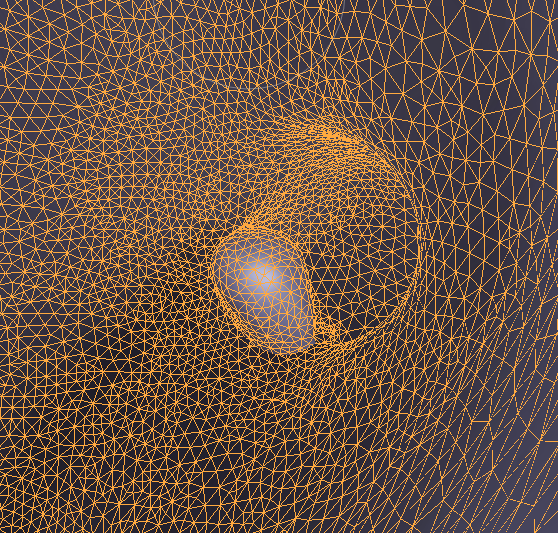
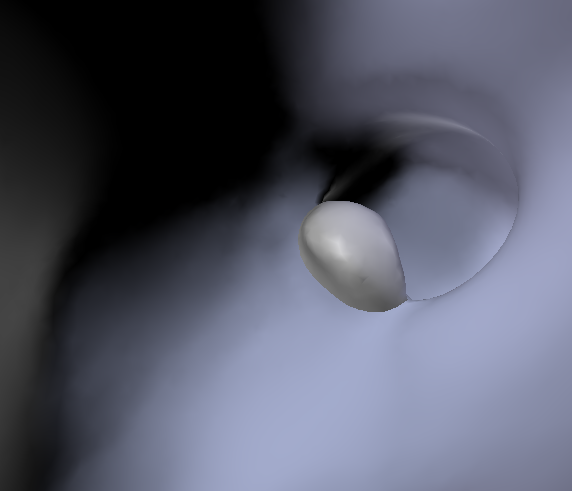
January 18, 2018 at 3:45 pm #32635Actually sculpting Melvin and going inside of the mesh, at the left leg there is some mesh which were somehow cumulated there. Is that an issue which should be removed? Presumably when the base was shaped by the skin modifier, that genereated it
 January 18, 2018 at 4:03 pm #32636
It’s not a tumor! I would say if it isn’t creating any visual problems externally, it doesn’t “need” to be fixed, though that may change if you continue to edit the area.
January 18, 2018 at 4:36 pm #32637Sometimes I piece of the mesh gets inverted. It can be smoothed out, but it’s a pain to work with.
January 18, 2018 at 4:39 pm #32638Thanks, could I please ask a second one, actually having 186357 vertices which is evidently too lot of, what is the tactic to decrease the density of some areas?
Subdivide collapse probably but so with the Inflate brush with slight strength and with big radius?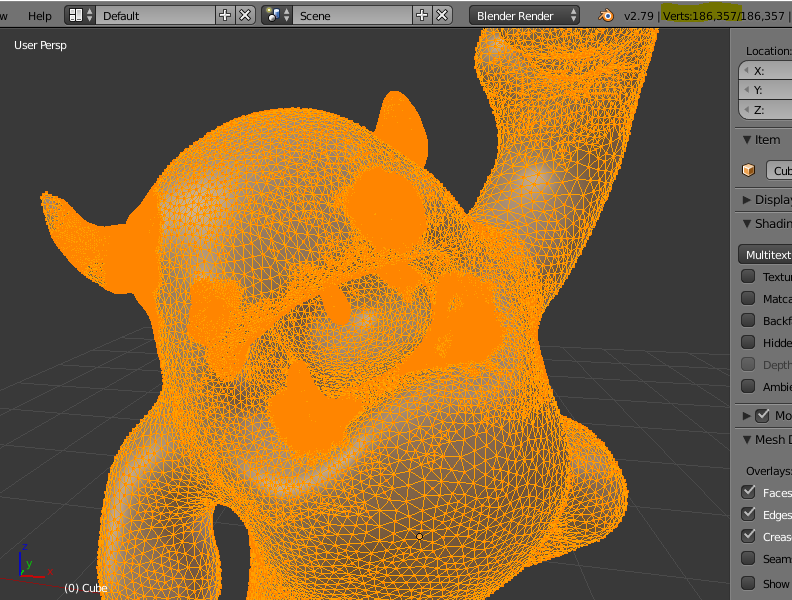 January 18, 2018 at 4:42 pm #32639
To John’s point, if this inside the sculpt and not hurting the exterior appearance, there’s no dire reason to fix it. But it can be fixed if need be.
In short, I would retesselate that area with big polygons by touching the area with a very low-strength brush (like Inflate) and subdivide collapse as the method. The retesselation should get rid of the artifact. Once gone, you can go back to smaller polygons and polish up the area.
If that didn’t make sense, please link me to your .blend and I’ll download it to demo the fix during next week’s stream.
-
AuthorPosts


- The topic ‘[ENDED] BC1-1801 – January Class Homepage – Getting Started with 3D Modeling & Blender’ is closed to new replies.