
[ENDED] BC1-1801 – January Class Homepage – Getting Started with 3D Modeling & Blender
Forum Archive › [ENDED] BC1-1801 – January Class Homepage – Getting Started with 3D Modeling & Blender
- This topic has 662 replies, 53 voices, and was last updated 8 years, 7 months ago by
LJ Simpson.
-
AuthorPosts
-
January 9, 2018 at 9:12 am #32415
That advice is golden @gradyp. Thanks for sharing! I remember being very intimidated by big scenes when I got started. Back then no one explained it like that: Breaking everything down into smaller shapes. It would have helped immensely.
January 9, 2018 at 9:30 am #32416Like Grady said, anything from Wacom is a good option. Alternatively I like Huion as less expensive option while still being good quality. This one is only $30!
Having a tablet for sculpting makes sculpting much more practical. While a mouse can be used, it’s far from ideal. I think of it like a hand saw VS a table saw. Technically I could rip-cut straight boards with a hand saw, but it’s incomparably better to rip-cut straight boards with a circular saw.
If you’re unsure about your capacity for sculpting, maybe wait for next week to watch the courses and live event, try sculpting with your mouse, then decide whether or not to get one. If you end up enjoying sculpting, you’re going to want a tablet.
January 9, 2018 at 9:33 am #32417Expanding on Grady’s info: The reply option is in the bottom left corner of the post box, beside the like heart.
January 9, 2018 at 1:56 pm #32418Somehow I always imagined that such Wacom tablet has some own operation system, the Blender needs to be installed there and like that doing the sculpting.
But thinking into that presumably it works like this:
– start Blender on the computer
– plug-in the Wacom through USB to the computer
– use the mouse as always, but as an additional input tool you can draw with a pen, also at anytime interacting with the mouseBriefly so it works around like that?
January 9, 2018 at 5:18 pm #32419That’s a fantastic idea! I’ve been looking at tons of anatomy books, but that didn’t really help translating the figure into modeling methods.
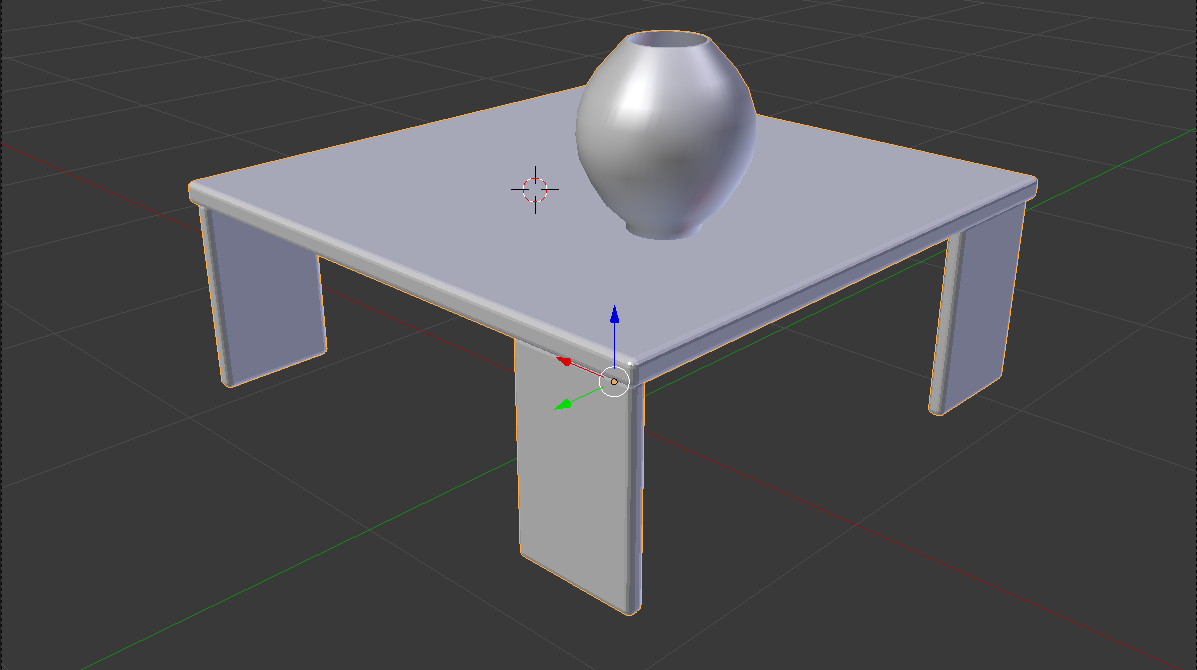
January 9, 2018 at 5:20 pm #32420This is my week two submission. Attached is the wireframe.
 January 9, 2018 at 5:20 pm #32421
This is my week two submission. Attached is the shaded version.
 January 9, 2018 at 5:21 pm #32422
This is my week two submission. Attached is the rendered version.
January 9, 2018 at 5:21 pm #32423This is my week two submission. Attached is the rendered
 version. January 9, 2018 at 5:23 pm #32424
I was wondering if there is a simple way of extruding a face from an existing model along a curve? I know I can Ctrl+click to ‘jump’ the extrusion along, but I’m looking for something with more control along the length of the curve, as well as ease in editing the curve (and hence the extrusion) after it has been created.
January 9, 2018 at 5:34 pm #32425That’s beautiful! Delicious textures.
January 9, 2018 at 6:05 pm #32426Well done. And quick too. The glass looks good and I like the bevelled edges of the table, nice and smooth.
January 10, 2018 at 1:17 am #32427That is a nice rendering.
For beginners it might be important to remind, that in this phase such beautiful rendering is not expected in the homeworks, at this point we just move vertices left and right 🙂
January 10, 2018 at 5:24 am #32428Not sure that you can snap an extruded face from one object onto another, but perhaps there are other ways to achieve a look you want. What are you trying to do?
January 10, 2018 at 6:25 am #32429BC1-1801 Week 2 Homework Submission (Part 1/3)
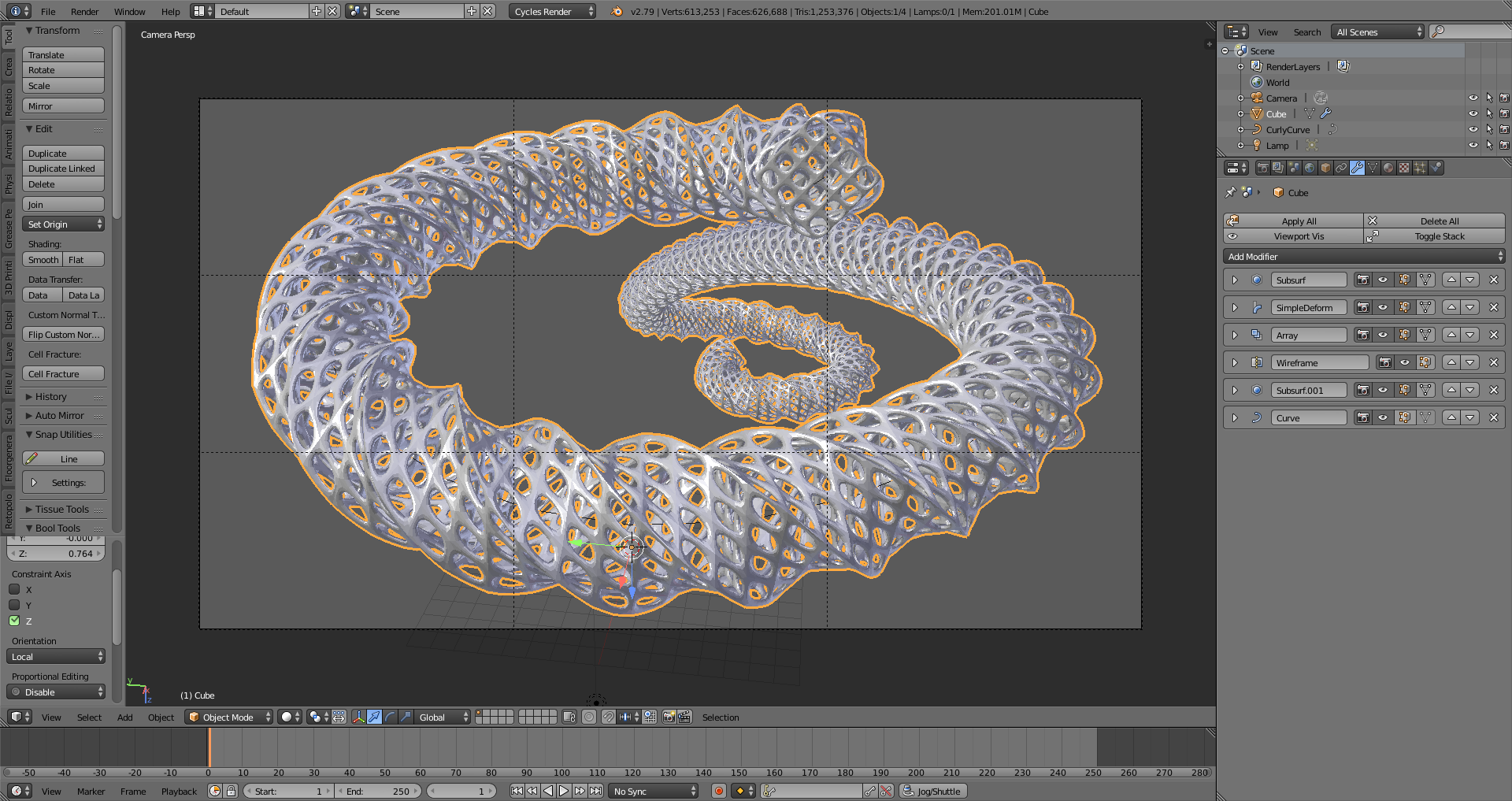
If you’ve never done an exercise like this, this is a fun one to do… If you look in the upper right in the outliner, you can see this scene only has 1 object added to the default scene — a Curly Curve. (I’ll get to that in a second.) Everything else is all modifiers. I share this one as a demonstration of just playing around and experimenting to get a feel for how these modifiers work. With a little coloring and texturing of the object and background, and you have an interesting abstract that could be used as a desktop background. Pieces like this are great ways to practice color theory, composition –all the technical aspects that are useful to understand when creating a scene — and in a way that is non-threatening because it started off as just a piece to play around with.
Best of all, these don’t have to take long at all. When I do one like this, from start to finish (except maybe rendering time) usually only takes me an hour, maybe two, to create, texture, compose, and prep for rendering.
Now, as for that CurlyCurve… Blender has a number of mesh and curve objects that aren’t turned on by default. In the User Preferences under Add Ons, in both the Add Curves and Add Mesh categories, there’s one that says “Extra Objects”. These have a number of useful meshes and curves with everything to bolts, to shapes, and more. In the most recent update to Blender, 2.79, one of the curves added is the Curly Curves, which is a collection of the curly flourishes used as decorations on a lot of things, such as mirrors, chairs, walls… These flourishes are found as decorative elements in so many places.
So feel free to experiment and explore! You never know what you’ll find that is useful or interesting — or that just might come in handy on a project down the road.
(The idea for doing something interesting came from Michael Pan, who, several years ago, did several of these in a month. He used particles and probably a few other tricks beyond the scope of a beginner class, but the idea here is to experiment with what you know to see what you can do. To see some of his, check out http://mikepan.com/cubes.html )
-
AuthorPosts


- The topic ‘[ENDED] BC1-1801 – January Class Homepage – Getting Started with 3D Modeling & Blender’ is closed to new replies.