
supete

Forum Replies Created
-
AuthorPosts
-
Thank you for the tips and encouragement. I will try to be more frequent with my posting in the future. I am certainly working on my time management to be able to fit everything I need to do and want to do every day.
Thanks again I saw you mentioned wobbly lines on my excercise and will try to think about that when working on gestures and head proportions next up 🙂
Also I wanted to share this video by Tim that I found on cgcookies youtube channel.
https://www.youtube.com/watch?v=FzirVkHHTsY&list=PLLvF9bS4OaDk6BUdIOo1fwCwZ8BwGUtqf&t=3s&index=2
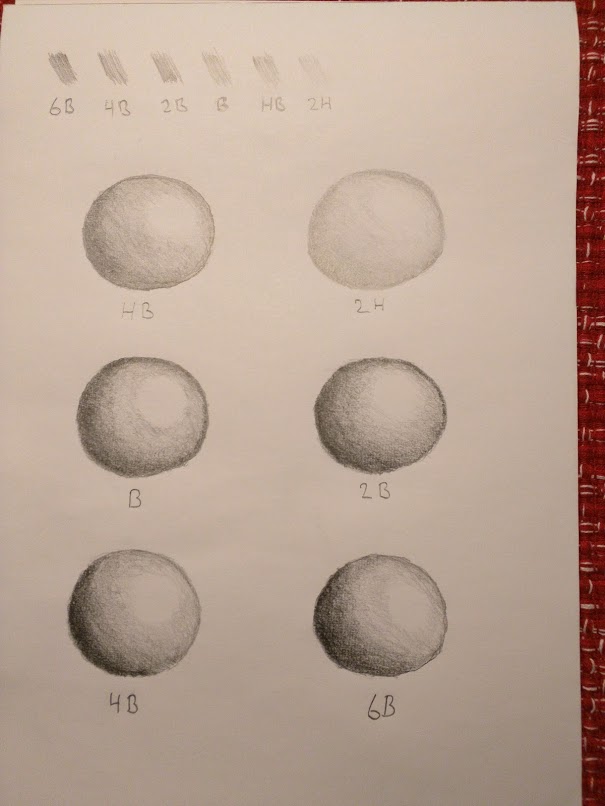
Here is my first post and it is my submission for the Pencil Hardness exercise here on cgcookie.
I found an introductory course that gives a basic introduction to digital art and photoshop on cgcookie concept art channel on youtube.
Here is the first video in the series https://www.youtube.com/watch?v=nN9gmMOpIvA&t=0s&list=PLLvF9bS4OaDnyy3MvYb5MUp4uKyAgmwcS&index=2.
REQUEST: I would like some added courses to the introductory flows on concept art. One course I would like is one that gives an overview over photoshop and the various workflows you can implement in it.
Example topics
* Working with layers (masks, shortcuts, overlays etc)
* Working effectively with a tablet (shortcut setups etc)
* Creating and saving brushes
* Good brushes for lineart sketching up to a finished product
Another course I would like is one that introduces the workflow of preparing and creating textures for your models rather than just using finished pre-prepared textures given to you.
Example topics
* Seamless textures
* Fixing lens distortion
* Evening out the brightness of a photograph
* Creating normal maps, displacement maps and specular maps from a basic diffuse texture
Lastly I would like to add that I think you guys are doing a great job and cgcookie is by far the best source for learning blender 3d among other things 🙂
Edit: Not sure if such a course would belong here on cgcookie but tips and tricks for actually taking good photographs of floors and walls to create textures from is also a topic that deserves it’s own video.
Thanks! Recalculating did the trick, I did look at where the normals was pointing and they where pointing in the right direction but I did not realize I had to recalculate them.
This however seems to be an issue with the .blend file on some setups perhaps? I was looking at some of the submissions from some of the other members and noticed the same issue on some of them as well.
-
AuthorPosts
