
Bennie Griffin

Forum Replies Created
-
AuthorPosts
-
Thank you for the mention, Kent. It’s an honour to be selected among such talented individuals. To all the other candidates, your work is beautiful and inspiring for all to witness. Take care.
Hi @adrian2301,
I am doing great, thank you for asking.
There is no need to apologize, Adrian. Sometimes circumstances occurs beyond our reach.
Thank you for taking the time to investigate. You’re the best.
I’ll just upload again as suggested.
Many thanks, Adrian.
Kind regards,
Bennie
Thank you, Omar.
Hi Omar,
My apologies for the misunderstanding.
I meant to say the images that were uploaded is not visible in my project. Yes the entire project is missing.
Thank you.
Kind regards,
Bennie
Hey Guys,
First of all my apologies for the distorted GIF. I’ll rather upload an image file next time.
Thank you so much @spikeyxxx and @adrian2301 for your time and diagnosis on my little problem.
Man you gentlemen really know your stuff.
Martin, you were indeed correct in pointing out my bone’s Local X-Axis. Thank you for elaborating on this.
Adrian, you were also correct in stating to keep the Z-Axis facing up. Thank you for this great rule of thumb.
My shape key driver is now functioning properly.
The plan here is to delete the animation and use a Controller Bone instead to drive the shape.
I currently have 3 rigs (Hardcover, Pages, Lock) that will be controlled by a Master Controller.
You guys are the best!!!
Kind regards,
Bennie
@blanchsb Correct. I’ve noticed that project comments were disabled.
@blanchsb Thank you Shawn. No apologies required, I completely understand.
@dostovel Thank you, Omar.
@adrian2301 @dostovel @spikeyxxx @slenaerts Thank you all for your kind assistance and feedback.
@adrian2301 Correct, the animation post on Discord was uploaded to this project. I can edit older projects except for this one. It does not allow me to edit, only displays a 500 error screen. When I try to delete it from my Dashboard a 404 error (page not found) is displayed. Do you have admin rights to delete this post on my behalf?
Kind regards,
Bennie
@adrian2301 Hi Adrian, I received this error minutes after updating a project. Currently it’s the 2nd image listed in student gallery.
Kind regards,
Bennie
Hi @spikeyxxx ,
Wow…thank you so much! I downloaded all the zip files into one folder and unzipped xx001 which in turn took all the other zip files into account as well. I wasn’t aware that you could split a zip file. Well…there is something new that I have just learnt. Thank you for sharing your extraordinary knowledge.
Hi @adrian2301 ,
I tried to copy and paste Kent’s GIF demo illustrating the use of how to unzip the source files and then I receive this error afterwards…

Hope I didn’t violate any rules.
Kind regards,
Bennie
Hi @adrian2301 ,
I hope that you had a blessed weekend.
Thank you for the response, Adrian.
I did indeed unzip one file at a time. I followed Kent’s GIF exactly in the same order.
In Kent’s GIF demo you will notice that he unzips the HUMAN_source-files.zip.001 which is successful. The same for me too.
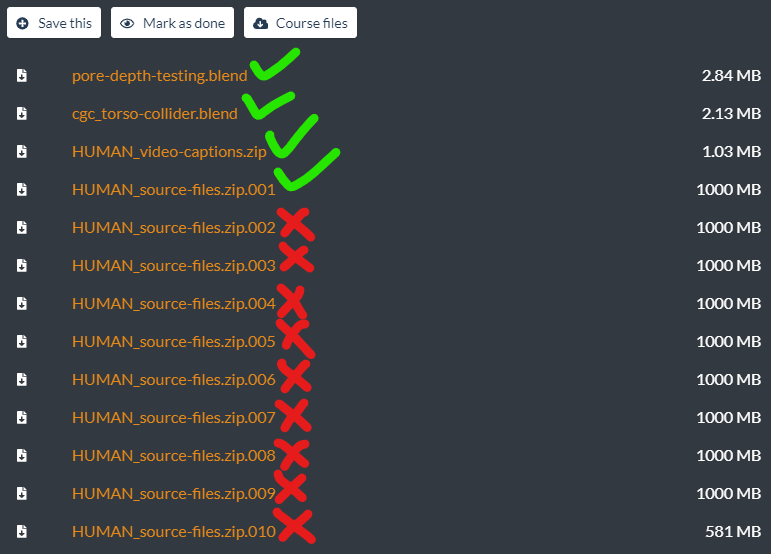
The problem is when I try to unzip .002, .003, .004 etc. I also unzip these files one at a time but to no avail only to receive an error that reads “cannot open file as archive”.
The other problem I have is that I can’t obtain the alpha brushes from those zip files in order to continue the course…so I am basically stuck.
Thank you again, Adrian.
Kind regards,
Bennie
Thank you so much, @adrian2301
-
AuthorPosts
