[ENDED] BC1-1908 – August 2019 Class Homepage – Get Started Building Stuff with Blender 2.8

Forum Archive [ENDED] BC1-1908 – August 2019 Class Homepage – Get Started Building Stuff with Blender 2.8

Viewing 15 posts - 61 through 75 (of 183 total)
  • Author
    Posts
  • #46024
    Zsolt Cseh
    Participant

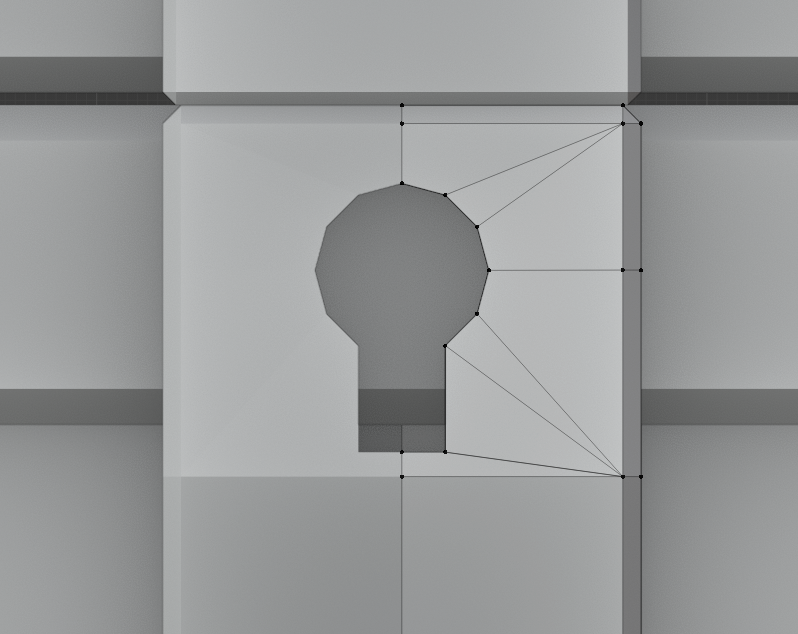
      Just have modelling the treasure chest and got to an interesting question, what if the key hole is too big and just realized that later? (not so bad looking but evidently bigger than in the tutorial)

      So briefly if the poor modeller realizes that late, how to make it smaller? Finding it especially tricky that the middle point of the circle is not clear anymore, plus the shape also extruded already

      #46025
      spikeyxxx
      Participant

        @csehz That is a problem that occurs many times.

        In this case, the keyhole looks fine.

        But to make it smaller, one way is to apply the Mirror Modifier. Then fill the keyhole ( ‘F’, just an N-Gon is fine). Press ‘I’ to inset.

        ‘X’ to delete the Face( the N-Gon). You can get rid of the ‘outer keyhole vertices’ by merging them with the inner ones, if that makes sense;)

        Now delete one half of the mesh and give it a new Mirror…

        Maybe there is a better way to do this, but in this case this will work.

        #46026
        Zsolt Cseh
        Participant

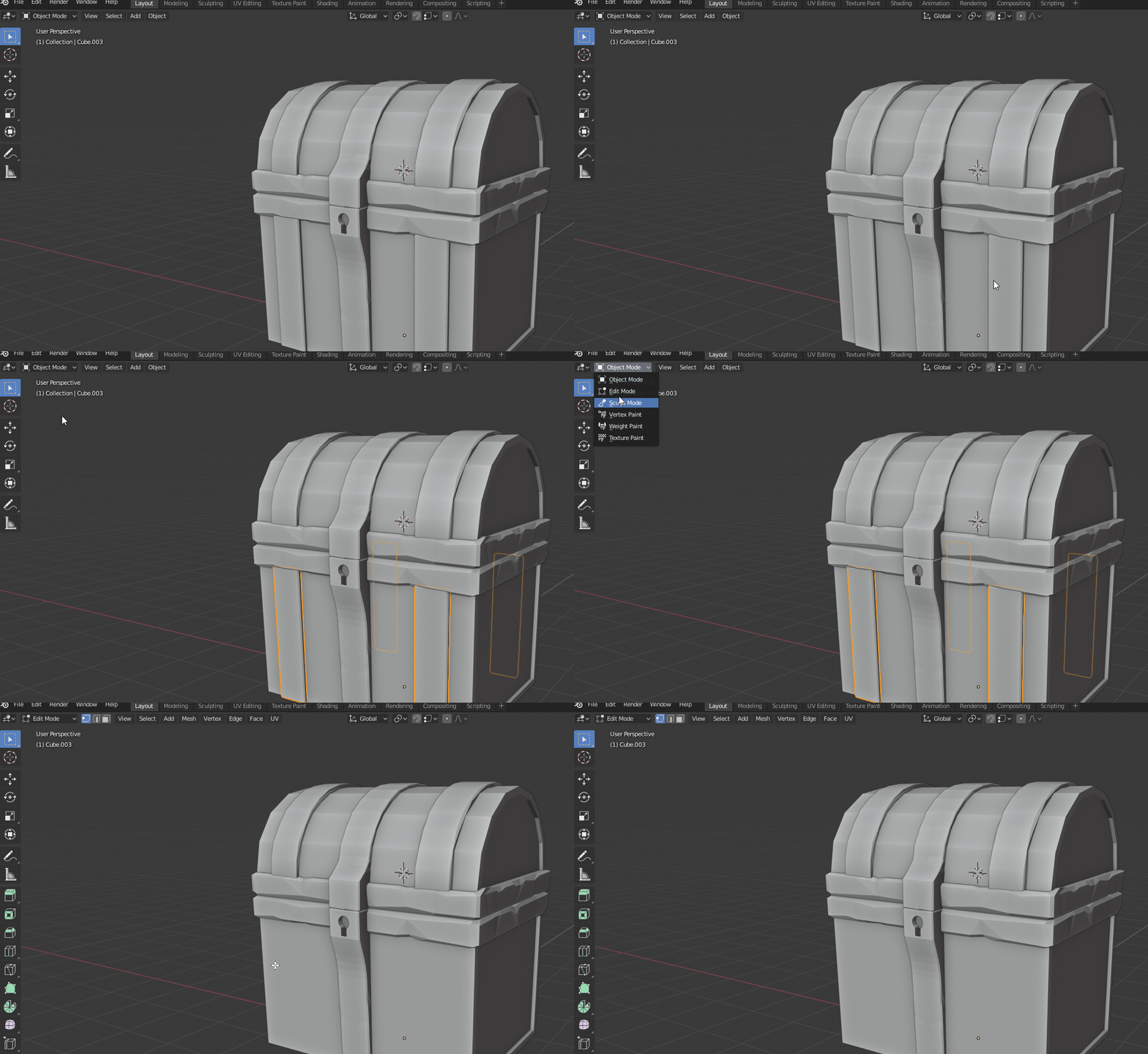
          Interesting question 2#

          Not clear how that could happen, but selecting that (it appears only at that one) particular object, going to its Edit mode it disappears 🙂

          #46027
          Kent Trammell
          Participant

            @csehz Here’s how I would fix the size of the keyhole (minding the mirror modifier):

            #46028
            Kent Trammell
            Participant

              @burnarakiss Welcome to your first class, Burn! Here’s an explanation from Tuesday’s stream about how to submit homework.

              #46029
              Kent Trammell
              Participant

                @csehz Are all your elements hidden in edit mode? Try ALT + H in edit mode to reveal hidden.

                #46030
                Zsolt Cseh
                Participant

                  @theluthier That is brilliant Kent. 

                  You solved both interesting questions in two minutes 😀 Of course that they were hidden in Edit mode.

                  @spikeyxxx Also thanks for your tip of course!

                  #46031
                  Thibault Caradec
                  Participant

                    Damn I’m starting to feel like I’ll never be ready for sunday submission. I guess it’s the worst when you’re pretty noobish in Blender : Doing anything, even simple, takes you so much time…

                    #46032
                    silentheart00
                    Participant

                      @otowa The first step is the hardest.  Just learning where everything is take time, and that’s okay.  Keep at it, and you’ll get faster.  You got this.

                      #46033
                      spikeyxxx
                      Participant

                        @otowa I’m convinced that you’ll be ready!

                        #46034
                        William Miller
                        Participant

                          I find it fascinating how even though almost all of us are making swords, every sword is different.  (Has anyone chosen the sign?)

                          #46035
                          Jeffery Foucha
                          Participant

                            Hello,

                            I was wondering where we can get the reference image used for tuesday’s class. I would like to follow along with it if possible.

                            #46036
                            grumpy
                            Participant

                              Hey there, i was just wondering if members who are following the class “passivly” (without livestreams and homework submissions) are allowed to participate in this thread?

                              #46037
                              Zsolt Cseh
                              Participant

                                Keeping traditions is a nice thing and especially for the new participants would like to mention, that here on CG Cookie there is a history already in Classes.

                                At the end of each completed class month Kent used to add the well deserved XPs to our profile, it is a kind of gamification to compensate the hard work, as it is really a challenge to sumbit homeworks on all the weeks.

                                This practice gives possibility for a small home competition, who were the best students in praticular CG Cookie Classes?

                                Here are the winners:

                                BC1-1801 – January Class – Katerina Novakova ( Sshiennar ) – 190 XP
                                BC2-1803 – March Class – Matthew Ullrey ( ullreym ) – 180 XP
                                BC3-1806 – June Class – Aaron Rudderham ( thecabbagedetective ) – 178 XP
                                BC1-1808 – August Class – Miranda van Elst & Aaron Rudderham ( smurfmier1985 & thecabbagedetective ) – 195 XP
                                BC4-1810 – October Class – Pavel Mazanik ( nekronavt ) – 176 XP

                                Miranda and Aaron are surely with us also this month, let’s see who will be the best in BC1-1908 – August 2019 class 🙂

                                #46038
                                Philip Rampa
                                Participant

                                  @otowa I am glad there are others who think that way. But we will learn a lot even if we get 1 XP.  🙂

                                Viewing 15 posts - 61 through 75 (of 183 total)
                                • The topic ‘[ENDED] BC1-1908 – August 2019 Class Homepage – Get Started Building Stuff with Blender 2.8’ is closed to new replies.