
[ENDED] BC1-1808 – August 2018 Class Homepage – Getting Started with 3D Modeling & Blender 2.8
Forum Archive › [ENDED] BC1-1808 – August 2018 Class Homepage – Getting Started with 3D Modeling & Blender 2.8
- This topic has 540 replies, 35 voices, and was last updated 7 years, 12 months ago by
yukino hatake.
-
AuthorPosts
-
August 8, 2018 at 8:23 am #37895
@yukinoh1989 Excellent – thanks for starting your individual thread! I didn’t record locally yesterday so I have to download from Youtube and re-upload. It’ll be up in the next couple hours.
August 8, 2018 at 11:10 am #37896@theluthier awesome then i can start tomorrow 🙂 look forward to see it
August 8, 2018 at 12:41 pm #37897Hi, a bit late to the class. Where, if available already, can I find the recorded first week? If not, when should I check back in? Thank you.
August 8, 2018 at 12:43 pm #37898@modeler3dvman Go to the Events page and click on past events. It should be there if it’s uploaded.
August 8, 2018 at 12:47 pm #37899@silentheart00 Thank you, will look now.
August 8, 2018 at 12:48 pm #37900@modeler3dvman If it’s not available yet it almost always is there within 48 hours of the stream so if you don’t see it yet it shouldn’t be long before it’s uploaded so just keep checking back.
August 8, 2018 at 12:54 pm #37901@thecabbagedetective Excellent, thank you for fast replies. I’ll keep checking.
August 8, 2018 at 12:59 pm #37902@modeler3dvman My apologies for the late upload of the stream recording. I forgot to record locally on my computer, which I usually do. Instead today I had to download from Youtube’s recording, combine audio and video, repupload to wistia…blah blah blah – It will be available today, very soon!
PS: Welcome to the class!
August 8, 2018 at 1:54 pm #37903@theluthier Thank you, I’ll return later today to check.
August 8, 2018 at 6:17 pm #37904@theluthier
hey i am watching the recorded livestream now .
Since i could not be there at the time i hope i can answer here and ask my questions too.
1: what experience level do we have in the house: 1, u just started this is my third week so i still will be able to learn plenty 😀
2 : we are free to sell? i got a question about this . not sure this belongs here but if i get better how do you start a career or how do you promote , sell youre models ? And how do you know what a fair prize is for what you offer to other people ?
3: On the num pad what is the period key (or how its called ) you talk about it at 52.45 minutes.Thats it for now 🙂 glad to be able to be here like you said this is an amazing community and great place to learn.
August 8, 2018 at 7:02 pm #37905I’ve been lurking in this thread because I’m interested in 2.8. I haven’t quite decided if I want to fully commit to joining or not, but I’m considering it… though, I guess I’m a little late to the party. Regardless, I wanted to try to help a little:
@yukinoh1989 The “period key” is the key with the little dot on the number pad on your keyboard. Providing I can figure out how to embed an image, you can see it on my keyboard in the image below.
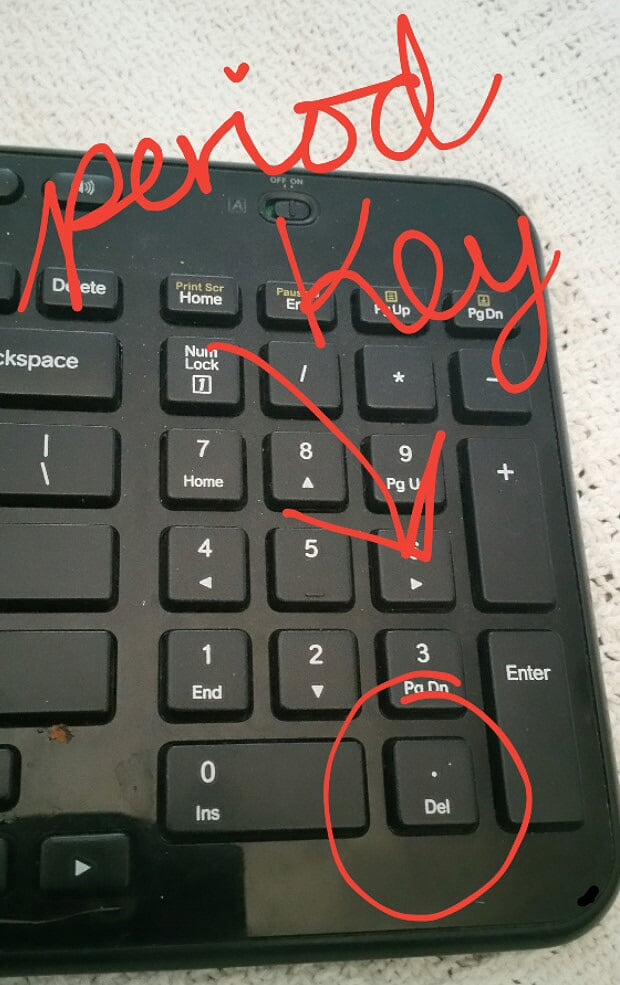
It’s helpful (at least in 2.79) for focusing your viewport on whatever object you have highlighted (and are thus working on). This is particularly helpful when you’ve managed to zoom too far out or pan too far over. Doesn’t help you, though, if you’ve managed to flip yourself upside-down. In that case, you’re better off hitting 1, 3, or 7 on your number pad to bring you to a front, side, or top view and then use the period to focus in from there. At least then you can start panning and orbiting and zooming all over again from a familiar orientation.
Not sure if that’s what you wanted to know, but that’s how I understood what you’re asking. 🙂
August 8, 2018 at 8:02 pm #37906@yukinoh1989 Good to have you on board! Not @theluthier obviously but I’ll do my best to answer your questions. Also as an FYI I’m 1 too, been doing this for 6-7 months.
Now whilst I would hardly consider my word gospel considering I’m not a professional (yet), I am under the impression that if you made something here that didn’t use any copyrighted characters, logos etc in this class you would be free to sell it, yes. Though whilst I doubt they’re copyrighted I would advise against selling things created specifically from a course aka the plane from the hard surface modeling fundamentals, just ’cause it’s something anyone can easily find.
Now for selling your models there are sites like BlenderMarket, Sketchfab etc in which you can sell your models, but the way I’d recommend starting (as it is how I started and how I’m slowly transitioning into professional work) is by asking friends and family if they want anything modeled. Things like logos or backgrounds seem to be the most popular with my friends. It’s a great way to get started and you’re working for someone you (at least should) trust, not to mention they’ll tell their friends and family if you do a good job and it could potentially explode if one of them has good connections. As for fair prices though, I can’t really say, as a lot of factors come into play. The only thing I can really do is recommend having a browse around other storefronts or maybe ask some of the professionals on this site what they charge. On a side note, sites such as BlenderArtists frequently post freelance job listings so when you feel more confident definitely check that out.
August 9, 2018 at 12:00 am #379072 : we are free to sell? i got a question about this . not sure this belongs here but if i get better how do you start a career or how do you promote , sell youre models ? And how do you know what a fair prize is for what you offer to other people ?
To add to what others have answered for you. From Blender Market, https://support.blendermarket.com. There are some
answers for you. Others sites where you wish to sell have their own rules and regulations.
August 9, 2018 at 12:43 am #37908@yukinoh1989
To go into the period key again:It’s helpful for zooming in as @hdpeterson said. It also centers the rotation point of the view to the selected object. So if you have trouble rotating around an object, you could use the period key, and it makes rotating around the object much easier.
And it works in edit mode too. Just select a vertex – or a view vertices – and blender now zooms in and rotates around the vertex/vertices. I use it all the time.
August 9, 2018 at 3:31 am #37909thanks guys. This really helped. gonna try to do some homework now 🙂 hope to make someting Nice
-
AuthorPosts


- The topic ‘[ENDED] BC1-1808 – August 2018 Class Homepage – Getting Started with 3D Modeling & Blender 2.8’ is closed to new replies.