
COLLAB2021 – HQ – Stylized Fantasy Environment
Forum Archive › COLLAB2021 – HQ – Stylized Fantasy Environment
- This topic has 510 replies, 67 voices, and was last updated 4 years, 6 months ago by
Kent Trammell.
-
AuthorPosts
-
April 7, 2021 at 1:25 pm #63498
You’re not too late @az93 – I have you on the roster. Do you have a gmail or google-associate email account for me to add?
April 7, 2021 at 1:26 pm #63499@spikeyxxx YES – I get it now. Great Trick – Thanks.
April 7, 2021 at 1:37 pm #63500Oh yes, having so much power confined to a non-undoable modal is risky business. Funky and potentially frustrating to work with.
April 7, 2021 at 1:50 pm #63501Ok, I just sent the email.
April 7, 2021 at 3:36 pm #63502📢 Announcement #2: Updates & Loose Ends
Discord
Our resourceful Team Leads have setup a discord server for us! The server features channels for each team including audio + video capability.
This changes our communication structure a bit from what I discussed during the stream yesterday. Now I recommend LOW LEVEL communication happens on discord since it’s the easiest / quickest form of communication we have. By “low level” I mean casual, small-consequence discussion. The main negative of persistent chat is their brief nature; they appear and then immediately get buried. This is fine for the majority of our discussions (let’s say 75%) but we want to avoid important info getting buried.
HIGH LEVEL communication is the important stuff that shouldn’t get lost in a persistent chat. Please keep high level stuff like protocols, announcements, lengthy troubleshooting and idea pitches on the forum threads.
A big shoutout to the leaders for just nike-ing the Discord idea into reality. I was against it for dumb reasons and now I’m already a big fan. Communication should be much improved as a result!
Week 1 Stream recording available
The steam recording is available to watch and features chapters for easier navigation. The stream was 3 hours after all and full of pertinent information. Please watch or at least skim the first 2 hours.
As promised presentation slides also available to view and I’ve added a Week 1 casual stream for Tomorrow (Thursday). Reminder that this will be completely unrehearsed; just a fly-on-the-wall type stream watching me work and being available to answer questions.
Team Threads
It’s important to be plugged into your team’s thread. I recommend checking in at least 2-3 times per week for important info:
- House (Exterior Front) – Team Thread
- House (Interior Back) – Team Thread
- Accessories (House) – Team Thread
- Accessories (Standalone) – Team Thread
- Nature (FG) – Team Thread
- Nature (BG) – Team Thread
Registration is CLOSED
Officially registration for the class is closed. I let a few stragglers join because I have a hard time saying no…but I’m not sure we can handle anymore! If you’re interested in the Collab you’re welcome to lurk but officially no more joining.
Asset Assignments
I’ve been confirming a steady stream of asset requests and the spreadsheet cells are filling up beautifully! As I asked on stream, it seems several “fill-in-where-needed” people have waited to claim an asset out of respect for those who wanted specific assets. Thank you for that!
At this point I think it’s safe for everyone to request and fill in remaining gaps. The goal being that everyone has a confirmed asset by the weekend.
If you do not have comment access to the Asset List spreadsheet, please send me an email ( kent@cgcookie.com) using either a gmail address or google-associated email and I will add you to the share list.
Syncing to Google Drive
I didn’t present this great during the stream. For week 1 I’d like to see everyone synced with the project directory but to NOT add their own .blend files until week 2. There’s some specific protocol I want to explain before contributor files are added.
To sync the project directory I need to add your email to the share list. If you don’t see the “SPICE-VENDORS-HOUSE” folder in your shared with me section of Google Drive, send me an email (kent@cgcookie.com) using either a gmail address or google-associated email and I will add you to the share list.
The next step is “adding” the shared folder to your Google Drive. This is a weirdly hidden feature using the SHIFT + Z hotkey. Team Leader Shawn recorded a great tutorial video about this process.
Once you’ve added the shared folder to your Google drive, you can install the Google Drive applet and begin syncing to your local computer. This syncing capability is very important for the project to function for everyone.
Submitting Homework
Reminder that homework is due every Sunday at midnight (your time). This gives me Monday to look it over, grade, and choose submissions to review during Tuesday’s stream.
To submit homework, post a reply to your WIP thread with this top line in bold: “Homework Submission – Week 1 – Asset Name”. This tells me that you’re finished and ready for a grade / feedback. Below the bolded line please add “@theluthier” to mention me so I will be notified. Below the mention I want to see at least one screenshot of your blocked out model. You’re also welcome to include any relevant info or comments if you wish:
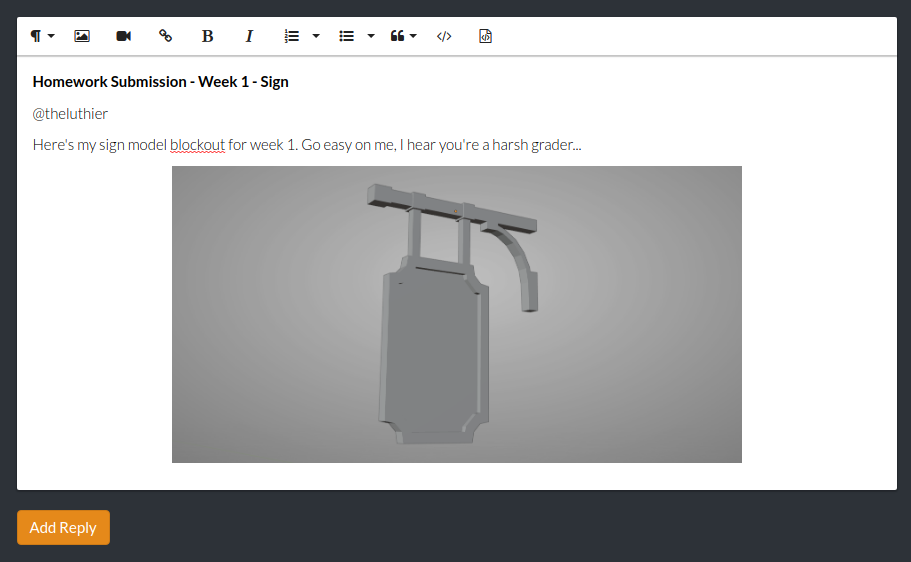
IF you finish your homework before Sunday, it’s OK to submit early!
April 7, 2021 at 11:39 pm #63503Thank you
April 8, 2021 at 12:09 am #63504@theluthier I don’t know if I’ve done something wrong or not, but when I try to add the SPICE-VENDORS-HOUSE (shared by CG Cookie COLLABS) to My Drive (Shift + Z) it first pops up and says that it was successful and then this pop up comes up immediately after it.
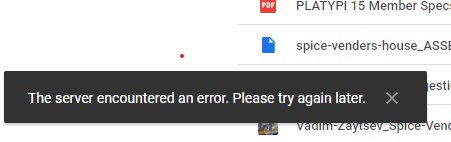
So to summarize, I have downloaded and installed the Google Drive app on my Windows computer and it all seems to be working alright, the only problem is when I try to add a Shared With folder to My Drive in Google drive. Any ideas. Thanks.
April 8, 2021 at 12:15 am #63505In the mean time I have downloaded a Hard/Unlinked copy of the spice-venders-house_ASSEMBLY.blend file to my computer, so I should still be able to make and rename a copy of that to be able to work on my particular asset.
April 8, 2021 at 12:32 am #63506Scratch that idea.
You can’t really work on an asset when the .blend file is looking for the Ref picture and it isn’t on your computer.
Honestly this is my first time ever using “syncing” and I know that I’m out of my depth here. @theluthier
A tutorial or a quick how-to work in syncing for the Spice Vendor’s House specifically would probably be of great value to a few people, not just me.I had hoped to start “breaking eggs with a stick” at this point, such is life.
April 8, 2021 at 1:23 am #63507When I do the Shift + Z command the folder does move to My Drive, for a second, before bouncing back and giving me the Server Error. @theluthier I don’t know if it has anything to do with my available drive storage: I have 6.1GB used out 15GB.
Unless it’s meant for week 2, I would like to know what the preferred workflow is for working with syncing and how I should copy the assembly.blend correctly so that I can work on the All Accessories asset.
I did watch @blanchsb Google Drive tutorial about how to download and set up the Google Drive Storage folder, but after that I started to get lost and my eyes started to glaze over when he began to go into the details about keeping your synced file current and what not.
Sorry, I really am a total newbie at all this syncing stuff.
April 8, 2021 at 4:13 am #63508Hey @vincav81 I think you may not have access until next week, which is why you will get the error, But here’s what to check for:
Be sure to select Shared with me then click on the Spice Vendor folder once so it is highlighted and then SHIFT + Z. Click on My Drive and you should see the Spice Vendor folder here also, you don’t need to access it here, you should now be able to sync (save to it via the Google drive folder on your desktop)
If you still have trouble see here 👇
Try checking your Firewall settings in any antivirus software you have, the default or recommended setting is best.
Also check your file sharing setting in Windows.
Go to the start menu, scroll down to Windows System, in the drop down menu select Control Panel. or search ‘Control Panel’ if you have the search facility activated.
In the Control Panel select Network and Internet, then Network and Sharing Centre, then in the list on the left select Change Advanced Sharing Settings.
In the private(current profile) section under file and printer sharing, I think this will need to be on.
Also in the All Networks section, under File Sharing Connections, select 128 bit encryption.
Also check the Google Drive sharing settings (You said you have 6.1GB used you should have nothing used if you are a new user on Google Drive, so definitely check these settings).
Do you see a cloud icon on the task bar next to the clock?
If not, in the start menu scroll to Backup and Sync from Google and in the drop down menu select Backup and Sync from Google
If you do, click on it and then click on the 3 dots on the right and then click preferences.
In the preferences window
Under My Computer deselect everything
Under Google Drive select Sync My Drive to This Computer and then select Sync these folders only (Absolutely Definitely if you have other non spice vendor files in your Google Drive) and you will see a folder named Spice-Vendor when you have access and done the SHIFT + Z thing next week, select this folder.
Under Settings, select Network Settings, then check the proxy setting is Auto Detect and the Download and Upload Rate are both set to Don’t Limit. (Limit setting not necessary but best for speed based on your ISP Mbps)
Hope this helps.
@theluthier Maybe worth everyone checking their settings, especially which files to sync so we don’t share private files and blow our 15GB limit on day one next week.
April 8, 2021 at 5:08 am #63509Hey @theluthier
There was talk about having moving water, thought I might draw your attention to this flow map addon in case you hadn’t seen it.
https://www.blendernation.com/2021/03/03/free-flow-map-painter-addon/
April 8, 2021 at 5:22 am #63510Nice effect. Downloading addon 😛
April 8, 2021 at 6:49 am #63511@adrian2301 Thank you for your response, I will check out your suggestion.
About the 6.1GB, I’m an “old” user on Google Drive, I’ve just never had to sync anything before.
Thank you.
April 8, 2021 at 7:08 am #63512I wish I could edit these posts. @adrian2301 I made mention of the 6.1GB because I didn’t know or not if it was a lack of space on my end that was stopping the file from being moved to the Google MY Drive section.
-
AuthorPosts


- The topic ‘COLLAB2021 – HQ – Stylized Fantasy Environment’ is closed to new replies.