
Timeka Cobb

Forum Replies Created
-
AuthorPosts
-
@martin bergwerf It’s a really smart idea. You and others have giving me excellent advice 🙂
@adrian bellworthy. Thank ya so very much!!!
I get desktops are a strong option and may consider but I may still go with a laptop. There are times when I may travel and have the urge to play around 🙂
@thehomme I understand your point of view
@thehomme Thank ya very much!! A desktop may come out on the cheaper end but I think a laptop may be the way to go that way I can do the courses on the go.
@Omar Domenech. Thank ya so very much!!! I am Big fan of Lenovos so I may check them out
Thank ya so very much Madam, this means a lot 🙂
That’s ok and thank ya 🙂
The tutorials are excellent and very detailed but I tend to get off track sometimes. I do give myself grace and step away for a few then come back so I won’t get frustrated.
@spikeyxxx Thank ya so very much!!!
@Omar Domenech Thank ya so very much!!! Right now Im working with a word style logo that I converted from a png to svg and pushed into Blender. It looks nice as is but wanted to make it pop a bit. I tried beveling it as well but for some reason it didn’t work. As you stated I’m going to try things out because its helping me learn my way around Blender and I’m liking the experience!
@jlampel…Thank ya so very much:)
Thank y’all again so very much 🙂
@Martin Bergwerf & @Omar Domenech …Thank yall so very much for the responses 🙂
I enabled the Cut Through but didn’t touch the Angle Constraint because I thought I heard in the video that it wasn’t needed. Doing that still didn’t help. unfortunately. I’ve restarted this course after being away form it for a few. First time I did this course I restarted 3 times lol!!
Pic Attached: I cant get the top cut (which is the back end on the cartridge holder) to work, the bottom is good.
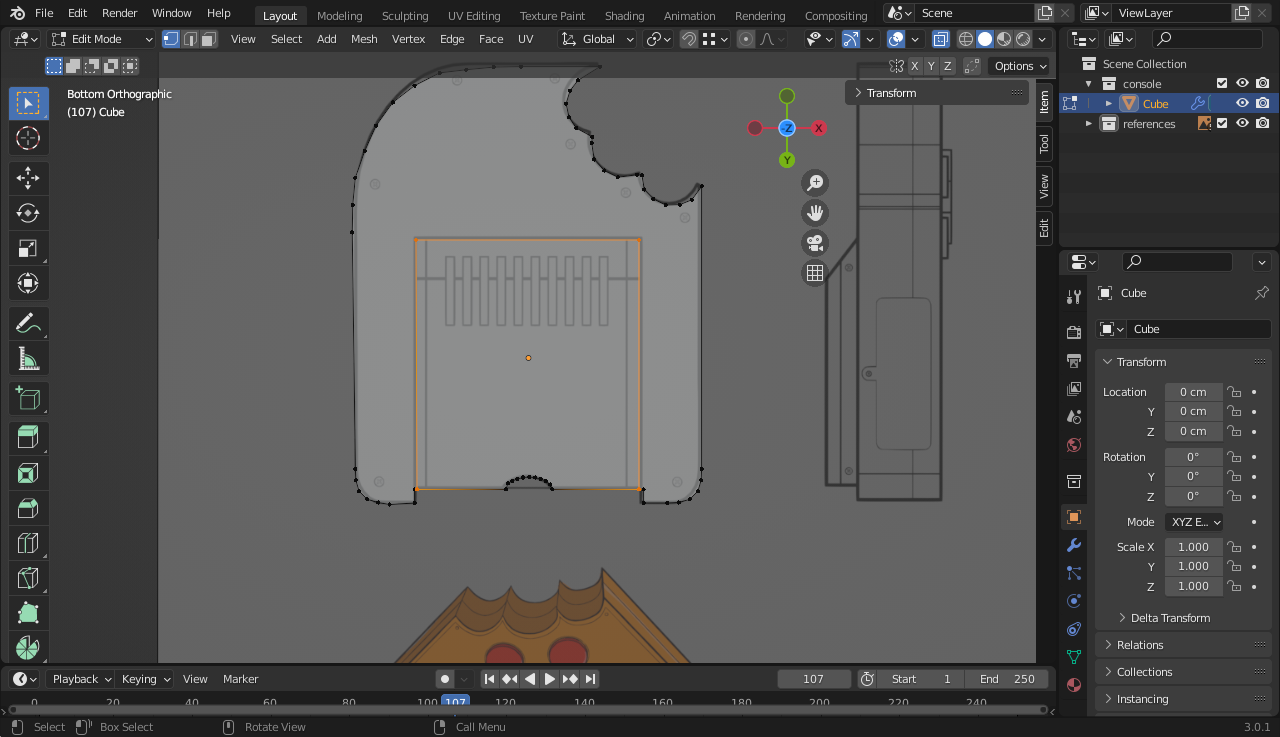
Here is my .blend file:
https://www.dropbox.com/s/bit93aof8wduy5o/mekagamecube.blend?dl=0
Thanks for the help!!!
Thank ya for the answer! Will try your way. Did some looking around and it seems in order for the knife tool to snap on there has the be vertices. The front of the insert has 2 vertices but the back doesn’t.
@wardred I duplicated the good face and brought it over. Will definitely keep your notes in mind for future reference since I’m brand new on this path 🙂
@spikeyxxx I’m not confident in this at all lol…hopefully over time it will change just need to keep at it!! Will try the knife project for sure. I also deleted the extra edge as well 🙂
I see what you’re saying! I think that was a step I overlooked. Is it possible that I can just for now duplicate the good one and bring it over or just do both from scratch?
May 6, 2022 at 2:05 pm in reply to: Are you new to CG Cookie? Say hi to your new Blender tribe! 🍪 #73167Hey Everyone!!
My name is Timeka and Im a newbie from Washington,DC. I became interested in this world through hearing about Second Life and Opensim and been fascinated for some years but scared to try due to the challenge I felt it presented. What changed my mind was trying to take already made avatars(CG Trader, Turbosquid, etc), rig in Mixamo, edit here and bring them in BabylonJS to build games. I thought to myself “Instead of going through various channels why not just work within one space”, so here I am!!
So far I’m liking the experience 🙂
-
AuthorPosts
