ethanglitch

Forum Replies Created

Viewing 5 posts - 1 through 5 (of 5 total)
  • Author
    Posts
  • in reply to: Fill a quad based on three vertices #68524
    ethanglitch
    Participant

      Sometimes it just feels good to be alive when you discover the ingenious ways people have catered for your job to be done.

      in reply to: Fill a quad based on three vertices #68522
      ethanglitch
      Participant

        Thanks it does indeed. 

        In my case it looked like it didn’t, but on closer inspection it was because it had two equally valid options and it happened to choose the one I did not want (it created the face with the vertex appointed by red):

        But pressing F twice and then deleting the first newborn vertex does the trick.

        in reply to: Fill a quad based on three vertices #68520
        ethanglitch
        Participant

          😀 

          Turns out with spikeys method no need to switch transform orientation.

          in reply to: Fill a quad based on three vertices #68519
          ethanglitch
          Participant

            This is pure gold, such a simple solution and even less to select! And after hitting F just need to hit the right mouse button to fix the location of the new vertex. 

            To tap more into your magic @spikeyxxx – perhaps there is a way to create a parallelogram from a faceless edge and a face as well? 
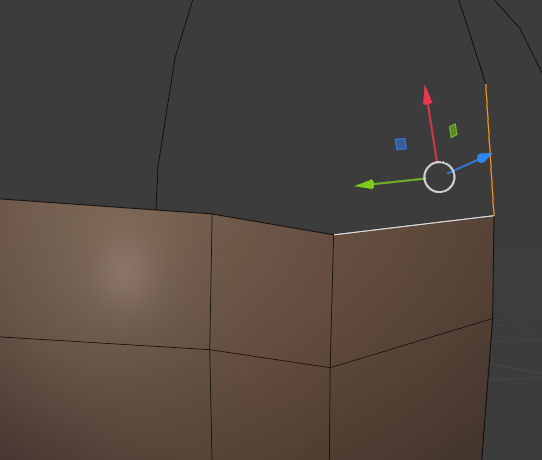
            (your method above does not yield in this case)

            in reply to: To pole jump or not #68488
            ethanglitch
            Participant

              Worked great, that pinch is not a pickle any more!

            Viewing 5 posts - 1 through 5 (of 5 total)