
Kyle Blaine

Forum Replies Created
-
AuthorPosts
-
Hey again, admins. Lol I’m going through these old courses and keep finding either hijacked accounts or straight up spam comments, like this last one above. 🙁 Not sure if there’s a formal “report” button I should be using, but thought you’d want to know. Thanks!
July 9, 2026 at 3:17 pm in reply to: Really great introduction to understanding loops– and a note about monkeys… #27332Hey admins, I know this is super old but just wanted to report this last post by user “whitequarter” is almost-cleverly evasive spam advertising, or hijacked for spam, in any case.
That’s funny, I was going to comment something extremely similar and saw @catboigalore beat me to it. 😀
I just wanted to say seeing your progress with this room project has been inspirational. It’s so wonderful watching someone learn like this. Your room project is certainly something to be proud of! Working through all those little quirks takes time, but soon it will all be second-nature. Keep it up! 🙂
Both are great strategies. I find myself following along the first time, but I try to integrate what I learned into a project of my own as well.
I’d say it’s almost like everything is similar to learning how to use hotkeys.
You find out “Hey this key-combo is really useful…” but you’ll forget it unless you use it practically!
So put yourself in situations to use what you just learned, and it’ll stick in your head. 🙂…and if it doesn’t stick the first time, that’s okay too. 🙂
Hey all! Sorry I realized I didn’t have notifications turned on. Thanks so much for your encouragement and kind words, and I’m glad you liked it!
Now on to the craziness: Unwrapping. O_O I’m gonna finally learn it for real this time. 🙂
January 22, 2022 at 11:11 pm in reply to: In what other situations would this “normals fix” procedure be used? #72146@adrian2301
As always, Adrian, you supply the most gloriously detailed responses and I learn even more than I hoped for!
Thank you especially for sharing those livestream moments! That’s immensely helpful.I’ll hit those next courses you suggested soon too. Always more to learn! It never gets boring. 🙂
Your guidance in this community is so very much appreciated. 😀
WOW! I really like how you play with emission materials for your lighting in particular.
The part that intrigues me the most is those glowing swirls and the crack across the chest. Is this what you meant by messy topology and the knife tool?
Personally I’m too rigid about such things and trying to get a “nice” mesh even if nobody will see it. I think it’s cool that you focused on the creativity and appeal of the piece, because in the end, in a still render it only matters what you can see, right? 🙂
You’re going places. Keep it up!
April 3, 2021 at 6:38 pm in reply to: Thank you for this great course and letting us play with your balls! #29516We were all holding our breath. Somebody had to make the joke. It was foretold by fate. It was statistically inevitable. Hahaha!
September 27, 2020 at 12:09 am in reply to: Can a Fresnel node be plugged into Principled BSDF’s “Specular” slot to use an accurate IOR? #60269Wow thanks for sharing that exact snippet! The part that got me most was “The specular value is not just a Frenel strength slider like you might think.” Busted haha.
That’s super good to know and I appreciate you clearing that up so well. I’m quickly becoming less afraid of shaders! 😀
EDIT: For anyone else who sees this, the linked video also shows a node setup for converting IOR to Specular value, and conversion values for a few common example materials. Like it was said in this course though, hovering around 0.5 seems to be the sweet spot give-or-take. 🙂
May 30, 2020 at 10:05 pm in reply to: I discovered a rig parenting issue I can’t seem to resolve… #57274With your patience, no wonder the little human is just fine. 🙂
Sorry for the late reply, but I finally got around to being able to fiddle with this again and all I can say is:
Thank you thank you THANK YOU!!!
Things get pretty confusing once all these little widget boxes start overlapping, but the way you illustrated that helped me really understand the “how and why” of this process a lot better! It’s still magical, but a bit more predictable now. 😉
I finally have a chest that squishes and squashes as if it were the same object, and I can carry on with animating it. I hope this might help anybody else who runs into the same thing.
Stay awesome, Mr. Dixon!
May 25, 2020 at 10:26 pm in reply to: I discovered a rig parenting issue I can’t seem to resolve… #57272No worries, Wayne. Totally understand! 🙂
I really appreciate you taking the time to assist, and I’m in no rush.
Usually when I attack an obstacle for a few hours I find I no longer need to ask the question, but rigging/animating is such a new field to me that it doesn’t seem to be the case this time!
Thanks again, and good luck with the little human. 😛
May 25, 2020 at 3:44 pm in reply to: I discovered a rig parenting issue I can’t seem to resolve… #57270Thanks so much for getting back to me and thanks for catching that! 🙂
I tried to apply those fixes, and I even went through the organizer view and compared hierarchies / parents of the bones more times than I could count. I suspect the organizer view isn’t showing me something crucial…
I see an improvement, but that lid still wants to make a big gap whenever I squash it down by the Lid_squash_top and Base_squash_top handles. Did I still not do it right or is there something else going on here?
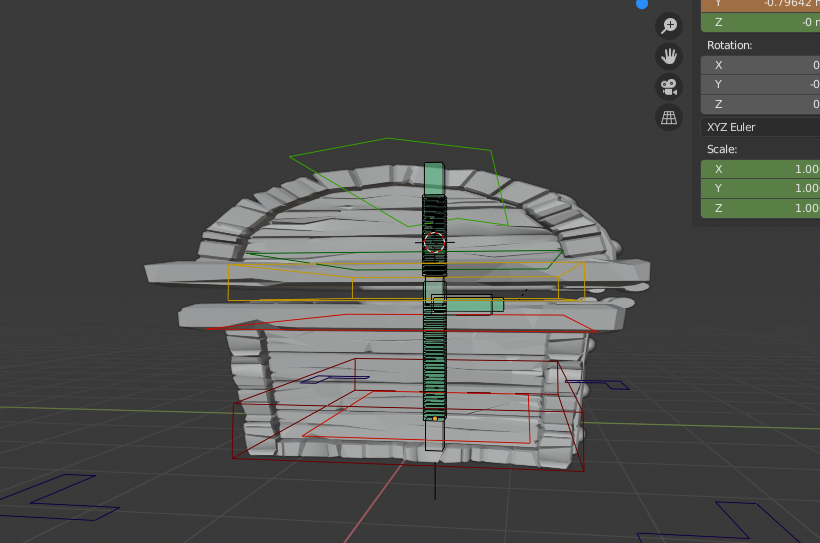
Work File: https://pasteall.org/blend/ebd4c4e498b84076a6de61e852f70997
Bamboozled again. 🙁
Thanks so much for your help in guiding me through this.
This may or may not be super helpful, but I’m currently going through sculpting myself, and I find that for the most part, sculpting functions haven’t much changed in 2.8! Fortunately, a lot of the sculpting tutorials here focus on technique mostly.
If you’re getting the hang of 2.8 still, I’d say it’s worthwhile to check out the quick “overview” CGCookie has about beginning 2.8, and then really, just about any sculpting video should be useful, because it’s one of the most “organic” workflows in Blender, as opposed to being purely technical, like say, rigging…?
That being said, a fair warning that the sci-fi helmet tutorial is a bit of an exception to this, because it hinges on a “grease cut” add-on workflow that hasn’t been updated since 2.7-something…So you’d need to find a creative way around that. =\
TL;DR though? Even though they’re likely coming out with plenty more tutorials in the future (ESPECIALLY with the later 2.8 versions focusing on a sculpting overhaul!) it’s totally worth just following whatever tutorial you fancy and adapting it to 2.8 yourself, once you have a grasp of where things got moved. It’s not as hard with sculpting as with other Blender activities. 🙂
The important thing about sculpting is doing as much of it as possible, tutorials or not. Hope this helps, and good luck! ^_^
March 31, 2019 at 11:27 pm in reply to: Overwriting 2.79 muscle memory to 2.8 after losing Ctrl + Tab #45685Wow, that’s just some brilliant design. How awesome! Maybe I can feel better using Blender on my tiny laptop now? 😀
-
AuthorPosts
