Troubles with painting across certain islands in 3d viewport

Forum Archive Troubles with painting across certain islands in 3d viewport

Viewing 8 posts - 16 through 23 (of 23 total)
  • Author
    Posts
  • #86400
    Omar Domenech
    Participant

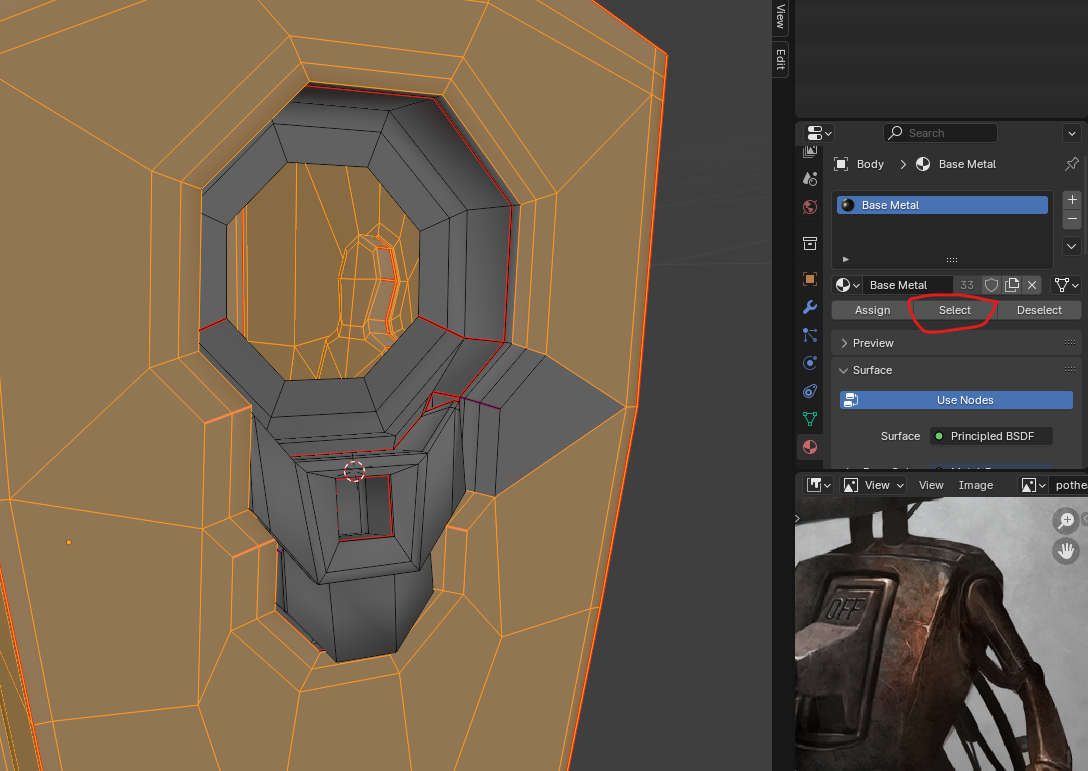
      If you go into edit mode and select your Base Metal material and hit “select” it will select all the faces that are attached to that material. So basically the faces you can’t paint on is because the Base metal material is not assigned to those faces. So just select those faces and hit the “Assign” button to get those poor faces some materials Harris, you had orphan faces without a material mom. My god. 

      Paint.png

      #86401
      Harris Clook
      Participant

        giphy.gif

        #86402
        Harris Clook
        Participant

          material moms.jpg

          #86403
          Omar Domenech
          Participant

            ” I will not leave orphan faces without material moms”. 

            #86404
            Harris Clook
            Participant

              oh for crying out loud. Back to the chalk board I go

              #86405
              Martin Bergwerf
              Participant

                Wow, I didn’t even know that you could do that. Thanks Omar (that probably would have taken me quite a while to figure out)…you deserve some (alcohol-free) Blackforest cake:

                lder Kirschtorte.png

                #86406
                Adrian Bellworthy
                Participant

                  Great job Detective Omar!

                  #86407
                  Dwayne Savage
                  Participant

                    I was going to skip this post, but glad I read it. I learn a few new things about texture painting. 

                  Viewing 8 posts - 16 through 23 (of 23 total)
                  • The topic ‘Troubles with painting across certain islands in 3d viewport’ is closed to new replies.