
[ENDED] BC4-1810 – October 2018 Class Homepage – Shading & Lighting with Blender
Forum Archive › [ENDED] BC4-1810 – October 2018 Class Homepage – Shading & Lighting with Blender
- This topic has 402 replies, 37 voices, and was last updated 7 years, 9 months ago by
Jere Haapaharju.
-
AuthorPosts
-
October 26, 2018 at 4:38 pm #41673
@arev All righty, 2.79 is more stable so I totally understand. Cycles will have no problems with the HDRI, and its less fiddely, so more power to you! looking forward to your end result 🙂
October 26, 2018 at 5:09 pm #41674I see Wes is now a Unity Training Course 😂

This problem occured before during last class I think, guess the web dev guy hasn’t fixed it for you yet…
October 26, 2018 at 5:20 pm #41675Question
Just to be sure,
I see the class wrap stream starts 1 hour earlier than normally, is this correct ??
October 27, 2018 at 11:30 am #41676@smurfmier1985 It’s set to 2pm eastern US time, which is normal…what are you seeing?
Lol sometimes the website’s cache messes up our thumbnails. I’ll pass along the goofy bug 🙇🏻♂️
October 27, 2018 at 11:34 am #41677@arev The bathroom scene shouldn’t be particularly high in polycount – not like the sportcar model from week 2. It’s not a game-ready scene though as that’s not the goal. The scene isn’t that slow for me in Cycles and I’m on a 5 year old mac..
I know the light-showing-through-walls issue with Eevee though. As far as I can tell it’s an Eevee quirk due to limited physically accuracy compared to Cycles. Part of the reason I suggested Cycles. @nekronavt do you have any tips to avoiding this issue?
October 27, 2018 at 11:49 am #41678@theluthier Strange.. I’m seeing 7 PM, but normally it’s 8 PM (it’s 6 hours later here)…
Is it already counting European Winter Time, could that be it? The time will shift one hour here this weekend.
 October 27, 2018 at 11:53 am #41679
@theluthier I already shared this in my homework thread, but I’ll also share it here since more people read this thread I think.
Have been fiddling a lot with Eevee the past couple of days, through trial and error I’m finally getting some good results 🙂
Hope these tips help if you’re struggling to get realistic lighting and shadows:
Tips for anyone using Eevee:
- Using light probes to get realistic results is a MUST. Add an irradiance and a reflection cube, and then bake the indirect lighting.
- To get even better shadows, use multiple irradiance light probes. That way you get more samples of those, which in the end gives a more realistic result in the shadows (does take longer to bake so keep that in mind).
- Use an extra smaller irradiance light probe in problem areas, like under a cabinet which is ‘floating’ a bit above the ground. This way the shadows underneath will look much better.
- If you have a mirror in your scene, use a reflection plane light probe to get better and less distorted reflections.
Also in regard to the issue @arev had, the HDRI shining through -> this gets fixed after baking the indirect lighting 🙂
October 27, 2018 at 2:00 pm #41680hey guys i might try tomorrow to work on my model. now i have a problem .
I would like to add blood above the principle shader (this gives the mess the collor) the blood is done in the diffuse shader and i somehow want that to layer it above the principle BSDF shader . right now i use a mix node but then i lose eighter the collor of the mess or i dont see the blood anymore .
i have been trying to think of a way to solve this but i cant think well since of the medication i am taking sadly.October 27, 2018 at 3:45 pm #41681@yukinoh1989 you could see what the add shader gives you. otherwise you will need to create a mask for the mix shader factor input. post a screen shot that includes your node editor and we can maybe give some more helpful suggestions.
October 27, 2018 at 4:05 pm #41682@yukinoh1989 just saw your nodes in your other post. Here is a node set up that can work with the mix shader. I just used a noise texture to generate the mask, but if you wanted a specific pattern you would just need to crush the levels on your diffuse input with a color ramp. Good Luck!
 October 27, 2018 at 4:48 pm #41683
In some of the live streams Kent showed this image which has a background I so much like, also played with it at the beginning of the week during some hours, but finally gave it up it will not be my light match, since having no clue how that white sparkling shine comes from the bottom 😀

Knowing the methods of Kent there has to be a cylinder object probably in the background and only area lamps used, but being not sure the color of the cylinder is blue or just the light? And at the bottom the white is so strong that washing out the blue color? But the gradiants are so nice delicate there that it can not be so strong, did someone maybe tried this at some of the weeks?
Also in the right bottom corner maybe the floor is going down slightly, or just the white who knows
October 27, 2018 at 5:53 pm #41684@smurfmier1985 That summary of your experiences is awesome Miranda, thanks a lot.
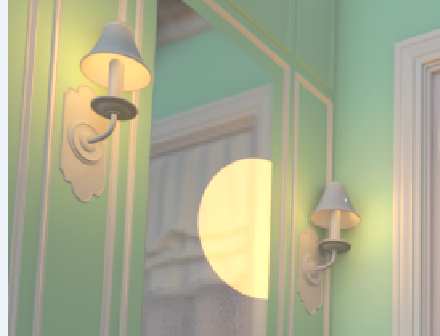
Could you please have a short look on this pic, just trying the lights there and Eevee is rendering some strange circle in the middle in the mirror, what can be that?
 October 27, 2018 at 6:03 pm #41685
@procyonlotor hey thanks a lot for the answer. So if I want to keep a texture I should also just add a color ramp then? Or will this method not work with the color ramp? Gonna try it out tomorrow.
October 28, 2018 at 12:44 am #41686@csehz Hi Zsolt, You’re quite welcome 😊
I experienced such artifacts when a light source is too close to, or shining directly into, a very reflective surface. Had this mostly with area lights (those area lights do not yet understand how awesome Eevee is, so they’re teasing us a bit 😛).
You could try to move away / rotate some of the lights, or change it to another type of lamp to see if that helps. Sometimes it also helps to change a material that a light goes through, or bounces against near a reflective surface, to a more rough surface (so less reflective).
I don’t know from which light source it’s coming in your scene, but if it’s the lights next to the mirror, and above suggestions don’t work, then you might have to move the lights to another position, turn them off or even delete one or both…
If it’s coming from the outside light source it’s probably from a round area light or spot light? If so I recommend changing it to a sun lamp. Had the least problems with sun lamps those seem to be well integrated.
Also a question to be sure, are you using a reflection plane for the mirror? That also helps to get rid of weird reflections.
Hope this helps!
October 28, 2018 at 5:31 am #41687What should i do when i want to credit an artist but he isnt showing his full name, shall i use the nick on their profile?
-
AuthorPosts


- The topic ‘[ENDED] BC4-1810 – October 2018 Class Homepage – Shading & Lighting with Blender’ is closed to new replies.