
[ENDED] BC1-1808 – August 2018 Class Homepage – Getting Started with 3D Modeling & Blender 2.8
Forum Archive › [ENDED] BC1-1808 – August 2018 Class Homepage – Getting Started with 3D Modeling & Blender 2.8
- This topic has 540 replies, 35 voices, and was last updated 7 years, 12 months ago by
yukino hatake.
-
AuthorPosts
-
August 23, 2018 at 6:01 pm #38105
@silentheart00 indeed i am happy i kept the first 2.8 blender ,seems best one so far. or at least i have not that many issues. just sometimes a crash and mirror mode have a problem too . but then again maybe its easier for me since i almost didnt use 2.79 . i looked into it but somehow i find 2.8 better for me.
August 23, 2018 at 6:17 pm #38106@yukinoh1989 2.8 Is definitely designed better. The only issue right now is it’s stability and you never know what will work and what won’t. I’m really looking forward to a stable 2.8 build that I can completely transfer over to. Hopefully the beta will be stable for the most part with only the most obscure and inconsequential bugs remaining.
August 23, 2018 at 8:24 pm #38107i should really read these class threads more often because its basically a cheat sheet if you just compile all the core information
August 23, 2018 at 10:42 pm #38108@yukinoh1989 I find it interesting that people are having issues with 2.8 Alpha 2. Maybe I’m not stress testing it enough when I use it? I do download the daily builds and keep the last 3, test the new one to make sure it works before I delete the previous builds, and I haven’t had much issue with them. Curious.
August 24, 2018 at 12:14 am #38109I haven’t been having any showstopping issues with 2.8 yet in my sculpting. Yeah the hotkey inconsistency is an annoyance for now; so I’ve taken to switching brushes by using the spacebar to bring up the tool menu right at my cursor, it seems almost just as fast as the hotkeys.
August 24, 2018 at 3:24 pm #38110@jakeblended Ooo I like that spacebar approach. Good call
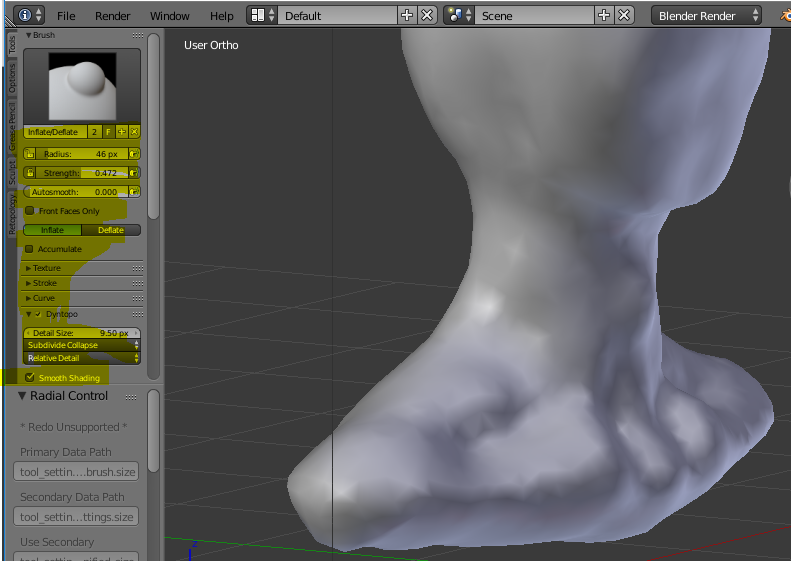
August 25, 2018 at 4:52 pm #38111Being not sure how that happened, but in 2.79 somehow the size of the font decreased in the left T panel (that yellow marked area on the printscreen), while in the other windows the fonts seem with the original size.
Does maybe someone know which shortcut results that? Finally I like it I think, because then that section can be more narrow and leaves more space for the modelling
 August 25, 2018 at 5:23 pm #38112
@csehz Ctrl + Middle Mouse button scales the panels and properties editors. You may have done it accidentally.
August 25, 2018 at 5:46 pm #38113@jakeblended Jake thanks for the prompt answer, yes confirming it was not intended, although so learnt something new 🙂
August 25, 2018 at 6:10 pm #38114@jakeblended @csehz I believe hovering your mouse over it and prssing the + or – button on your numpad does it too
August 26, 2018 at 12:43 am #38115@yukinoh1989 @theluthier I noticed this watching the replay, so I went back and checked… I have been following 2.8 since before the code quest. A version from last month didn’t have this problem. When I changed a brush set to have a particular one active, when I used the hot key for that group, it would use the one that I had selected. But all the versions that I had downloaded from this month (including the alpha 2) had that behavior Kent experienced in the live demo where it kept switching to another in the list, so something changed between the latter part of last month (July) and the start of this month (August).
Since this was a sculpting week… One thing I really do like about the 2.8 version is the persistent icon in the upper left that shows which tool you’re using (as well as being able to see the list of brush sets). It was something that I had a layout specific for sculpting that was a work around in 2.79 to have something that showed which brush I had active, and now I don’t have to.
August 26, 2018 at 1:18 am #38116Looking through the homework submissions, I’m seeing a lot of great work! Keep it up!
For those who are tackling the “extra credit” head for a first time (ie you’ve never done one before) don’t be discouraged if you struggle getting it to look right. I find I struggle getting them to look right initially. One of my first “successful” sculpts that I did, I think I spent 30-40 hours on it before I actually got it starting to look correct. But once I got there, it was immediately recognizable. You never know what you’re going to do that will make it click (in at least your mind, if not others).
The biggest thing that will help is working on the larger forms, general proportions, and such, refining and iterating as you go. Keep at it. Sometimes, a small change will make a huge difference and suddenly, the likeness you weren’t seeing magically appears.
August 26, 2018 at 12:05 pm #38117Hi I am been sick so I was not able to start the “BC1-1808 – August 2018 Class Getting Started with 3D Modeling & Blender 2.8
“better late then never
my question is since I donot have a num pad on my mac keyboard how do I in 2.8 Alpha and Alpha 2 do I use focus on a selected object? if I had a num pad normally you would just use the period
August 26, 2018 at 12:53 pm #38118@gradyp i am glad to read this. i was like how many hours can just eyes and refininga nose take . and then overal the full head. still not completed but i guess its normal then to take this long.
August 26, 2018 at 6:40 pm #38119Wanted to give you a little reminder, in case you missed it:
This weeks stream is on Wednesday, instead of the usual Tuesday.
Hope to see you all there 😊
-
AuthorPosts


- The topic ‘[ENDED] BC1-1808 – August 2018 Class Homepage – Getting Started with 3D Modeling & Blender 2.8’ is closed to new replies.