Collab 2020: Modeling Heavy Equipment (Backhoe)

Forum Archive Collab 2020: Modeling Heavy Equipment (Backhoe)

Viewing 15 posts - 1,336 through 1,350 (of 1,440 total)
  • Author
    Posts
  • #55112
    spikeyxxx
    Participant

      There really shouldn’t be much of a difference between the Pointiness version and the Dot Product one,,,,????

      #55113
      abm3010
      Participant

        Maybe you can work around that problem by having an empty and parenting that part to it. Then rotating the empty to rotate the part and I think that way it should not effect your textures. 

        #55114
        Adrian Bellworthy
        Participant

          Thanks @abm3010, but that didn’t work either. But I have solved the problem and using an empty works this way as well.

          I was playing around this morning, opened a new scene with a modified cube added the edge scratch nodes through an emission node and this was the result.

          so far so good, and then rotate
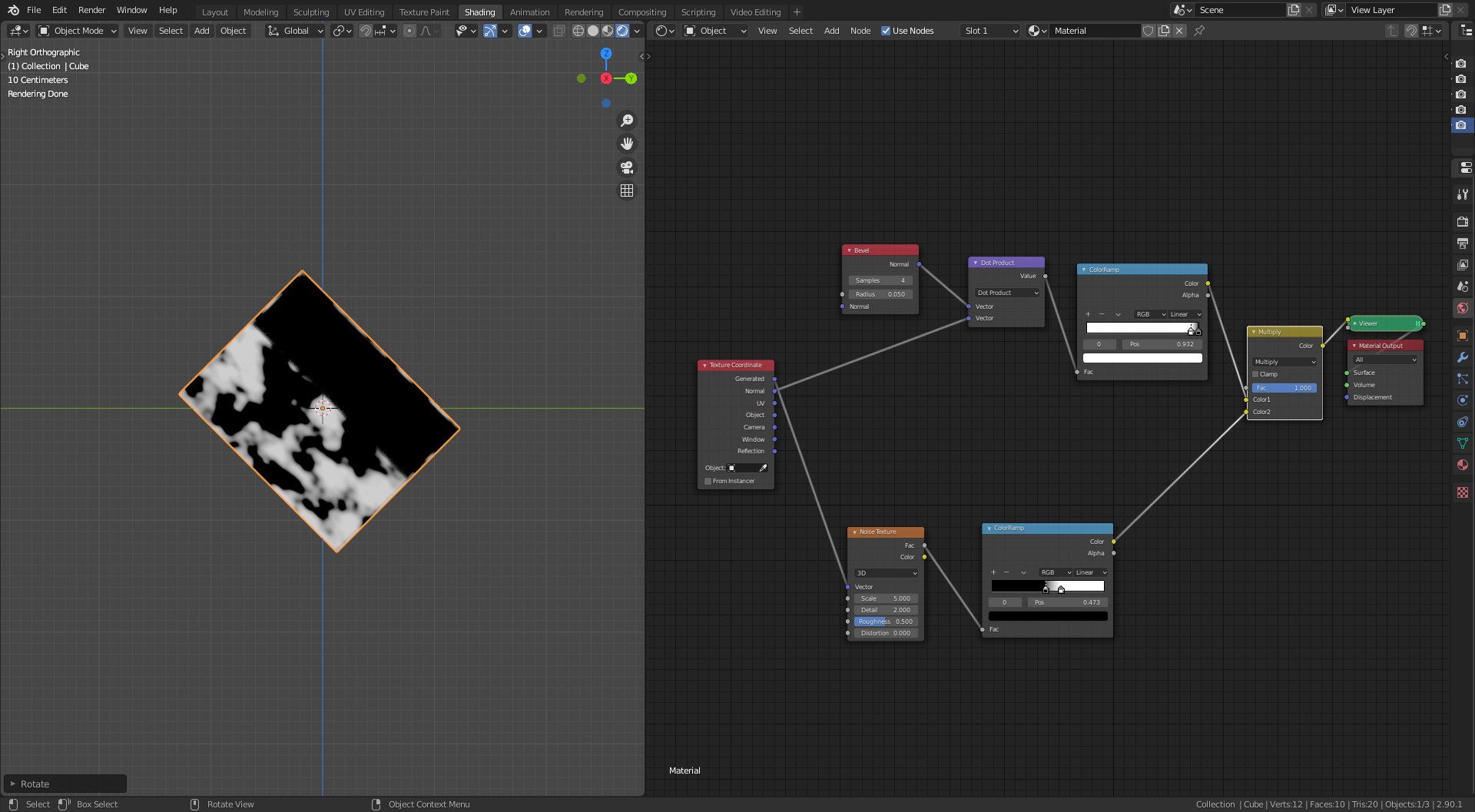
          so I know the issue is here some where, try changing the multiply node to add, screen and same or worse

          so I add the pointiness node setup and swap between the two just in case there was some confusion and to see if Blenders brain is not as smart as @spikexxx.

          Nothing worked.

          But then while deleting the pointiness nodes I accidently used the geometry node normal output instead of the texture coordinate node normal output into vector math second input. 

          and hey presto
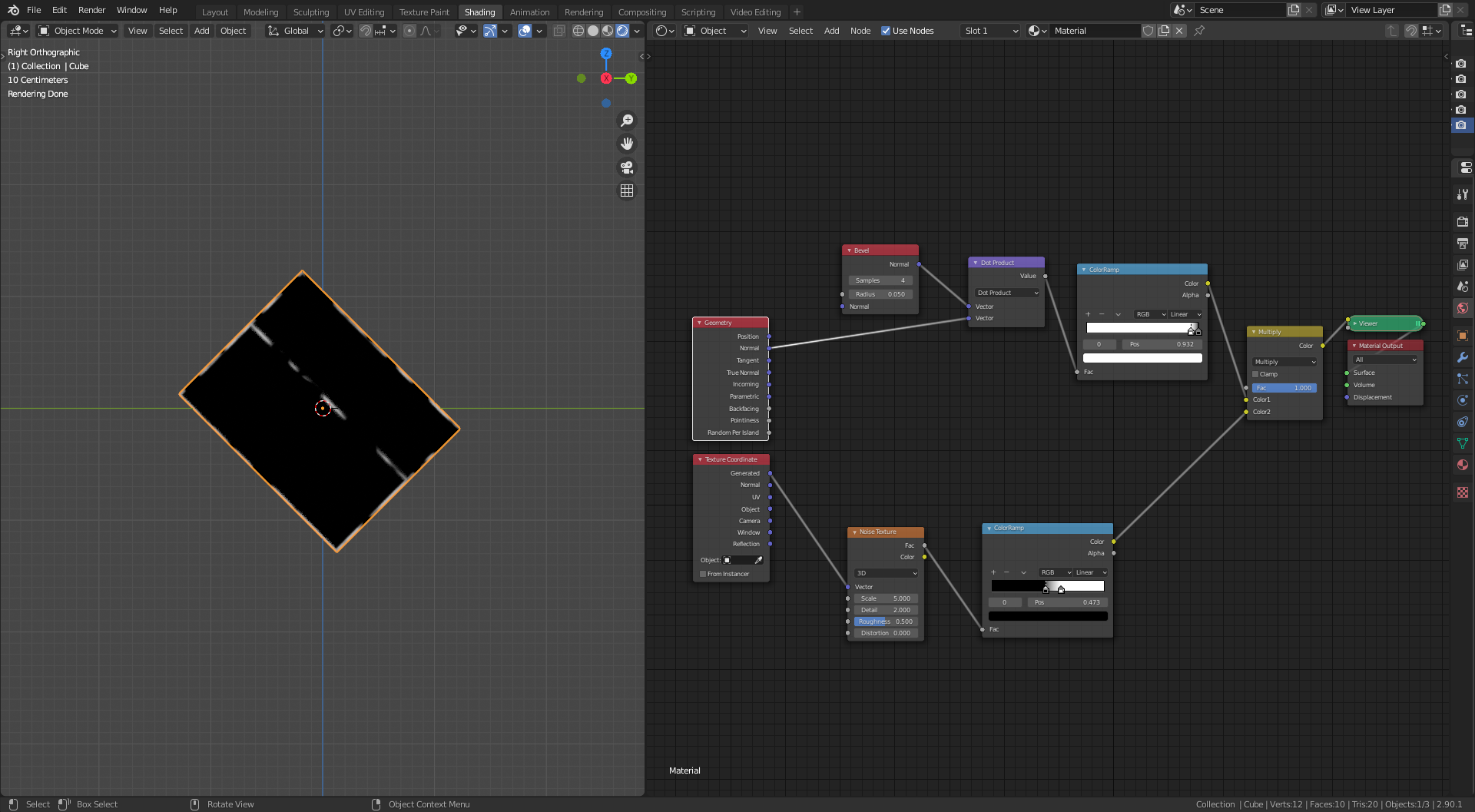
          Note the word accidently, just in case you thought I was as smart as @spikeyxxx 

          Thanks for the help. With out you all I would have just settled for the pointiness option, I think the dot product option is better.

          #55115
          spikeyxxx
          Participant

            Oh man, how could I have not seen that!

            Glad you got it working now. Lucky accidents can sometimes really save the day 🙂

            #55116
            Kent Trammell
            Participant

              WOAH this is looking so good @adrian2301! You’re in good hands with @spikeyxxx’s shading tips 👌

              #55117
              Shawn Blanch
              Participant

                I think that makes sense. Since your geometry is tied to the object, correct?

                #55118
                spikeyxxx
                Participant

                  When I’m not mistaken, @jlampel also mentions the difference between the Normal outputs of the Texture Coordinates an the Geometry nodes in his shading course.

                  #55119
                  Kent Trammell
                  Participant

                    Greetings DOG POUND! It’s been a long time but I’m happy to announce that the DOG showreel is underway. Admittedly I got a little overwhelmed immediately following the streams last year but I enlisted the help of @jlampel to make this showreel happen first thing in 2021. Here’s a previs blocking out camera movement and part assembly timing:

                    While it’s still a long way from being final, I for one am pretty jazzed about the previs! The first time getting a solid grasp is a big step.

                    The fade-in is a temporary way to establish timing of each part’s assembly animation.If you’re wondering what the flickering is at the beginning, I’m not going to tell you yet – don’t want to ruin a small surprise 😎

                    The environment is likely going to be a dark, hazy, concrete garage with spotlights on our dear ‘ol DOG. In the vein of this artwork we discussed on stream.

                    I intend to post updates like this as we go. Feel free to comment with feedback!

                    #55120
                    Parker Bourassa
                    Participant

                      That looks awesome!
                      Are we going to crowd-source the rendering at all?

                      #55121
                      Kent Trammell
                      Participant

                        Thanks Parker! Almost certainly we will need to crowd-source the render. Especially if we have to use Cycles. I have a memory of trying Eevee with this scene only to have it crash. Maybe that’s not the case anymore 🤞

                        I plan to use SheepIt where CGC members of the “CG Cookie Render Monster Team” can contribute their PC for rendering backhoe scenes. 

                        #55122
                        Adrian Bellworthy
                        Participant

                          This is looking excellent so far, I’m excited to see the progress reports and the final result.

                          This project is in the safe hands of two legends @theluthier and @jlampel. 👍

                          #55123
                          Ingmar Franz
                          Participant

                            This is looking great already at that early stage 👍! Thank you @theluthier and @jlampel for your work so far 🤝!

                            #55124
                            Omar Domenech
                            Participant

                              No need for the small surprise, I’m willing to bet the flickering at the beginning is Blender finally gaining consciousness, rapidly opening and closing its eyes for the first time. The human world was fun while it lasted, we had a good run.

                              #55125
                              Shawn Blanch
                              Participant

                                I was just thinking about this project this week it is looking killer! I’m excited to continue watching the progress.

                                #55126
                                artifact
                                Participant

                                  That looks great. Can’t wait to see it all come together in a render.

                                Viewing 15 posts - 1,336 through 1,350 (of 1,440 total)
                                • The topic ‘Collab 2020: Modeling Heavy Equipment (Backhoe)’ is closed to new replies.