
Collab 2020: Modeling Heavy Equipment (Backhoe)
Forum Archive › Collab 2020: Modeling Heavy Equipment (Backhoe)
- This topic has 1,439 replies, 27 voices, and was last updated 4 years, 1 month ago by
Omar Domenech.
-
AuthorPosts
-
October 2, 2020 at 4:09 am #54992
@blanchsb i am done with my part the last note from kent was just to add some thenkness to the duster and i have done that with applying all modifiers except for subdiv
October 5, 2020 at 3:07 am #54993@duerer I have looked at the bolts from your rear axle intersecting with the chassis, they intersect on both sides of the chassis. I can’t do anything with the chassis apart from make it thinner, which is not an option as it is already looking a bit thinner than it should be and this would disrupt everything connected to the chassis. My suggestion is to widen that square section of the axle with the bolts and move the bolts over to realign with the holes.
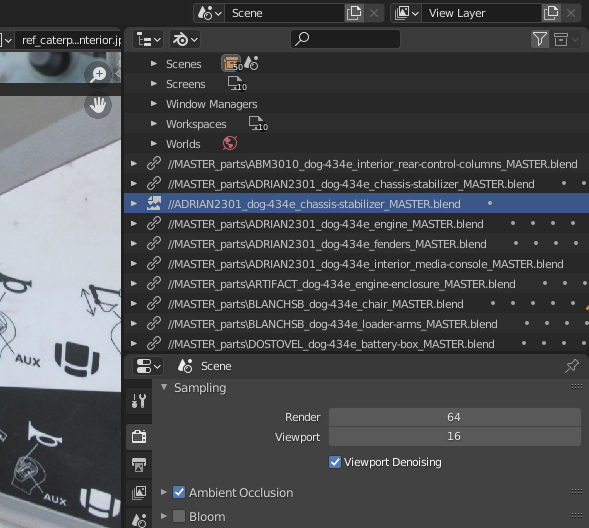
October 5, 2020 at 4:55 am #54994@theluthier , we receive an error message when opening the master file. I seems like it is to do with the broken linked file highlighted below.
It is missing the location folder at the start of the location address (//MASTER_Parts\….. ) it’s looking for the chassis collection in the same folder as the master file and not the master parts folder. The chassis collection has been linked in with the link above this one so the broken link can be removed.
The other error is the same problem, it’s for a material in that broken link.
 October 5, 2020 at 5:17 am #54995
Now I’ve got legitimate online friends up in here! Talking Blender, developing inside jokes, talking real life. It’s a cool thing. COOL THING I say!
@theluthier , It’s a good feeling being apart of a special group of friends, long may it last after this project ends.
I was struggling with the joke @blanchsb , I was wondering if maybe it was an American joke,
Then I said the full name out load……… I think the neighbours may have heard 🤣
October 5, 2020 at 6:33 am #54996@spikeyxxx and @artifact , [Q] for each of you.
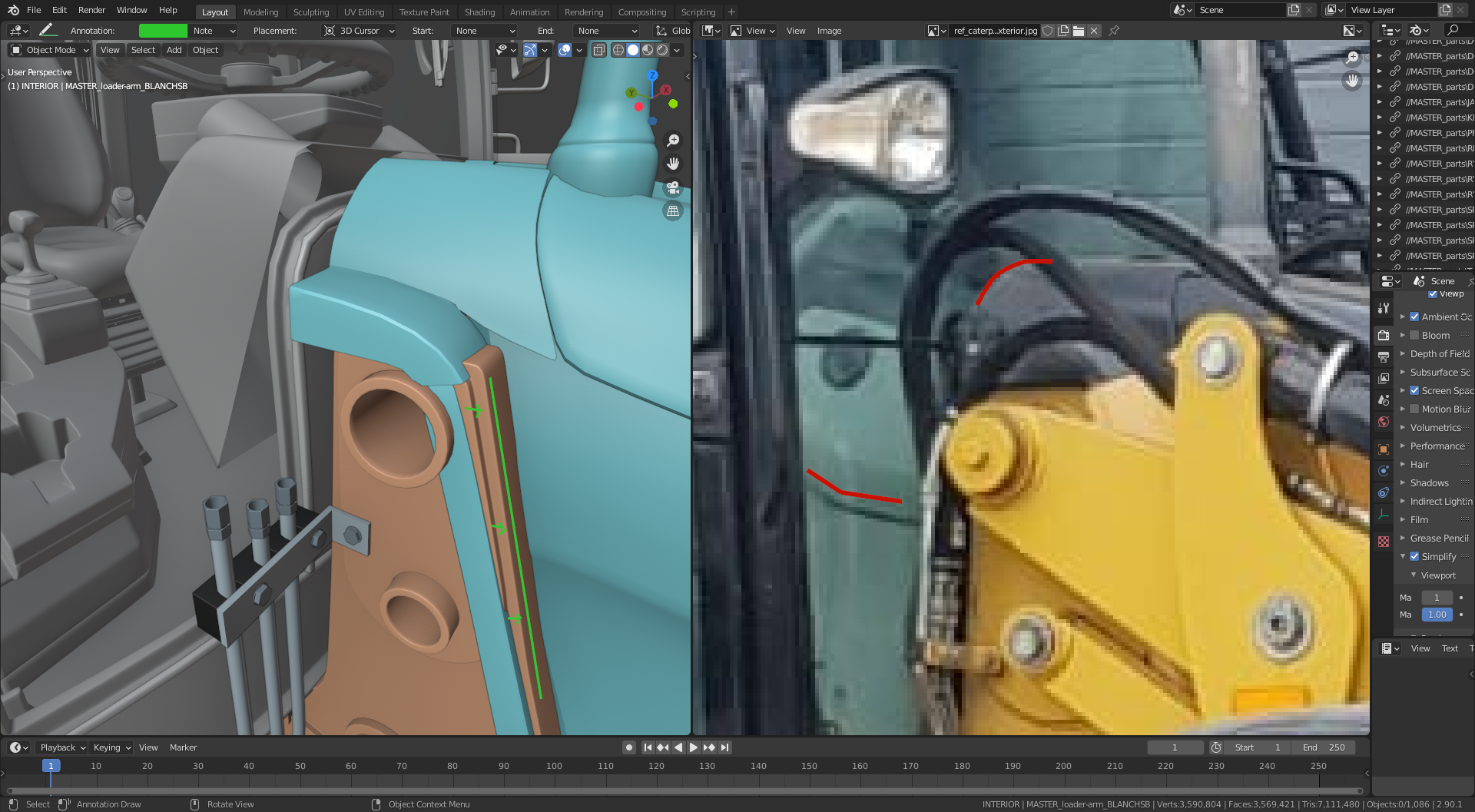
There is a section within the cab front window which I think the steering console and engine enclosure should possibly line up with, is this something you could achieve with your parts?? and @theluthier how easy would it be for you to adjust this part if needed??
I’ve tried to show some shape to these parts in the right image below which might help. @spikeyxxx there seems to be a fairly sharp turn as the steering console nears the window. And @artifact the top of the engine enclosure seems to curve down to the window, if you could move this part forward to line up with the sloped part of the chassis (left image) this should give enough room to add the curve.
@theluthier it maybe that you will need to narrow this part in the X direction, depending on @spikeyxxx and @artifact ‘s thought’s on this.
 October 5, 2020 at 7:49 am #54997
Thanks @adrian2301 . That angle is a nice catch, hadn’t realised yet that that was curved like that 😉
For me it’s no problem to adjust at all! I think @artifact should decide the exact shape, because he will probably have the most problems changing his geometry,and then @theluthier and I can adjust to that.
October 5, 2020 at 8:40 am #54998Strange. At the end of last week I also noticed that @duerer ‘s rear axle master file ended up in my root Google Drive directory which google tells me isn’t even a shared directory 🤔
I’m trying to work out this issue now and running into trouble. I can’t seem to delete nor relocate the offending library because it’s “indirectly linked:

As far as I can tell something is using a material from within that file. Yet even setting the users to zero doesn’t appear to solve the issue…
I’ll continue trying to figure it out. Though at worst, if it doesn’t go away, it doesn’t appear to be consequential to anything. Just a minor annoyance to get a warning and know a linked library is broken.
October 5, 2020 at 8:41 am #54999I’m happy to alter this part if needed 👌
October 5, 2020 at 9:01 am #55000I’ve created a new spreadsheet tab to the collaboration google sheet, called “MOLE List“. @blanchsb@adrian2301 If we document loose ends there then we can probably keep better track of when they get solved and by whom (for some extra XP 🤑)
I created a first entry with this intersection of the engine enclosure and chassis. Note the small black triangles in the upper right corner of cells showing there’s a note with additional instructions (accessible by hovering the mouse over the cell). I think the way this can work is:
- MOLE (or non-MOLE) notices a loose end (intersection + gaps mostly, missing piece, scene file error, etc) and adds it to the spreadsheet.
- The contributor(s) responsible for the part(s) are notified of the issue on the forum by @-ing them. Ideally each issue will be solved by the OG contributor.
- Once the contributor is contacted, that cell is filled with the lightest orange color.
- If that contributor doesn’t respond or isn’t available for the fix, someone else will fix it (MOLES or me or anyone that wants extra XP)
- Once the fix is solved, the fixer’s name is entered into the appropriate cell (maybe filled with the lighted green? Not really necessary but could be nice visually).
What do you think of this plan?
October 5, 2020 at 11:16 am #55001@adrian2301 @spikeyxxx @theluthier @blanchsb At first glance, it is seems doable. I’ll have to move forward most of my mesh as Spikey says. Let me have the first crack at it and then I’ll go over it with Spikey and Kent.
October 5, 2020 at 12:47 pm #55002My latest theory is that one of the MASTER files has an object that’s linking the the “Steel_bolts” material from the chassis master file that’s in the wrong directory. Unfortunately since most MASTER files are using the chassis (due to it being the backbone of the whole DOG) I’m afraid the only way to fix this error is to remove the stray material.
I say “unfortunate” because each file would need to be checked 😵 Blender doesn’t make the tracing of an “indirect library link” very easy. For rendering I will ultimately delete all materials from the master files anyway, applying my own. I suppose at the very worst that’s when the problem will be solved.
October 5, 2020 at 12:48 pm #55003Sounds like a good plan to me.
October 5, 2020 at 12:51 pm #55004It’s probably in my chassis file.
I’ll hunt done this stray dog and impound it.
October 5, 2020 at 12:56 pm #55005@adrian2301 If you change the outliner to “Data API” in the assembly file and navigate to the materials, you’ll see several “Steel_bolts” materials. One of them is from the wrong-directory-chassis blend and it only has one user:
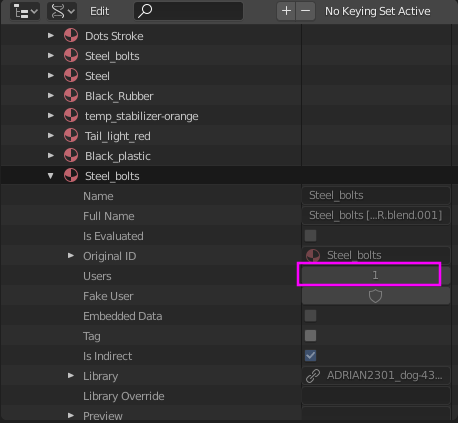
THAT user is the culprit according to my theory. It’d be a weird problem to happen in your correct chassis file..but worth checking I suppose.
October 5, 2020 at 3:30 pm #55006@theluthier I found the stray dog, I’m afraid I was too late, had to put it down.
Found it in the swing frame file, when I did the hydraulics I originally had the collection in the chassis file and then moved it into the swing frame file after I finished.
I went back to the master to see it was now zero users but still had the error.
So I did what you said in the live stream, I added a cube and allocated the material to it and shift x’ed it in the material panel, saved the file and reverted it and hey presto, vanished , no errors.
-
AuthorPosts


- The topic ‘Collab 2020: Modeling Heavy Equipment (Backhoe)’ is closed to new replies.