
ATTENTION ALL PROBLEM-SOLVERS: How would you approach this scenario?
Forum Archive › ATTENTION ALL PROBLEM-SOLVERS: How would you approach this scenario?
- This topic has 24 replies, 5 voices, and was last updated 2 years, 7 months ago by
Dwayne Savage.
-
AuthorPosts
-
January 20, 2024 at 12:05 pm #17401
Attention: Python and developing ahead. I’ve been contemplating a solution for this, but it’s becoming increasingly complex for me. The question is clear: How can you synchronize the clock with the position of the sun? In other words, how can you create a functioning clock in this animation? (A day time lapse)
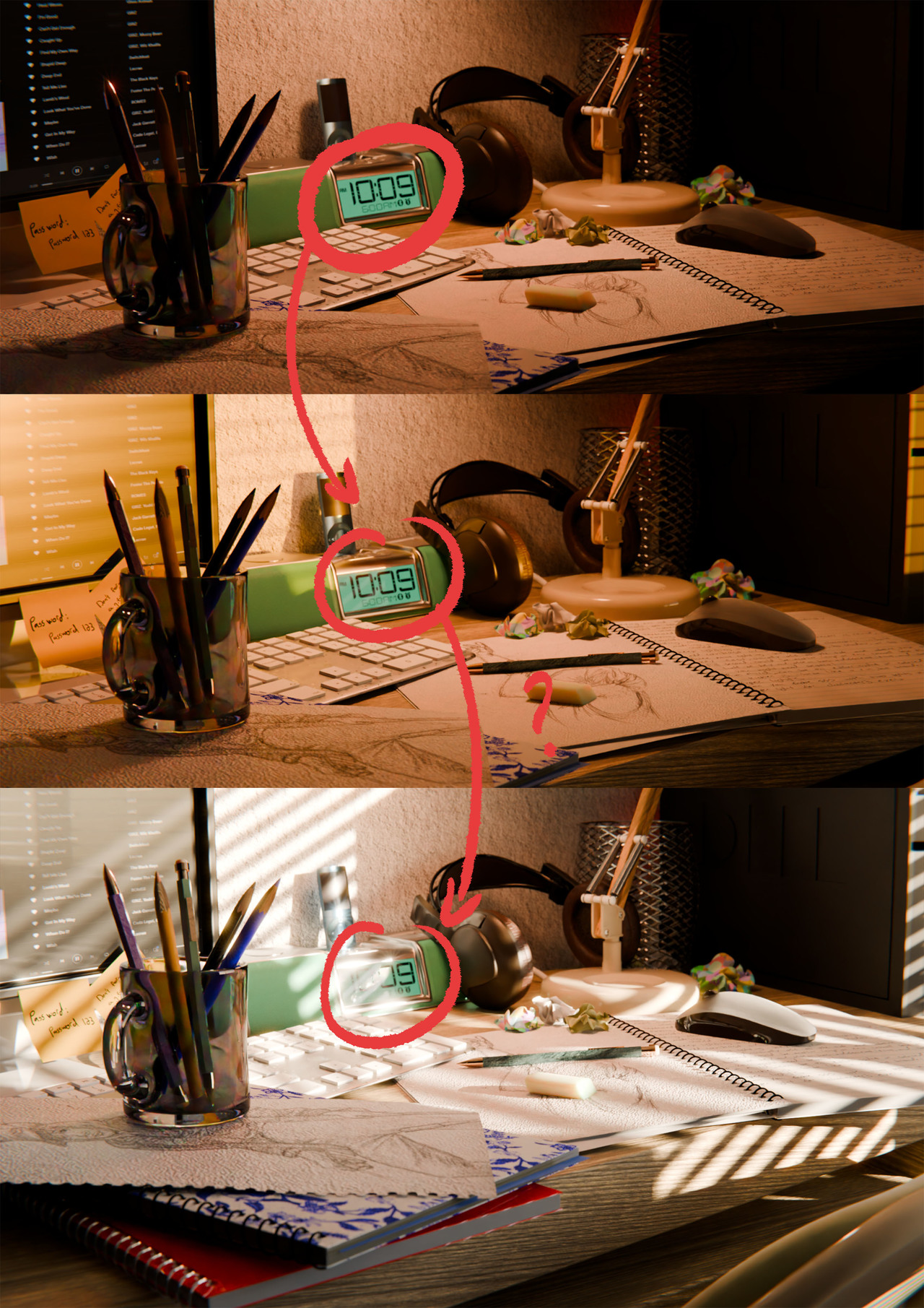
The solution I’ve devised seems overly complicated, but I believe it’s a viable approach…
So, let’s get started:
- First, I would create textures for numbers 1 to 9, in order to represent all possible hours.
- Next, I would take the mesh and create two placeholders in the area of the numbers, assigning them the same material but with the textures set up in the shading area.
- The third step, which is the most complex, involves creating a Python script with an iterating if/then statement: If sun.elevation = 90º, then texture.n. The idea is to increment from one hour to the next (without minutes) to simplify the process. So, depending on the sun’s elevation, Blender would automatically switch between the different textures (.jpg).
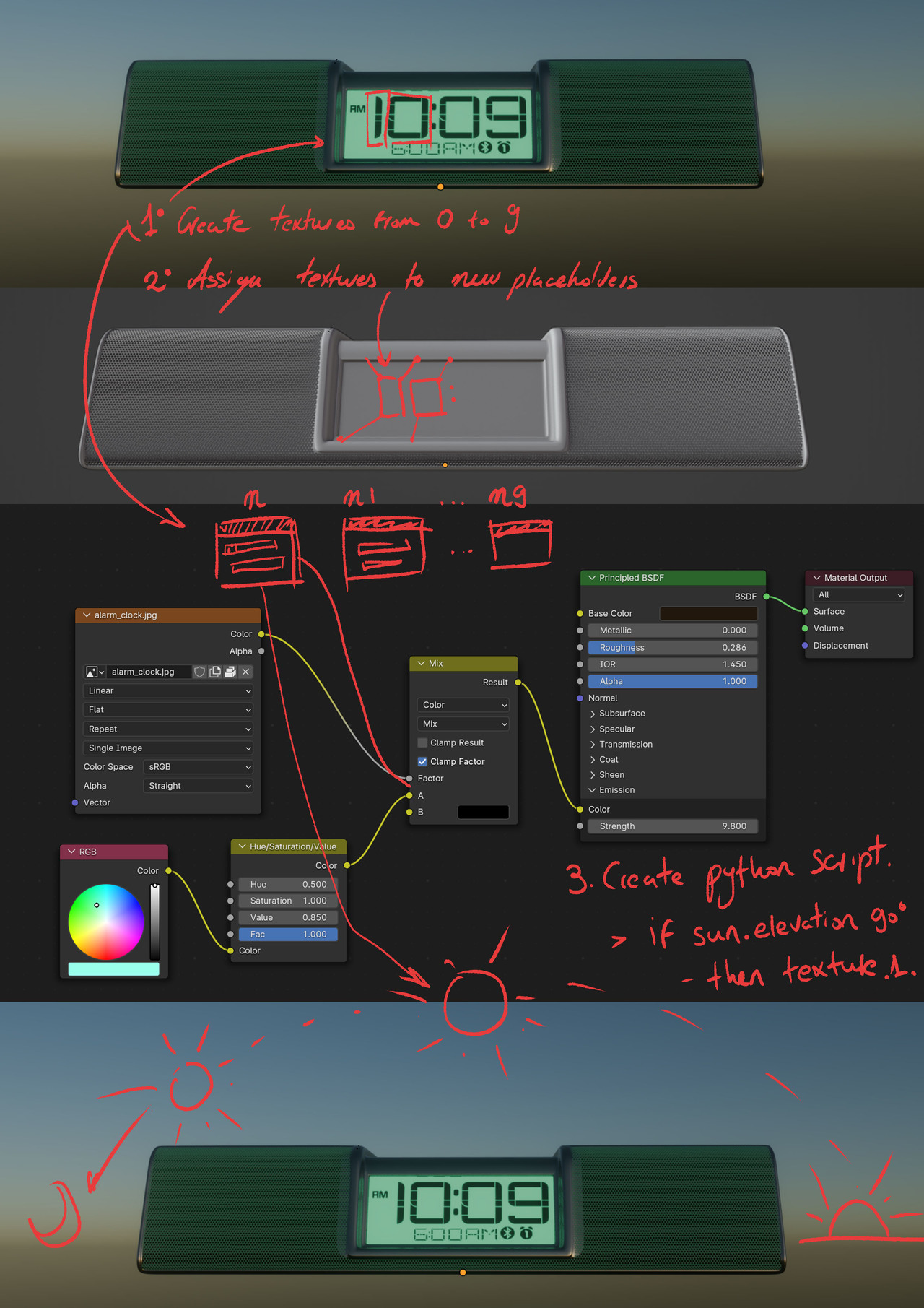
I’m not certain if this is feasible, but it seems plausible in my mind… I would appreciate it a lot if someone with more expertise in this area could correct me and show me the script for this… or explain how they would approach this question!
Thank you all.
January 20, 2024 at 12:41 pm #83684Hi Juan,
That is an interesting problem..
The main problem is, that the sun rotation, doesn’t directly transfer to a time…
But if you are able to make a correlation, there are probably many ways to do this, but here’s one idea:
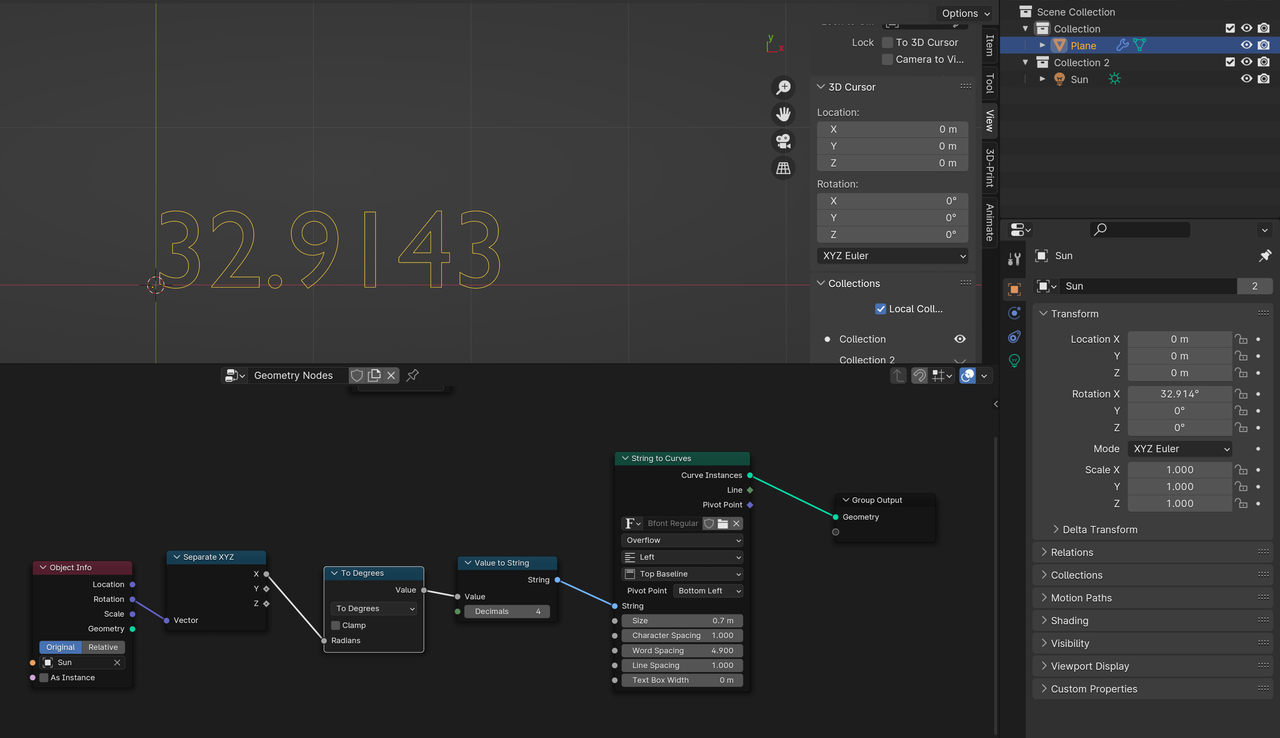
You’ll need to do the math to get the conversion you want, but this might get you in the right direction.
January 20, 2024 at 12:51 pm #83685And with this setting?
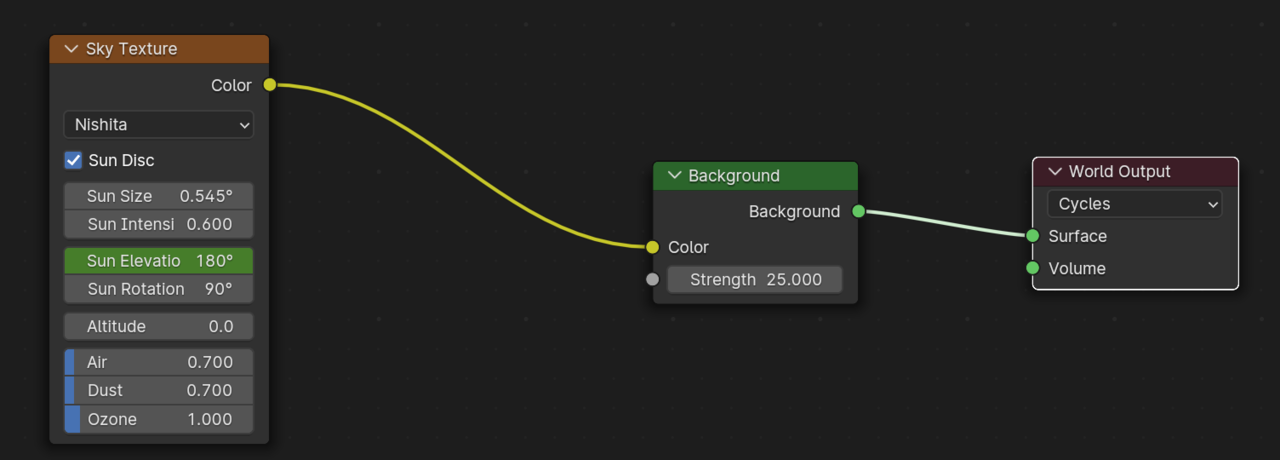 January 20, 2024 at 1:16 pm #83686
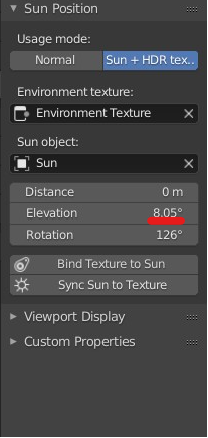
Why not use the sun position addon that comes with Blender. You have to set the date and time and location and it will adjust the sun lamp and or sky texture. There is also a HDR+Sun lamp mode, but I haven’t used it. Then you can either use drivers or keyframe the time/date. The manual isn’t very helpful, but it’s a starting place.
January 20, 2024 at 1:27 pm #83687Didn’t knew it existed! hahaha (I’m a newbie at Blender…) I’ve been reading about it now, but I stumble at the same painpoint… How can various textures automatically switch among eachother in the shader editor, depending on a value in this case being the string of the sun’s elevation?
 January 20, 2024 at 1:57 pm #83688
Hey Juan,
like I said, many ways to do this,
but, following “my method’, you can animate the Sun Elevation and use an Empty with the same (or modified) keyframe values and then again:
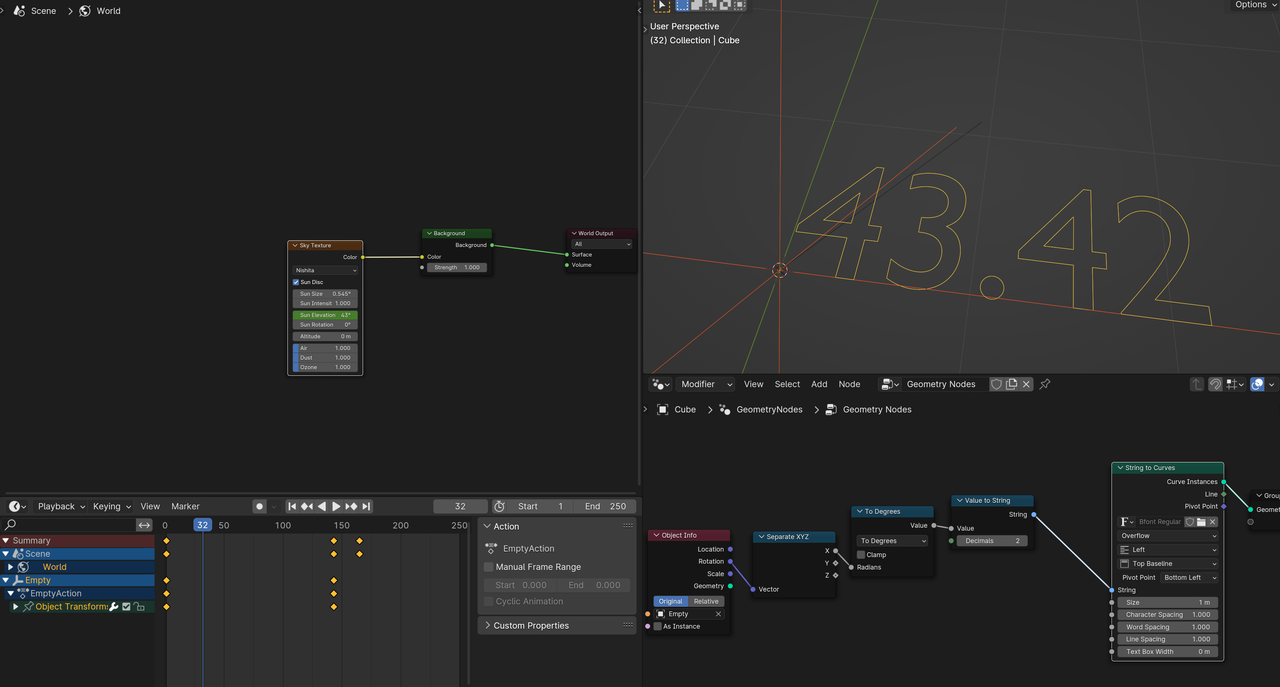
(You could also use Drivers, but they might have update problems…)
January 20, 2024 at 2:00 pm #83689Combine this method with the Addon Dwayne suggested should work.
January 20, 2024 at 2:52 pm #83690 January 20, 2024 at 3:18 pm #83691
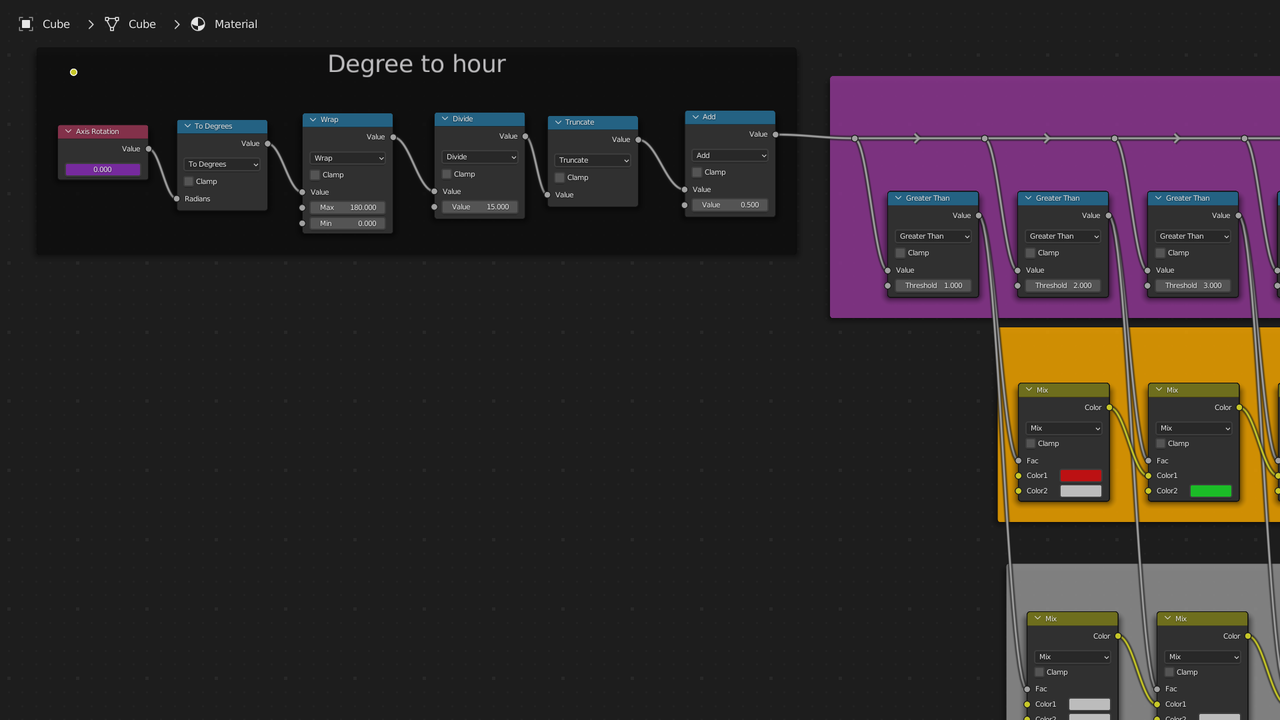
Thinking in terms of textures/materials the first thing is to convert the degrees to hours. Going based off a sundial it’s 15 degrees for each hour. Blender uses radians so we have to deal with the conversion problem for degrees over 180 and map this to the hours from 1 to 12. So here is what I came up with. The axis rotation is just a value node. I copied as driver the axis of an empty. You’d use the axis of your sun lamp or the elevation setting if using the addon. You might have to do some additional math to get the exact timing. Mine just goes 0-14 degrees is 01. 15-29 is 02 and so on until 180-194 which starts at 01 again. 195-209 is 02. The last add node adds 0.5 just so I can use hole numbers in the greater than nodes.
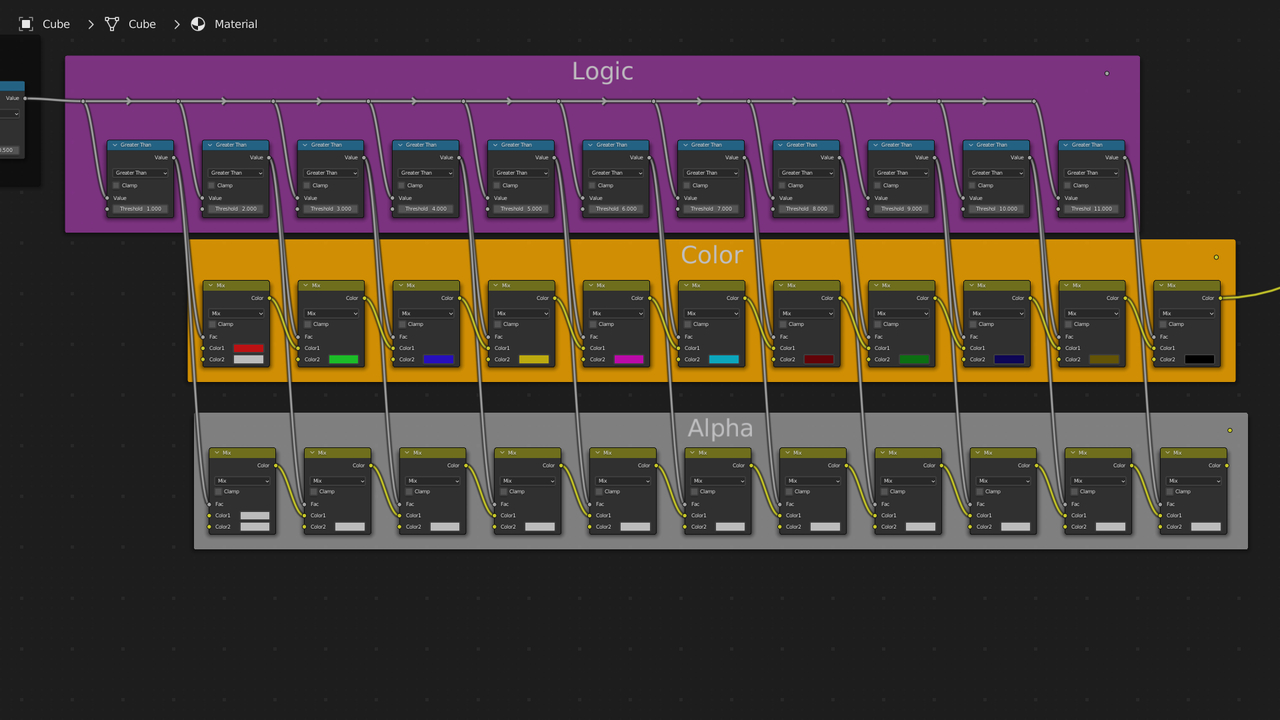
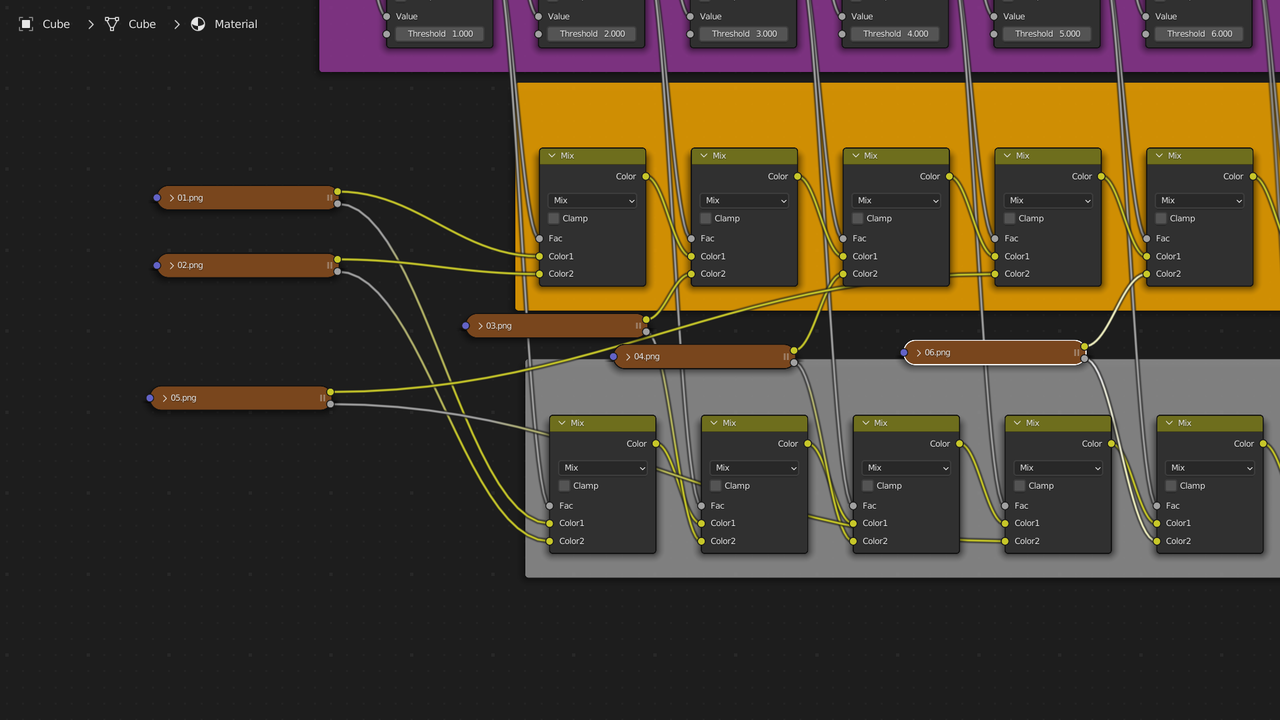
Then we have the texture selection section which is divided into 3 parts the logic, the color, and the alpha. If you don’t need to pass thru the alpha channel then you can skip the bottom section. Greater than produces a 0 if it’s less than the threshold and a 1 if it’ greater than the threshold. A MixRGB(Color mix in newer version of blender. I did this in 3.2) set to mix will be all the top if fac is 0 and all bottom if fac is 1.
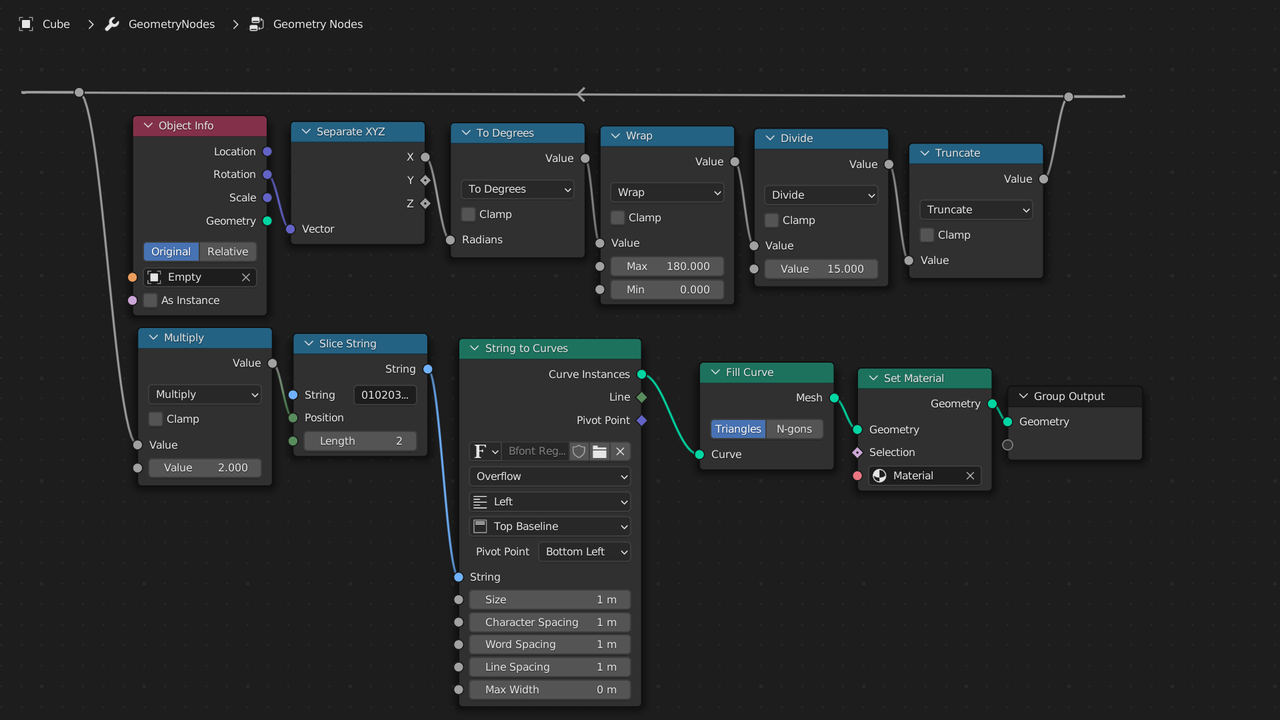
You can do it easier in geometry nodes. Just note if you use 180 or higher you will need to correct for the conversion, which inverts the value. 180 becomes -180, 270 becomes -90, etc.
January 20, 2024 at 3:20 pm #83692I added the clock.blend file That I created to google drive. This is suppose to be the share link, but if it doesn’t work let me know.
https://drive.google.com/file/d/1S9ZSvsaRkVM1-_XSUp_arcmkt8pdvNhG/view?usp=sharingJanuary 20, 2024 at 3:27 pm #83693Forgot to include pic of my geonode setup. I use 010203040506070809101112 for the string.
 January 20, 2024 at 3:49 pm #83694
@spikeyxxx Could you explain step by step from the beginning how you would do it? Sorry, I think I am missing the point. I believe that I understand what you meant though; you are talking about animating the sun’s elevation with an Empty, then using the value of the position of that Empty and converting it into a curve to represent the numbers (if I’m not mistaken). However, that would result in curves that lack a specific format or the desired texture, in this case, the distinctive typeface of a digital clock (that you have to craft manually). So, imagine you create different textures for each hour, from 1 to 9, all in PNG format. How would you make them interchangeable as the sun rises in the object shader editor? It seems like it would involve one texture beind connected, then disconnected, followed by another texture image connected and so on… as the sun / or empty changes its elevation/rotation.
Your method is quite clever Spike. There would also be additional steps required, such as setting the value range from 0 to 24 and many other details, including assigning some arbitrary values that could probably lead us to the ultimate conundrum / Confusion.
Findings: The Nishita Sky textures seems incapable of achieving this, there’s no valid mapping input, therefore is impossible (as far as I’m concerned) to assign the texture coordinate of an Empty. You can do it with the Hosek / Wilkie sky texture but when you move your Empty you change the value of the geometry (Good!) but you don’t change the sunset appearence (Womp womp!), creating then an unrealistic scenery…
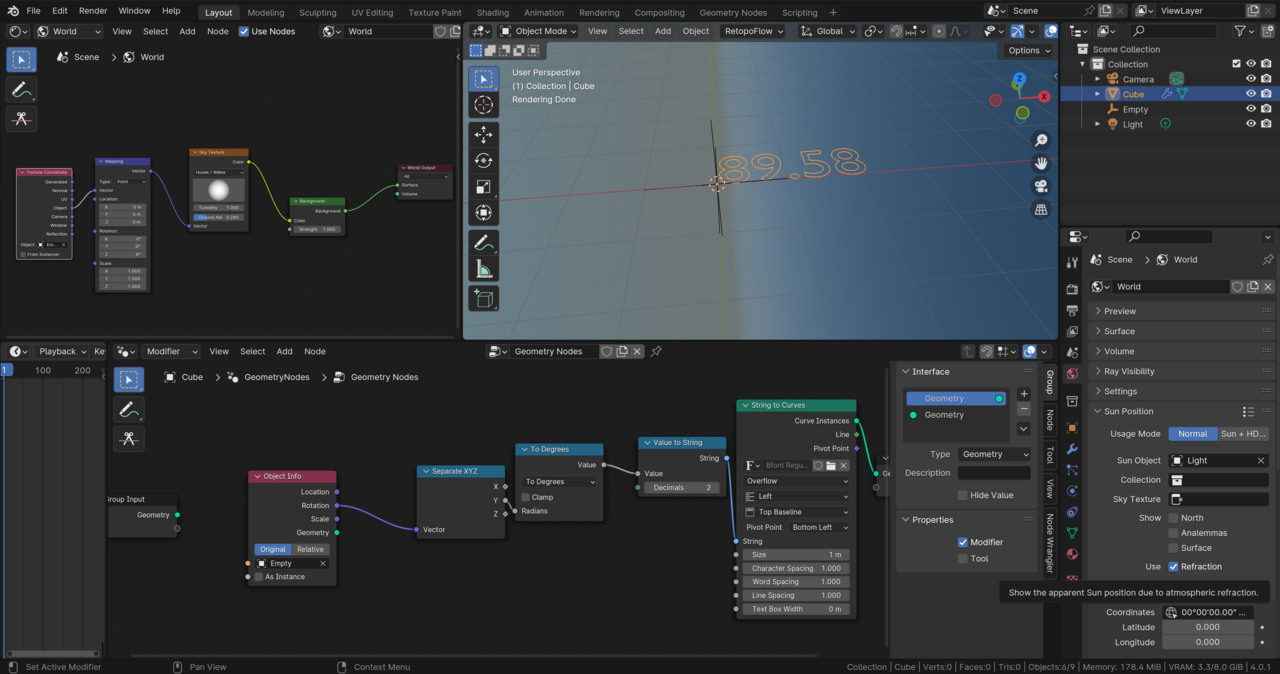
Wanna give it a try and lend us a hand @dostovel?
Thank you again guys!
January 20, 2024 at 4:19 pm #83695@dillenbata3 I’m in awe. I needed some time to process all this information, but it is fantastic. I think that would solve the problem, but this raises the question… Would it work with different image textures? For value 1 this texture and so on…
The geometry node is also marvelous, but with this set up we shouldn’t care about it too much. Change the number given to a placeholder such a square plane for it to display the different textures crafted (the hours with the used typefaces in PNG) and that’s it! Am i right?
January 20, 2024 at 5:15 pm #83696You’d just plug the PNGs into the mixRGB/Color nodes. Top row would be for the image color. Bottom row would be for the image alpha. 01 would go into A of first node. 02 would go into B of first node. 03 would be B of the second node. Then B for each node.
 January 21, 2024 at 1:10 am #83697
HI Juan,
Here’s a short description of my workflow, it’s just a proof of concept and leaves a bit of work still to be done. But I think you prefer Dwayne’s practical solution anyway.
I set two Keyframes on the (for instance) Elevation of the Sun in the Sky Texture, and also on the (for instance) X Rotation of an Empty). That results in two curves, that can be manipulated in the Graph Editor.. I think the GN part is straight forward, you can also set the Font there. You’d have to insert a few Math Nodes to convert the degrees into a time. (Most notably a Modulo 12/24 for the hours and a modulo 60 for the minutes…)
Like I said in the beginning, the biggest problem, is to convert the sun position (or, in CG, the Elevation and Rotation) into a time…it depends on the time of year and the location on earth as well…but it’s still just a bunch of Math Nodes.
-
AuthorPosts


- The topic ‘ATTENTION ALL PROBLEM-SOLVERS: How would you approach this scenario?’ is closed to new replies.