
Reply To: Omar Domenech’s Demo Reel
Forum Archive › Omar Domenech’s Demo Reel › Reply To: Omar Domenech’s Demo Reel

Ok, finally back to this thread. I agree that this project was a weird one. It started off quick with 4 random people rendering (as in not part of our team) but promptly dropped to just me rendering for the first few hours. Then mostly plateaued for a day before bolting to the finish line. The progression graph from SheepIt presents it well:
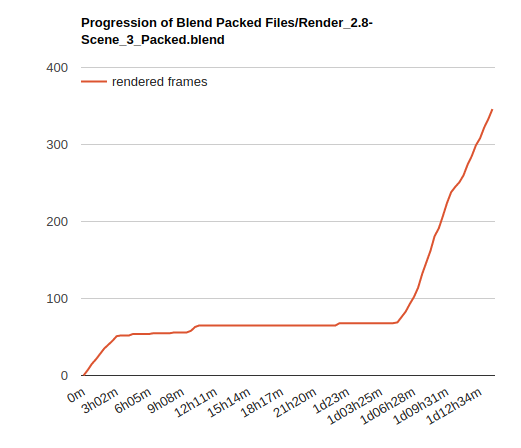
Very odd that @sheila5 and others weren’t able to contribute despite enabling “Render my team’s projects first”. It made me wonder if the scene was too heavy for most computers, especially non-GPU-capable ones. I did a test with the current settings (1000 samples + denoising + 256 px tiles) and simply switched to CPU. My computer slowed way down after 15-20 minutes of rendering at which point I killed the render because I had to do other stuff. I just did another test dropping the settings (250 samples + denoising + 32px tiles) and it rendered in 9m 26s.
My theory is that the scene I uploaded took too long and too many resources to render on most people’s computers, thus SheepIt kept it waiting till more powerful machines were available. More and more I think 1000 samples is [always] too high but also the 256 px tiles is a potential problem. Even though it’s optimal for GPU, it’s less so for CPU. My test results:
- GPU 256 px tiles = 1m22s
- GPU 32 px tiles = 1m32s
- CPU 256 px tiles = 11m51s
- CPU 32 px tiles = 9m26s
So I’m thinking 64 tiles is the optimal middle ground for GPU and CPU renderers. Also I’m going to try setting to CPU in the .blend file and see if that’s better than GPU. I feel like currently these scenes are GPU by default with CPU being optional. Maybe if we switch that around sheepit won’t keep it waiting (?)
@dostovel I just saved a new version of Scene 3 (and zipped it with “optimized-1” suffix) with CPU as the device, 256 samples, and 64px tiles. Can you submit that as a project to Sheepit? Note that sheepit will detect both .blend files in the .zip and you only need to submit the render-ready one.