Zoom in/out

Forum Archive Zoom in/out

Viewing 15 posts - 1 through 15 (of 15 total)
  • Author
    Posts
  • #16897
    Roxana Moise-Dan
    Participant

      Hi!

      Is there a way to zoom in and out in the outliner? I can’t find anything on the internet and I swear I managed to do that by mistake one time, but can’t remember what the shortcut was. And I didn’t noted it down because it was something I usually use everyday.

      Am I crazy?

      #81317
      Omar Domenech
      Participant

        Not in the outliner that I’m aware of, but you can zoom in and out in other menu’s if you hold control and press the mouse wheel and move the mouse. 

        #81318
        Martin Bergwerf
        Participant

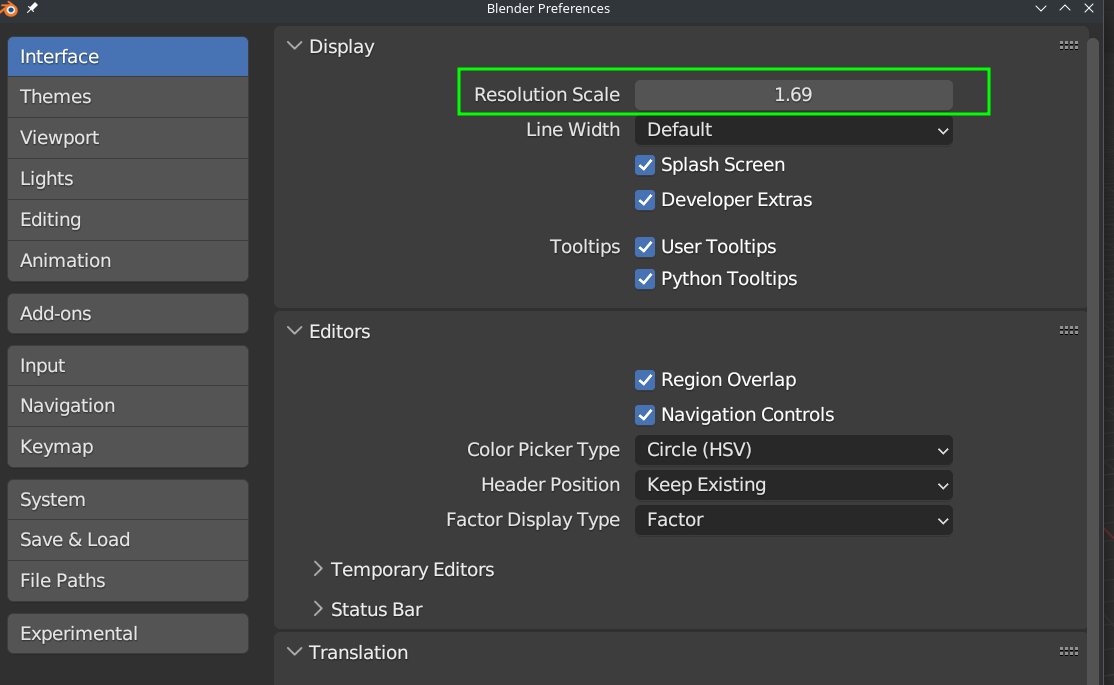
          Yeah, the Outliner seems to be an exception…I just set the general UI zoom, so that I can read it (Interface > Display > Resolution Scale (I have it up to 1.69 on my 4K monitor, so bad is my eyesight 😉))

          #81319
          Adrian Bellworthy
          Participant

            Hey @ox ,
            No you’re not crazy!
            I swear I have zoomed in and out in the outliner before. It doesn’t work now though.

            #81320
            Roxana Moise-Dan
            Participant

              Ah, I told you! So happy someone else remembers it too! But yeah, tried eveything, doesn’t work anymore.

              Thanks again, guys. As usual 🙂

              #81321
              Martin Bergwerf
              Participant

                | I swear I have zoomed in and out in the outliner before.

                Are you sure Adrian ? Memory can be tricky. (When I read your comment, I also remembered that being possible…but:)

                I have tried this in a few versions that I have lying around, going back as far as 2.66 and the Outliner wouldn’t let itself be zoomed in or out with CTRL MMB.

                #81322
                Adrian Bellworthy
                Participant

                  I’m positive. I also did it by accident, so I can’t remember how.
                  It must be with different hotkeys, it might of been CTRL NUMPAD+, or something like that.

                  #81323
                  Roxana Moise-Dan
                  Participant

                    Exactly, something with the numpad. I agree with Adrian. 

                    #81324
                    Martin Bergwerf
                    Participant

                      Doesn’t seem to be possible. There is a RightClickSelect request for it and someone made a patch for it…doesn’t appear to be implemented..

                      It’s very weird that the Outliner seems to be an outlier 🤔

                      #81325
                      Roxana Moise-Dan
                      Participant

                        I think me and Adrian created a bug while trying to do something else. And that’s how it worked, because like you said, there is nothing of the sort implemented in any version. Would be cool, though. I have so many typos because I can’t see that far (4k monitor).

                        #81326
                        Martin Bergwerf
                        Participant

                          Numpad + expands the items in the Outliner, but doesn’t zoom.

                          But you can make the whole UI larger:

                          UI.png

                          #81327
                          Roxana Moise-Dan
                          Participant

                            Yes, thank you. I knew that and didn’t want to change the whole UI, but I’ll do that because I have no other option. 

                            #81328
                            Martin Bergwerf
                            Participant

                              As you can see, I have it quite large on my 4K monitor 😉

                              #81329
                              Dwayne Savage
                              Participant

                                You could try a different font or adjust just the text size(F4->Preferences->Theme->Text Style->Widget->Points->Default is 11) This will only affect the text of the user interface. Panel title affect the panels header and widget label affect labels. This way you’re only changing the size of the text. I also find that changing text anti-aliasing(F4->preferences->Interface->Text Rendering->hinting) to full helps some people to read the text better. sometime none works better. You can also change the font here. 

                                #81330
                                Roxana Moise-Dan
                                Participant

                                  Wooow, that makes a lot of difference! Thank you so so much!

                                Viewing 15 posts - 1 through 15 (of 15 total)
                                • The topic ‘Zoom in/out’ is closed to new replies.