Why we use ambient occlussion node here instead of incerting a value node directly to subtract color 2?

Forum Archive Why we use ambient occlussion node here instead of incerting a value node directly to subtract color 2?

Viewing 7 posts - 1 through 7 (of 7 total)
  • Author
    Posts
  • #15000
    elijah0429
    Participant

      as described above

      #73929
      Jonathan Lampel
      Participant

        A value node returns a flat value for every part of the model, so we wouldn’t be able to isolate the effect to the crevices and it would just appear equally across all surfaces. When in doubt, try it and see what happens! 

        #73930
        elijah0429
        Participant

          Hi John, thanks for answering the question. One more question about this node, when I set the map range minimum lowend for the AO node, the change does not seem like linear change. The 0.1-0.9 change was minimal, the 0.9-1 change is massive, like 20% for 0.1-0.9, 80% for 0.9-1. May I know where went wrong for the model?

          #73931
          spikeyxxx
          Participant

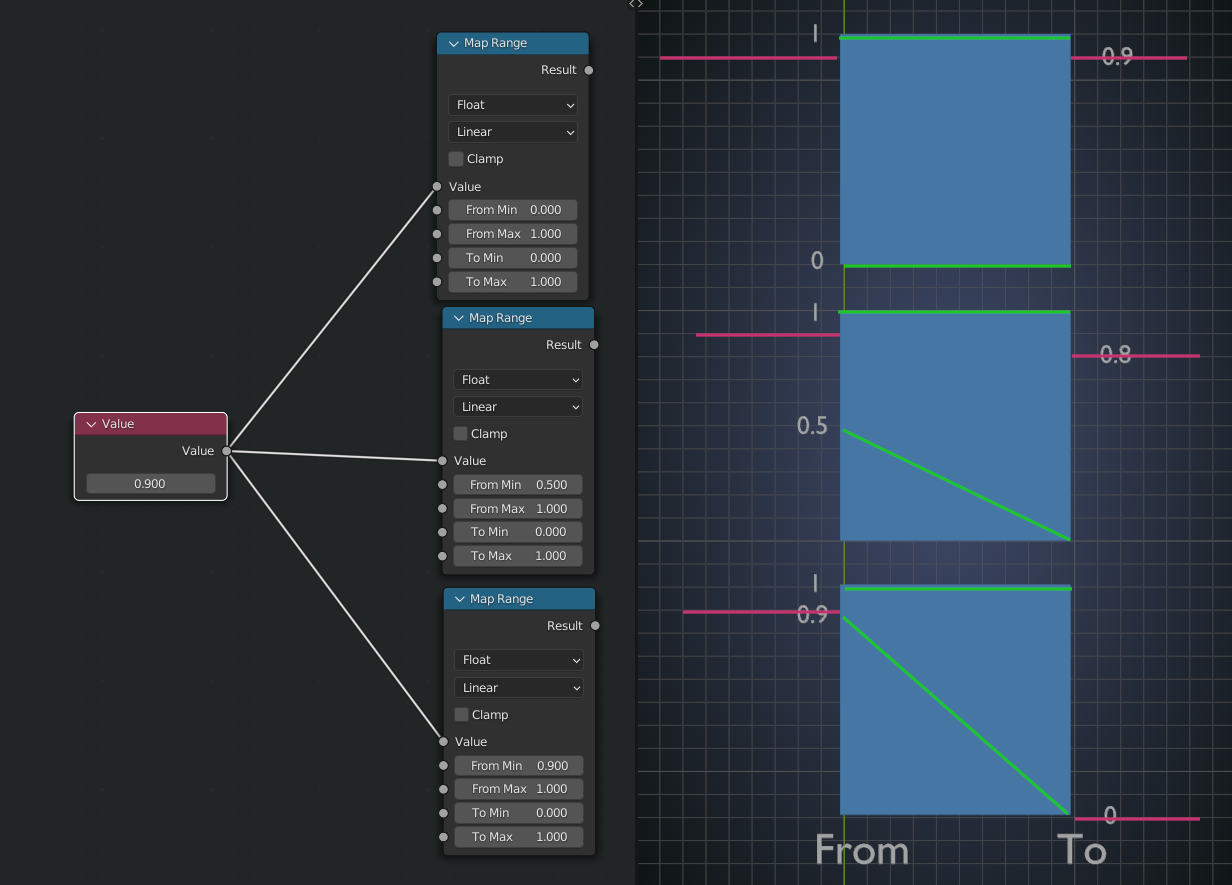
            Hi @elijah0429 the thing is, that the input value (range) is important to how the Map range reacts and it is a bit hard to explain, but maybe this image will help:

            MR.png

            #73932
            elijah0429
            Participant

              Hi Spikey, thanks for the image. May I know what are the 4 lines referring to? I would guess the left side is input, right side is output? Why the 0.9 would change to 0.8 tho on the second picture? Also, if I am not taking it wrong, the third map range means that all the input that is lower than 0.9 will have an output to 0. So does the green line mean any linear relationships or are they simply arrows?

              #73933
              spikeyxxx
              Participant

                The blue boxes are the Map Range Node the ‘red’ lines are the Input and Output and the green lines  represent the Values in the Node; so in the last picture, From Min = 0.9 goes to To Min = 0. The green lines are thus indeed more like arrows (I actuallyshould have drawn them as arrows, that would have been more clear…))

                In the second picture, the area between 0.5 and 1 gets mapped to the area 0 to 1. So 0, 5 becomes 0, 0.6 becomes 0.2, 0.7 becomes 0.4, 0.8 becomes 0.6 and 0.9 becomes 0.8. This is why the interpolation is called linear. Another example: in the third Map Range Node, 0.95 (halfway between 0.9 and 1) goes to 0.5 (halfway between 0 and 1).

                (I told you it’s not easy to explain.)

                In the third Map Range Node, as it is not Clamped, 0.8 will go to -1 and, for instance, 0 will go to -9.

                #73934
                elijah0429
                Participant

                  Hi Spikey, thank you so much for the explaination. Now I totally understood it.

                Viewing 7 posts - 1 through 7 (of 7 total)
                • The topic ‘Why we use ambient occlussion node here instead of incerting a value node directly to subtract color 2?’ is closed to new replies.