Why my axe is all greyed out?

Forum Archive Why my axe is all greyed out?

Viewing 11 posts - 1 through 11 (of 11 total)
  • Author
    Posts
  • #15696
    maxcady
    Participant

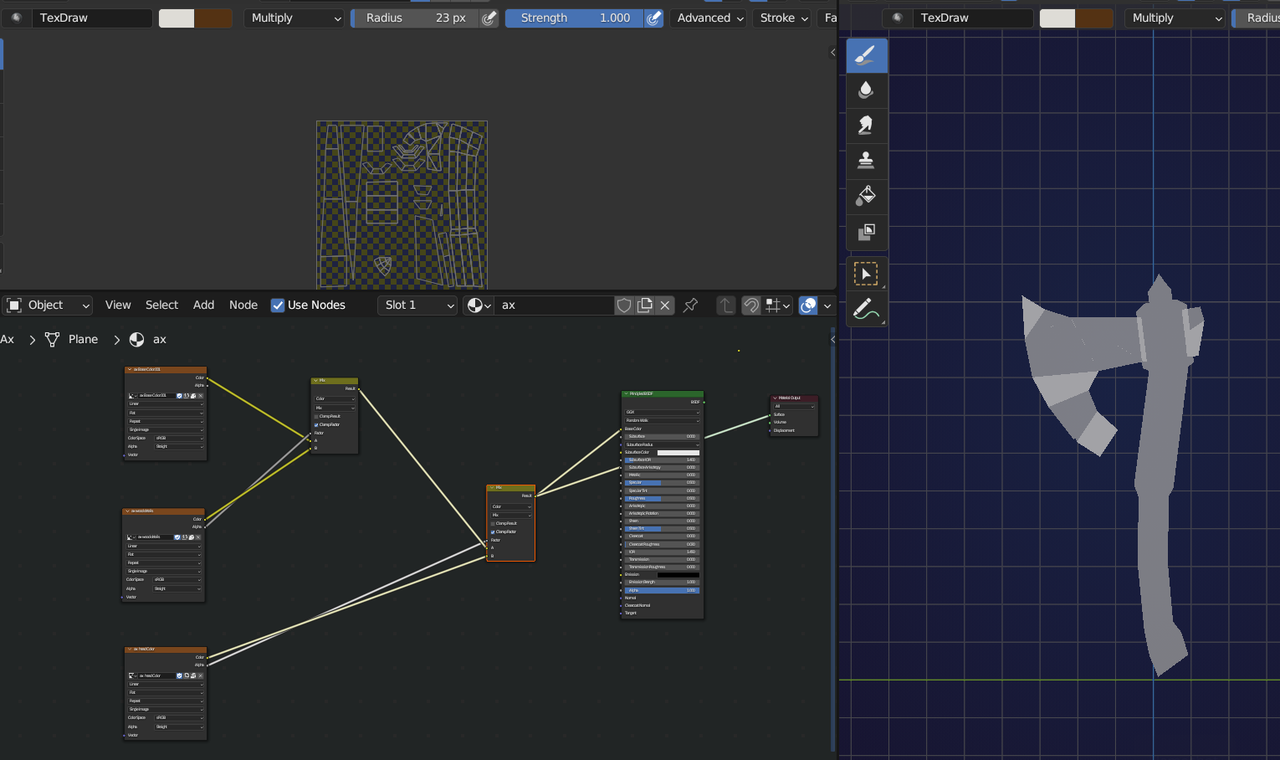
      I try to paint a part of the object. I try to select it. In texture paint mode it’s all greyed out. Why, and how can I solve the problem?

      Greyed out

      Picture

      #76587
      Austin Dunham
      Participant

        In your picture it appears you’re in “solid view” instead of material preview or rendered.

        Normally you’d probably want to be in material preview to see how things look.  (Rendered is nice but uses more resources.)

        Up at the top right of your screen where you see the 4 circles next to a drop down you can select wire frame, SOLID – which you’re in, material preview, or rendered.

        Edit: You have to pick material preview in both windows.

        #76588
        Martin Bergwerf
        Participant

          Hey Max,

          You don’t have a Texture Node Selected, so the Texture in Solid Mode only shows grey (Edit Mode Selection Masking):

          Axe.png

          If you switch to Material Preview, like Wardred says, you see the result of the second Mix Node, but you still need to select the Texture you want to paint on.

          #76589
          maxcady
          Participant

            So you need to switch to material preview and select the texture. I will get back to you.

            #76590
            Martin Bergwerf
            Participant

              Yes.

              If you only select the texture Node you want to paint on, you will just see that Texture (when in Solid Mode), not the base texture.

              When you want to see the base texture and the one you’re painting on, you’ll need to be in Material Preview. 

              #76591
              maxcady
              Participant

                I redone the course completely and it was just fine. I don’t understand what I did wrong. I was in material preview and I selected the texture node. So I still don’t understand.

                #76592
                Omar Domenech
                Participant

                  Blender system is convoluted, it’s never been optimal. There are addons in the blender market that make texture painting much more intuitive and fun. You may want to go the market a go and see if there’s anything there that interests you. Also check this list out that Jonathan Lampel put together:

                  https://cgcookie.com/posts/the-ultimate-2022-guide-to-the-best-blender-add-ons

                  #76593
                  maxcady
                  Participant

                    thx. I will check them out! What addon do you use for texturing painting?

                    #76594
                    Omar Domenech
                    Participant

                      None, I hardly use any addons. Not for any particular reason, just that since I don’t do 3D as a full time job I’ve never had the time to sit down and see which addon would speed up my work flow, since I don’t do any workflow because I only do 3D as a hobby. That might be starting to change though. I do use Wayne’s camera rig addon all the time. 

                      #76595
                      maxcady
                      Participant

                        cool. what is Wayne’s camera rig addon?

                        #76596
                        Omar Domenech
                        Participant

                          Search for Add Camera Rig in the addons panel. 

                        Viewing 11 posts - 1 through 11 (of 11 total)
                        • The topic ‘Why my axe is all greyed out?’ is closed to new replies.