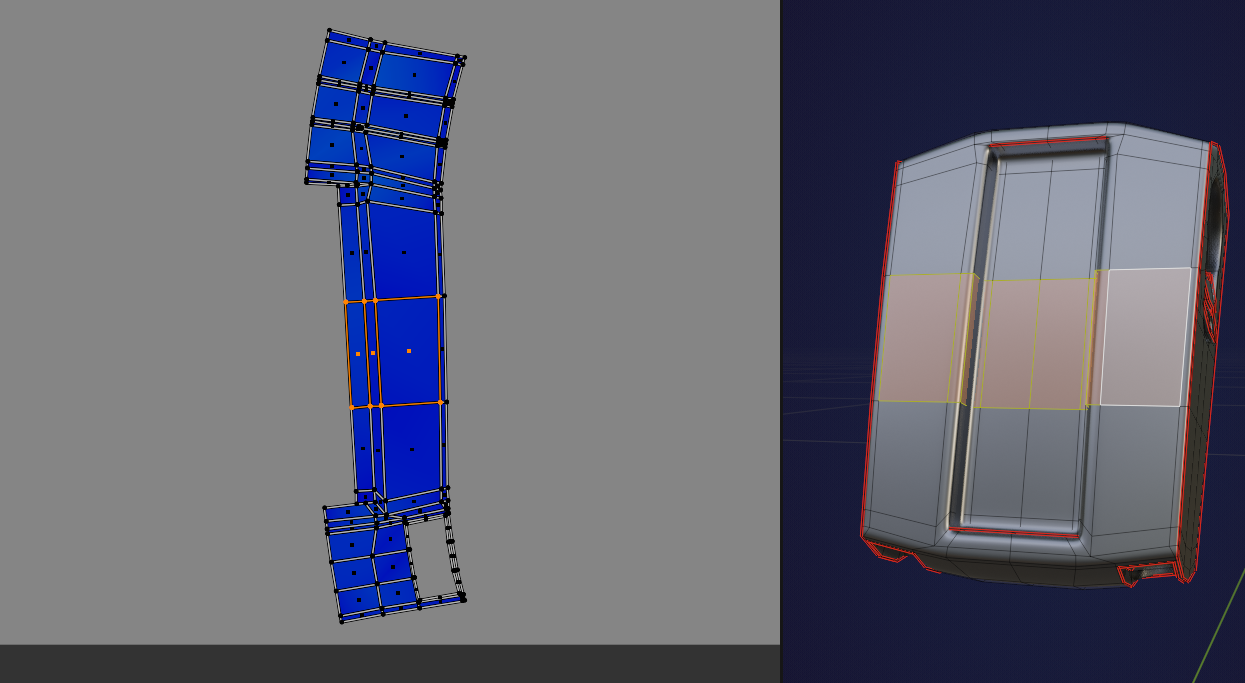
Why is this mesh in paint mode symetrized?

Forum Archive Why is this mesh in paint mode symetrized?

Viewing 9 posts - 1 through 9 (of 9 total)
  • Author
    Posts
  • #15781
    maxcady
    Participant

      When I paint, it repeat in X axis. No overlapping in UV, symetrized option is set to none both in viewport and paint tools options.  And there is no mirror modifier. 

      I even divided the mesh in 2 and unlink everthing, and it still doing the same thing. So my guess would be in the brush settings but I have no clues other than that. Is it a bug?

      File

      #76893
      Martin Bergwerf
      Participant

        Hi Max,

        There are actually overlapping UVs:

        Overlap.png

        My guess is, that You Unwrapped that part, while there still was a Mirror active.

        You’ll have to re-Unwrap.Average Island Scale and Pack Islands.

        #76894
        maxcady
        Participant

          Good. But I did average island Scale, but for all the meshes at the same time. I will try to do something differently.

          I just found out that I can’t do this process cause I started to paint the meshes. Repack everything will mix my colors. Is there a solution to this?

          #76895
          Martin Bergwerf
          Participant

            No, you’ll have to start over, because you’ll need to re-Unwrap. That will change the UV Map.

            #76896
            Martin Bergwerf
            Participant

              You can Unwrap everything in one go. But You’ll have to re-do all the painting.

              #76897
              maxcady
              Participant

                I wont do that. I will bake all the materials except the body and I will repack the overlapping body and do the painting.

                #76898
                Omar Domenech
                Participant

                  Starting over is painful, but if you manage to muster the courage to do it, you will level up much faster than everybody else. 

                  #76899
                  maxcady
                  Participant

                    Why is that? Just to correct a simple mistake? All I will learn is to be patient enough to do monkey work. I prefor learning than perfection.

                    #76900
                    Omar Domenech
                    Participant

                      Not for simple mistakes no, but often you will spend much more time trying to fix something than if you started over. And all the while you’ll gain a lot of speed and you’ll start judging with much more accuracy how to approach something at the beginning, so you avoid a fatal mistake later where changes are more painful. Because you’ve already been down that road and instead of staying on it until the painful end, you decided to turn back and saw what the correct way was, and the more you do it, your foresight on situations will improve tremendously.  

                    Viewing 9 posts - 1 through 9 (of 9 total)
                    • The topic ‘Why is this mesh in paint mode symetrized?’ is closed to new replies.