Why Extrude then Scale in the D-Pad?

Forum Archive Why Extrude then Scale in the D-Pad?

Viewing 4 posts - 1 through 4 (of 4 total)
  • Author
    Posts
  • #17347
    Ali Abdelfadeel
    Participant

      Why do we need to extrude first then scale? I understand that the extrude will create a new edge so it can be scaled, but why not add vertices with a loop cut then extrude the new face?

      #83438
      Martin Bergwerf
      Participant

        Hi Ali,

        without a timestamp, I have no idea what extrusion you are talking about, but there are almost always more than one way to get the same result. If your method works here, you can certainly use that…

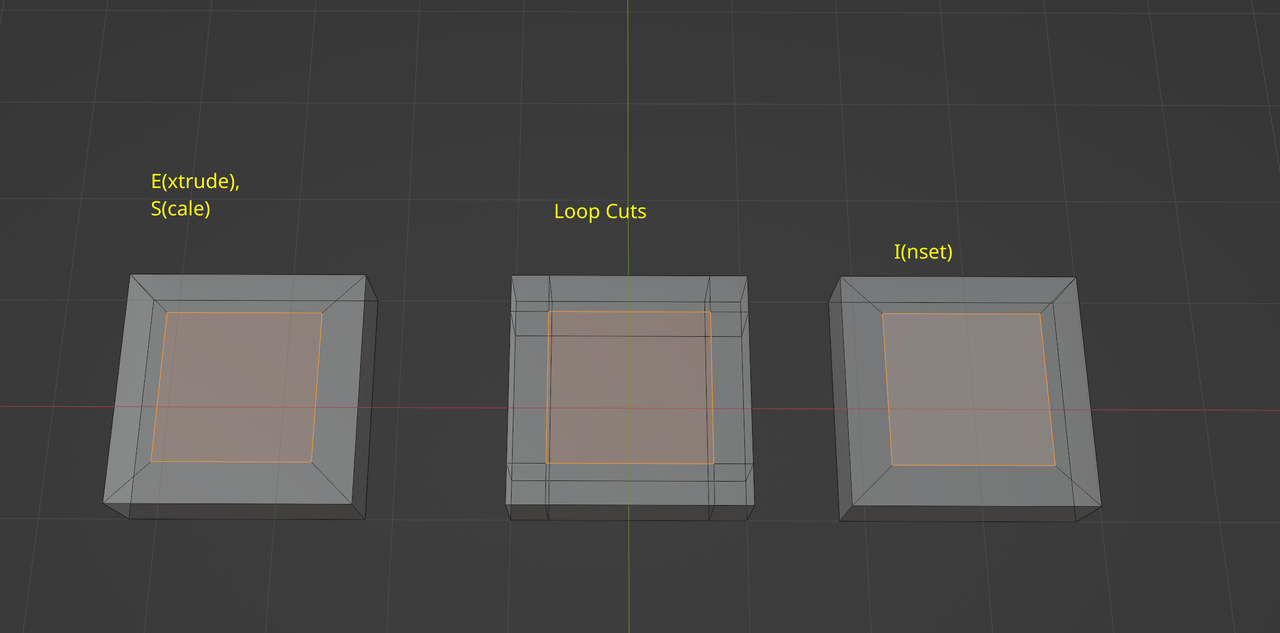
        Here is an example, Extrude and Scale gives the same result as Inset, but CTRL+R is a lot more work (has to be performed twice) and results in a lot more Edges…

        Extrude.png

        #83439
        Martin Bergwerf
        Participant

          Oh, I’m sorry, I see what you mean know (it was in the title)…the D-pad.

          Yes, same story, there are more than one ways to do this.

          I’d use a larger Plane, Subdivide it (two cuts) and then Delete the four corner Vertices…same result.

          #83440
          Omar Domenech
          Participant

            As Martin says, both are valid options, there is no right or wrong there, you can extrude or just cut in some loops. One common mistake that happens all the time here is that people forget to extrude first before executing a transform, the consequence is that it drags all the faces that are connected to the mesh with such transforms, be it scaling or moving. Maybe extruding becomes second nature and we tend to extrude more often than not.

          Viewing 4 posts - 1 through 4 (of 4 total)
          • The topic ‘Why Extrude then Scale in the D-Pad?’ is closed to new replies.