
Why does the ray fire from the cage’s edge along the average normal?
Forum Archive › Why does the ray fire from the cage’s edge along the average normal?
- This topic has 20 replies, 6 voices, and was last updated 2 years, 10 months ago by
Thomas Hock.
-
AuthorPosts
-
August 30, 2022 at 12:42 am #15386
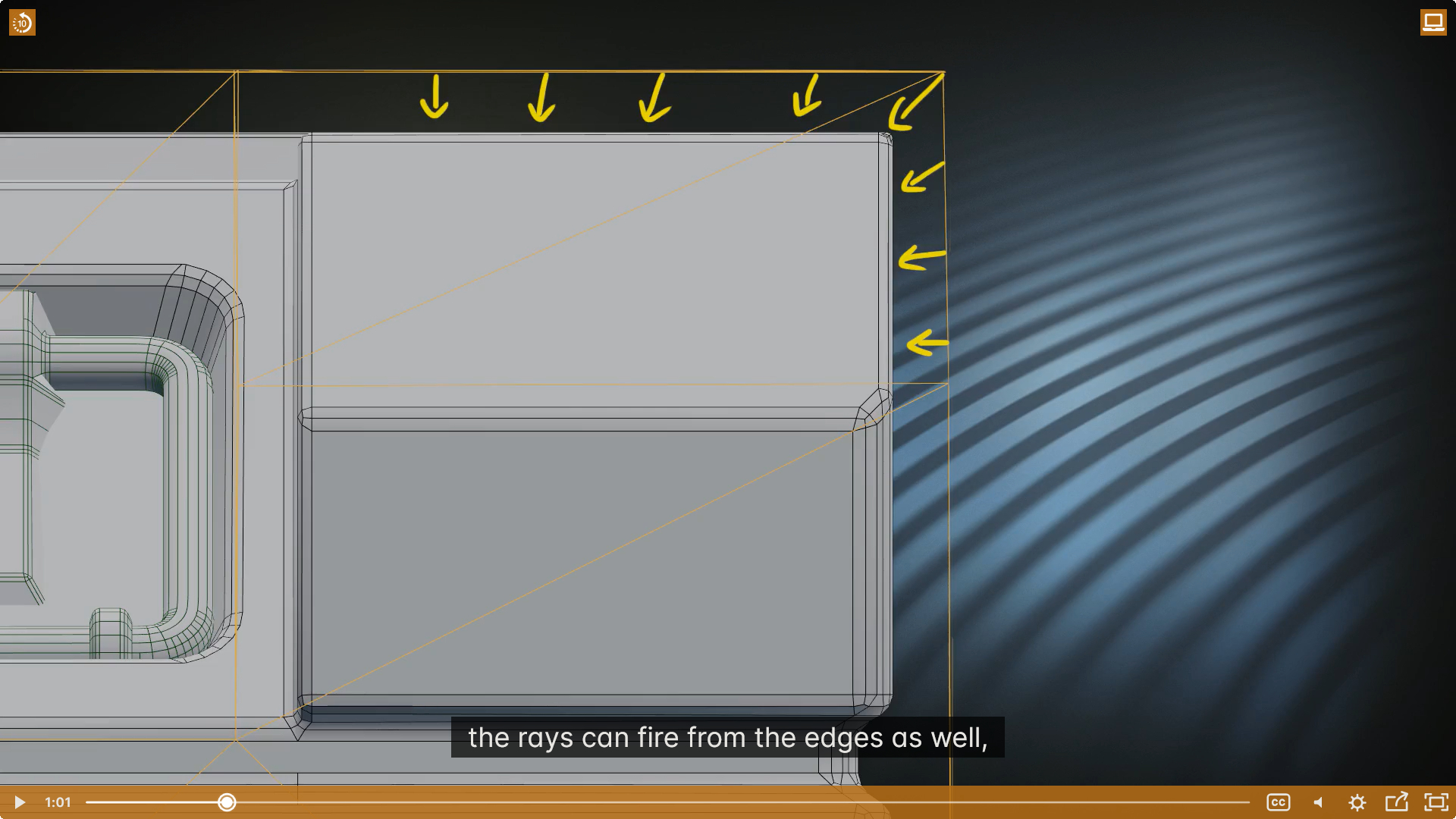
On the course video, the ray fires from the cage’s edge along the angle about 45 degree (or along the average normal of the cage’s edge in the opposite direction):
However, all the cage’s edge normals are still perpendicular to the corresponding faces unless the “Shade smooth” is used. As the following screenshot shows, no average normal is used, all edge normals are split normals.
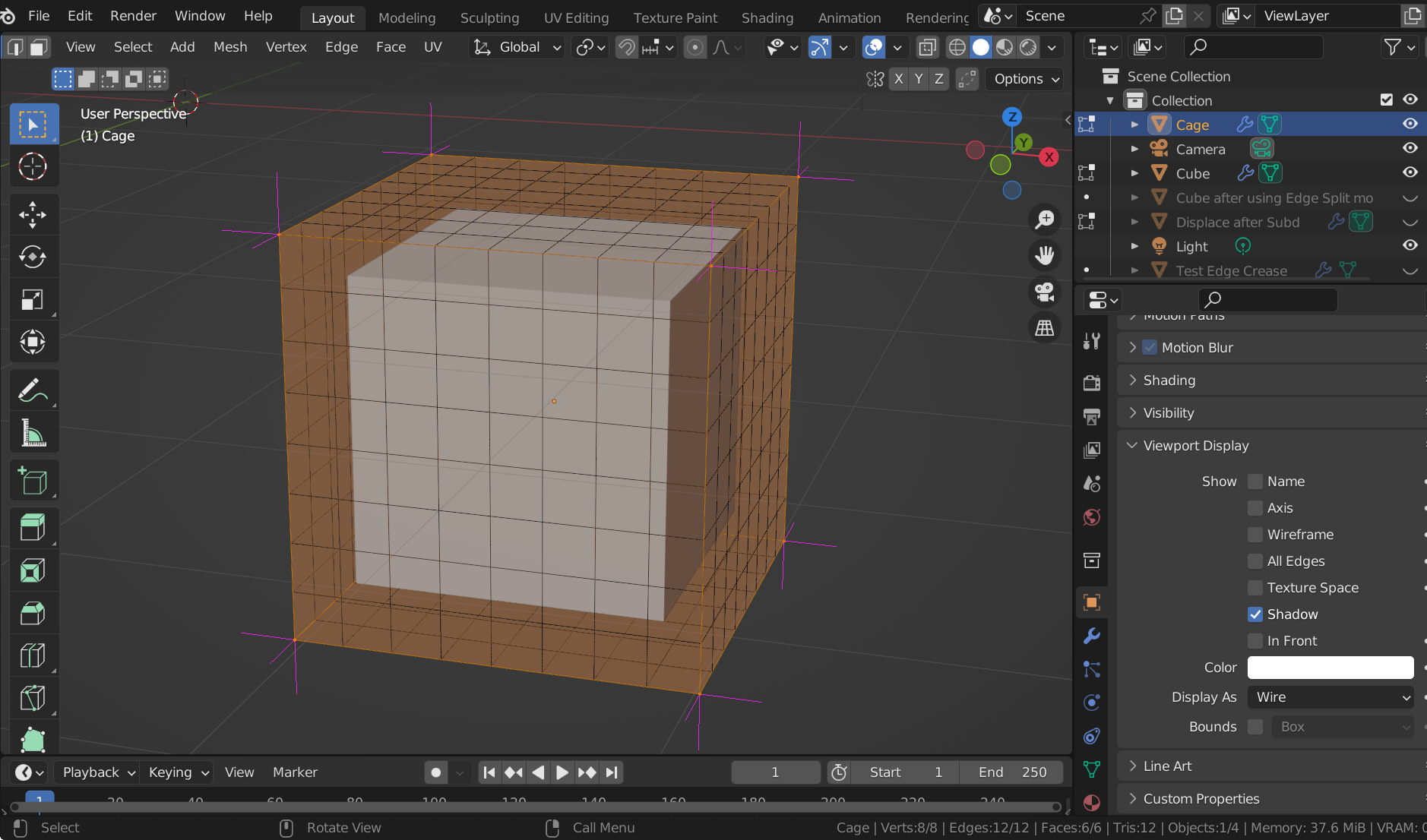
So why does this course assume that the ray fires from the cage’s edge along the average normal (in the opposite direction) please? Thanks!
August 30, 2022 at 3:34 am #75249August 30, 2022 at 3:48 am #75250The course has already mentioned some problems caused by the rays fired along the split normals. But my question is that:
I don’t understand how the rays can fire from the cage’s edge along the average normal. Because this is only possible if the “Shade Smooth” is applied. With the “Shade Flat”, the cage only has split normals. However, this course does not mention that the “Shade Smooth” is applied.
August 30, 2022 at 4:10 am #75251Although the Cage is not Smooth Shaded, the information of the averaged Normals is still available (or easily calculated).
The Rays are not dependent on the Normals of the Cage.
August 30, 2022 at 4:19 am #75252“The Rays are not dependent on the Normals of the Cage.“
Then, who determines the direction of the rays please? Can I manually control the direction of the rays? Thanks!
August 30, 2022 at 4:45 am #75253Like Spikey, I’m not entirely understanding of how this works.
I would suspect by enabling the cage option in the bake properties may alter the normals.On further reading, the blender manual says,
When not using a cage the rays will conform to the mesh normals. This produces glitches on the edges, but it is a preferable method when baking into planes to avoid the need of adding extra loops around the edges.
The inward rays are casted from a version of the active object with disabled Edge Split Modifiers.
The normals (rays) as I understand it, on the cage object the angles of the rays are dependent on position.
Something like this: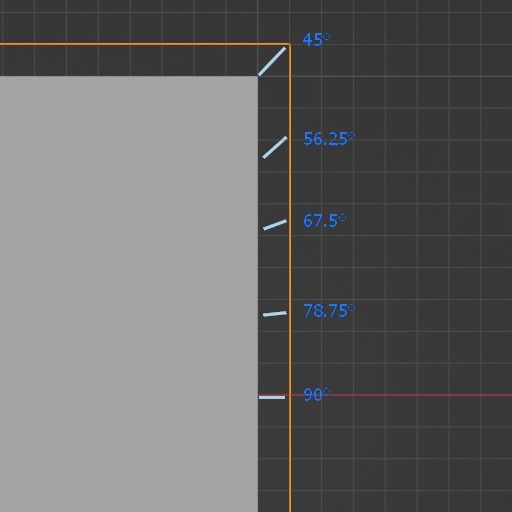
These are not exact angles but a guide
August 30, 2022 at 4:49 am #75254What I meant was:…not dependent on the ‘Shading Normals’ of the Cage. (The Cage doesn’t even have Shading…)
I don’t think you can control the ray direction manually, but again, I am not sure about all this.
August 30, 2022 at 4:57 am #75255Boy, that escalated quickly. I’m guessing the cage does to the normals its own thing under the hood, without you having to set shade smooth or anything. Blender be nice like that, saving you a hassle or two.
August 30, 2022 at 5:19 am #75256@Adrian ,
45 degree, 56.25 degree, 67.5 degree, 78.75 degree …. do you know why the angles of the rays are changed based on those exact values please?
It is unbelievable to me that a simple cage will tell the direction of the rays to behave in a such precise manner.
” without you having to set shade smooth or anything.”
@Omar ,
Yes, you are right – when baking the normal map and no cage is used, people do have to set both the low poly and the high poly with “Shade Smooth”. For example,
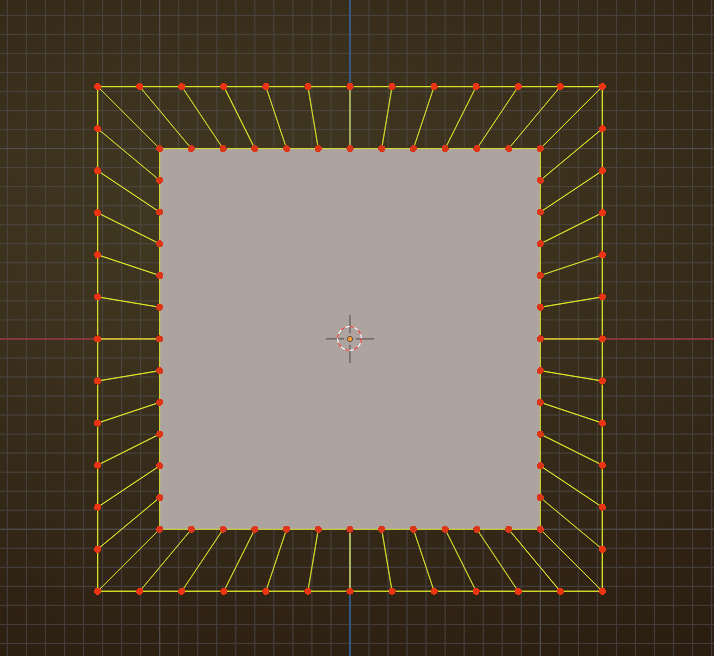
August 30, 2022 at 5:36 am #75257don’t worry about those angle values too much; the side of the Object has to be represented on the side of the Cage and because the Cage is larger, the corresponding points of the Object are in an angle to the Cage:
 August 30, 2022 at 7:41 am #75258
Cool in depth explanations. And even though we see that picture above as a cube from up top and a cage with the normals pointing at the cube, I like to think of it as a trampoline, with the elastic tendons supporting the thing where you jump at the middle.
August 30, 2022 at 7:45 am #75259It’s amazing, how many complicated CG concepts can be explained by trampolines
August 30, 2022 at 7:46 am #75260Exactly as Spikey said, visualized as if the cage is extruded from the mesh, with many more rays than in the visuals.
Knowing how things work is useful, but try not to get bogged down by the details of how and why.
It will probably have little or no effect on the result of your Blender project.August 30, 2022 at 12:45 pm #75261Martin’s picture above is perfect! A cage only works because it has the exact same vertices as the low poly object. The bake can then use the imaginary line that’s drawn in between each matching vertex to guide the rays INSTEAD of using the normals.
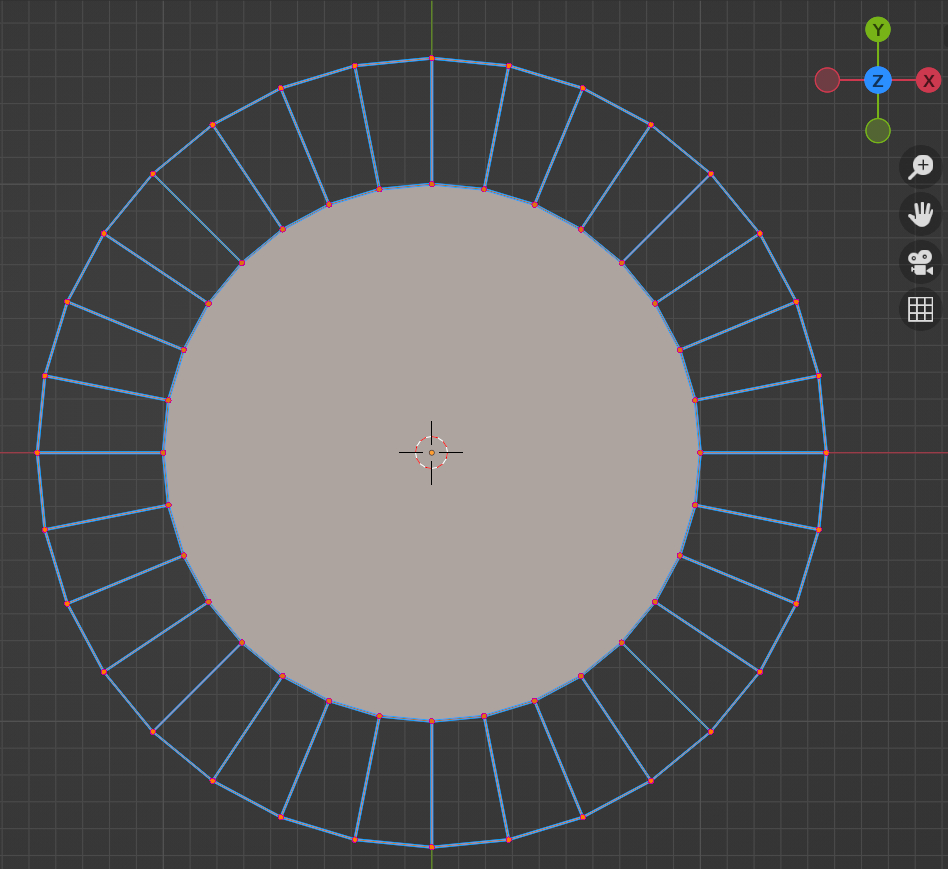
August 30, 2022 at 10:49 pm #75262Based on the answer from Martin, does this mean that the directions (or the angles) of the rays for a cylinder must look like the diagram below please?
(On the diagram, the rays fire inward and follow the imaginary straight lines from the external cage to the surface of the cylinder.)
-
AuthorPosts


 ?
?


- The topic ‘Why does the ray fire from the cage’s edge along the average normal?’ is closed to new replies.