Why does smooth move my mirror axis vertices?

Forum Archive Why does smooth move my mirror axis vertices?

Viewing 6 posts - 1 through 6 (of 6 total)
  • Author
    Posts
  • #11458
    projectcambrian
    Participant

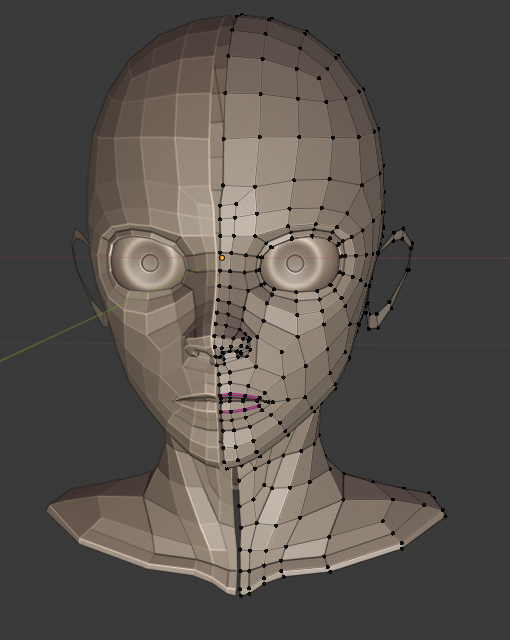
      When I smooth vertices, it moves the mirror plane vertices. So far I’ve gotten away with just selecting all of them, scaling X to 0, and then moving them to X=0…but with the nose geometry, the vertices are too close together to be easily selectable, and so my work-around has fallen short. Why is this happening? How can I “lock” those vertices to the YZ plane so this doesn’t happen?

      #53486
      Shawn Blanch
      Participant

        Hey  @projectcambrian
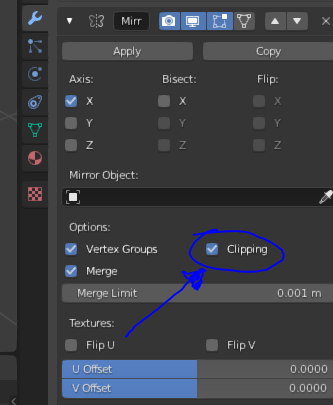
        In your mirror modifier settings do you have the “clipping” box checked?

        That should prevent those from separating.

        Jusst be careful not to move other verts too close to that mirror plane or they will get clipped too haha.

        #53487
        Mark Smith
        Participant

          as mentioned clipping “anchors the verts on the mirror axis….

          #53488
          projectcambrian
          Participant

            Thank you!

            #53489
            projectcambrian
            Participant

              Thanks for the screenshot. That box wasn’t checked by default…checking it solved the problem. Thanks!

              #53490
              Shawn Blanch
              Participant

                yeah it is never checked by default. Only clips when you want it too.

                there are reasons for doing both in the same workflow. Maybe you want to temporarily disable it to extrude some more vertices out from the center and then turn it back on to clip the new stuff, etc.

              Viewing 6 posts - 1 through 6 (of 6 total)
              • The topic ‘Why does smooth move my mirror axis vertices?’ is closed to new replies.