Why are the filled areas different colors?

Forum Archive Why are the filled areas different colors?

Viewing 7 posts - 1 through 7 (of 7 total)
  • Author
    Posts
  • #20748
    hyunwoo Choi
    Participant

      I’m following along well, but when I press F to fill, there are parts that are different colors. When I go into object mode, the colors are different or something. Why is this happening?

      #97083
      Martin Bergwerf
      Participant

        Hi Choi @ayaf ,

        Is it possible that you are in X-ray Mode?

        Maybe you have inconsistend Normals, that would show in X-Ray and is not uncommon whenm you have filled Faces. In Edit Mode, Select everything with A and then SHIFT+N to recalculate Normals.

        Could be something else, hard to tell without a screenshot.

        #97084
        Elizabeth Yorick
        Participant

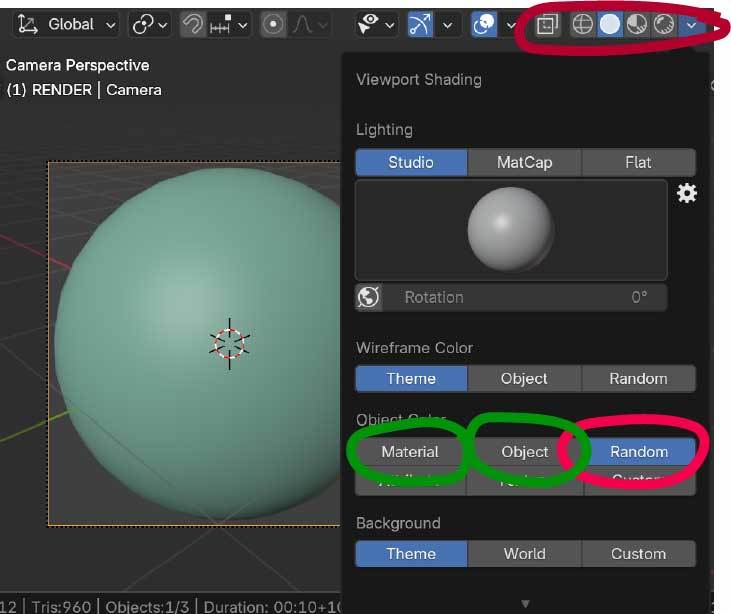
          Martin should be right.  But just in case it’s not flipped normal’s, and you’re in “Solid” shading mode, you may have “Random” turned on under your Viewport Shading or you may be in a different MatCap or Lighting scenario.  Try selecting “Object” or “Material” under Object Color or changing your MatCap.  Hope this helps and as Martin said, it’s hard to know what you’re looking at when you didn’t include a screenshot.  If you’re still having difficulties, paste a screenshot of what you are seeing and one of us can help.  Good Luck and keep going‼️

          Examples-20.jpg

          #97085
          Omar Domenech
          Participant

            One other thing, you could also have had a material assigned to some faces and then when you create a new face, you have to re-assign the material. So that new face can be of different color if that happens. Double check of that to be sure. 

            #97086
            hyunwoo Choi
            Participant

              Thank you so much! I just checked and it seems like it was because the heights were different ^^

              #97087
              hyunwoo Choi
              Participant

                025-09-15 141028.png

                this is image

                #97088
                Omar Domenech
                Participant

                  The viewport has subtle feedback to let you know if surfaces are wonky or normals are flipped. As you say, that looks like if those faces are higher or lower creating a shading split there. So a little S to scale, Z to lock the axis and 0 to scale it all to zero should solve it. 

                Viewing 7 posts - 1 through 7 (of 7 total)
                • The topic ‘Why are the filled areas different colors?’ is closed to new replies.