Where is the View Properties Panel in Blender 2.8?

Forum Archive Where is the View Properties Panel in Blender 2.8?

Viewing 4 posts - 1 through 4 (of 4 total)
  • Author
    Posts
  • #8457
    jmccloud
    Participant

      At 1:20 in the view he says to press the “N” key to view the View Properties Panel.  A view properties panel comes up but I do not have the options for the UVs section that it shows on his screen.  How can I access them?

      #28771
      Kent Trammell
      Participant

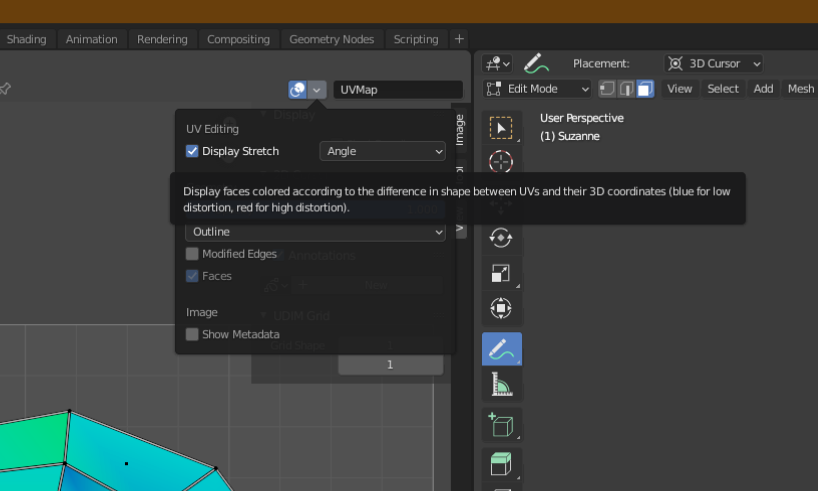
        The UV stretch properties in 2.8 are in the “topbar” of the UV editor window. All the way on the right of the toolbar (you’ll have to pan it to the right till it stops) you’ll see a “Display” dropdown where’ you’ll find the UV stretch options.

        #28772
        Cory Petkovsek
        Participant

          The previous answer is out of date. As of now, you can find the UV options by placing the mouse in the UV editor panel, pressing N, and looking under the View tab, Display, Overlays.

          #28773
          jeremywalton
          Participant

          Viewing 4 posts - 1 through 4 (of 4 total)
          • The topic ‘Where is the View Properties Panel in Blender 2.8?’ is closed to new replies.