Where is “Dimension” now that (Musgrave Texture Node) has been replaced by (Noise Texture Node)?

Forum Archive Where is “Dimension” now that (Musgrave Texture Node) has been replaced by (Noise Texture Node)?

Viewing 4 posts - 1 through 4 (of 4 total)
  • Author
    Posts
  • #17853
    Chris Le Fave
    Participant

      Jonathan is using Blender 2.91.0 for this tutorial, and the current version as of my writing of this question on 4/21/24 is 4.1.1.

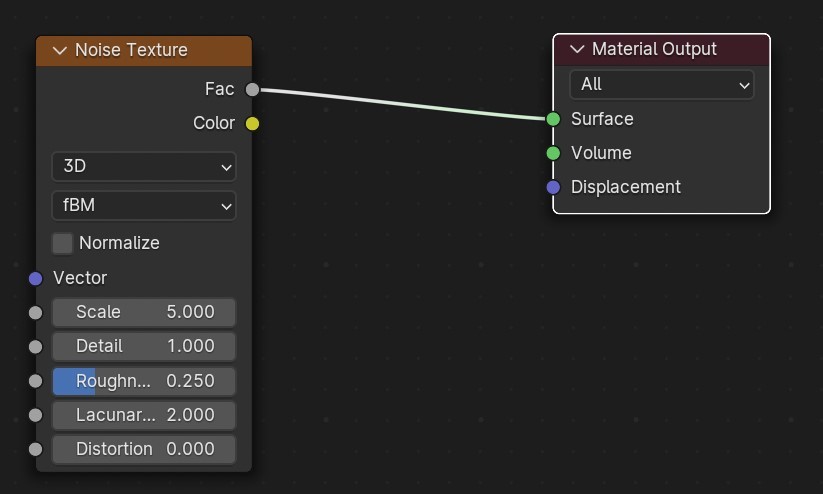
      As a result, I’ve attempted to use the Noise Texture Node as a substitute for Musgrave, however, the Dimension fader is missing and as a result, I’m unable to (without further knowledge) achieve the same effects as seen in this video tutorial and the same will be true for the subsequent video called “Creating Procedural Grunge”.

      What can I do, if anything, to remedy this?

      #85564
      Omar Domenech
      Participant

        Yes the Musgrave has been integrated into the Noise texture and now the Musgrave is no more. You can either use the same Blender version JL is using in the video, or you can try and emulate the Musgrave settings with the noise texture. 

        This setup could give you the Musgrave pattern, I haven’t tested it though, it was a setup from Furlong. 

        Musgrave.jpg

        But then Martin said this:

        “Firstly: simply copying numbers (from tutorials or so, be it noise, or colors, or…) is never recommended. But if you want to convert ‘old Musgrave’ to ‘new Noise’, you can also just Save the Musgrave (in 4.0-) and open the File in 4.1+.”

        Also here’s the link the with news from the Musgrave:

        https://youtu.be/xuOUzaGf1qM?t=443

        #85565
        Dwayne Savage
        Participant

          It is part of the roughness setting. So basically “L**-D” can be typed into the roughness. For more info. D is the dimensions. L is the Lacanarity

          https://docs.blender.org/manual/en/latest/render/shader_nodes/textures/musgrave.html

          #85566
          Chris Le Fave
          Participant

            Thank you Omar and Dwayne! The Roughness Setting does certainly seem to replace the “Dimensions” as long as the normalize box is unticked. Thank goodness. I didn’t want to just watch the tutorial, I wanted to follow along. Thanks for the specificity!

          Viewing 4 posts - 1 through 4 (of 4 total)
          • The topic ‘Where is “Dimension” now that (Musgrave Texture Node) has been replaced by (Noise Texture Node)?’ is closed to new replies.