where did my city go?

Forum Archive where did my city go?

Viewing 5 posts - 1 through 5 (of 5 total)
  • Author
    Posts
  • #18205
    Eric Szabo
    Participant

      started laying out my city last night. came back today. most of the assets are not showing up on screen. their empties are all visible. what happened?
      Thanks

      #86986
      Omar Domenech
      Participant

        Well we may need a bit more information than that, since that sounds like the blend file lost all the links. Did you move any folder on your computer? Rename any file? Rename any folder? The blend file follows the path on your folders and if something changes it looses its way and can’t find anything. 

        #86987
        Eric Szabo
        Participant

          hmm, I did save the Assemble file ‘one folder up,’ as Kent directed. Possibly something incorrect happened there. I’ll look there next. 

          Besides that, I don’t think I moved/changes/renamed anything. I could, of course, be wrong.
          EDIT: I tried moving the saved file’s location. that didn’t work. Moved it back. Same result: In the Assemble file, in the outliner, only empties are showing up. The collections are not there. This is true for most, but not all of the assets. Some items are showing up as intended.
          Does hiding, or restricting access in the Assets file affect the library? I wouldn’t think so; I tried manipulating this and so no difference.
          I could redo the assembly. That’s not a big deal. But I do need to trust that future work will be preserved.
           
          What other information would be useful to you?

          #86988
          Adrian Bellworthy
          Participant

            Make sure you save the Blender file with the marked assets in the asset library location set in the file paths section of the preferences.

            The Blender file you are using to build your city will be looking at this location for the assets. If the asset file is not there, then the assets can’t be found and will not show up in the asset browser or the 3d view.

            #86989
            Kent Trammell
            Participant

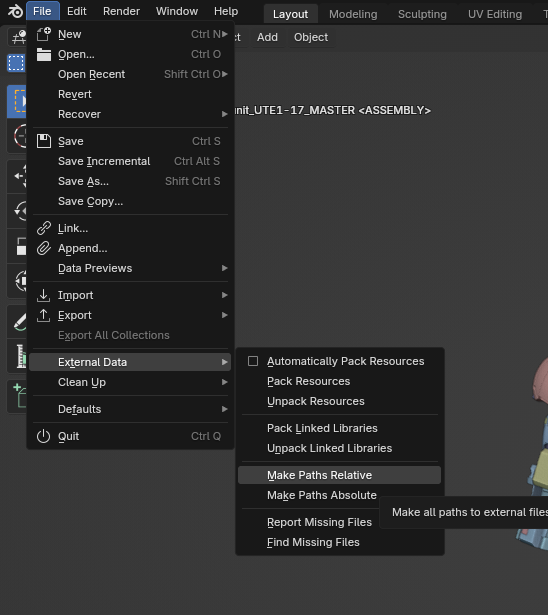
              It sounds like your paths got messed up. Happens all the time when utilizing a linking workflow. If you saved your assembly .blend in a new location from where it was saved when you linked in your assets, I recommend saving it back in that original location and going to File > External Data > Make Paths Relative. Save the .blend and revert it to reload all paths

            Viewing 5 posts - 1 through 5 (of 5 total)
            • The topic ‘where did my city go?’ is closed to new replies.