Whenever I scasle rotate or move something it also affects an object nearby.

Forum Archive Whenever I scasle rotate or move something it also affects an object nearby.

Viewing 15 posts - 1 through 15 (of 15 total)
  • Author
    Posts
  • #10922
    frostheart10
    Participant

      As the title says I’m having issues for example I’m scaling the plane and this happens:

      https://gyazo.com/591cd5ede3a2827f4cc476542df6d31e

      It’s a pain, IDK if I have accidently turned something on.

      #51597
      William Miller
      Participant

        Did you parent the rock thing to the plane?

        #51598
        Char Hunter
        Participant

          @frostheart10  which object are you scaling and which object is scaling with it.  I can’t tell in the video.  

          Sometimes when you duplicate an object, with Shift + D or Alt + D, they can have different effects

          on the object.  Explanation here https://blenderartists.org/t/difference-between-shift-d-and-alt-d/603153 .

          Also, make sure you only have the object you want scaled or rotated highlighted.  I know it’s common sense,

          but sometimes there’s something highlighted that you can’t see.  If you can, post the .blend file, maybe we can 

          do a little investigation.  

          #51599
          frostheart10
          Participant

            No I didn’t, none of it’s parented, I’m enlarging the plane (particle emitter) but it moves or scales the bottom rock.

            #51600
            frostheart10
            Participant

              I’m scaling the small plane particle emitter within the rock, you can see that it’s highlighted when it enlarges.

              Sorry for not being clear, it also does it to any other nearby object when I add a new one.

              #51601
              frostheart10
              Participant

                I can post the blend but how would I upload it here?

                #51602
                Markus Berg
                Participant

                  Use something like Dropbox, one drive or similar and post the link.

                  #51603

                  @frostheart10  Just use pasteall.org It was created for the very purpose of sharing Blend files.

                  #51604
                  frostheart10
                  Participant

                    Thanks for the suggestion but pasteall only takes up to 30mb, for some reason my file size is a lot higher than this, for a low poly model too, is that normal for it to be around 90mb?

                    #51605

                    That feels like a huge filesize for what is essentially a very simple scene. You can always just copy the file and throw away everything but the two objects that show this weird problem. This is, in general, a good way to troubleshoot as well.

                    Try that, it may diminish the filesize so you can post it and we can take a look. 🙂

                    #51606
                    Char Hunter
                    Participant

                      Also @frostheart10 maybe we can see more of your UI as you execute the scale if you can’t upload a .blend file. 

                      We might be able to determine what’s going on that way.  

                      #51607
                      Grant Wilk
                      Participant

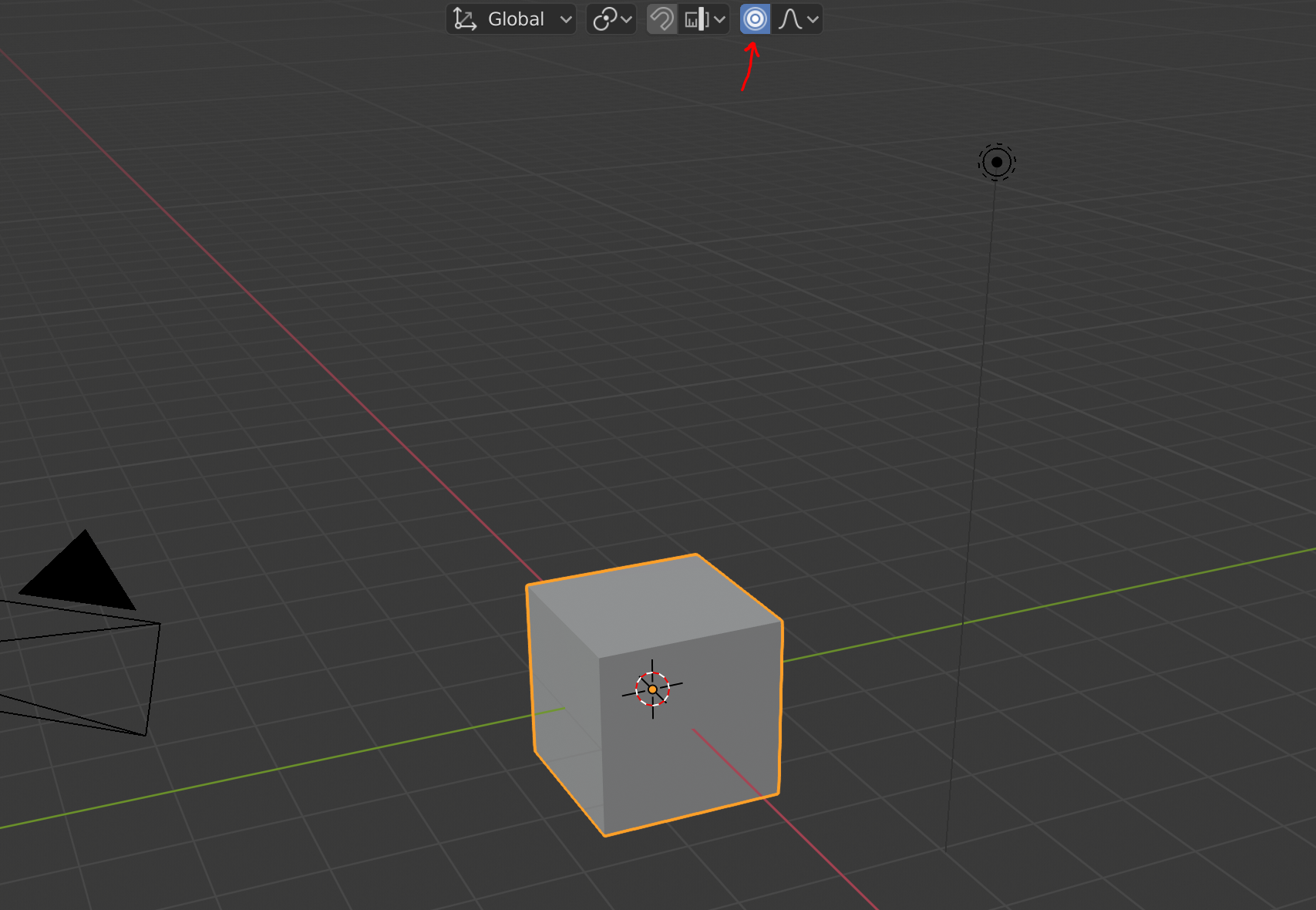
                        Hey there! Looks to me like you might have proportional editing turned on. You can disable proportional editing by clicking this little icon at the top of the 3D viewport, or by pressing the “O” key!

                        Let me know if this helps 🙂

                        #51608
                        Char Hunter
                        Participant

                          👏🏽 Doh! I should have thought of that. 

                          #51609
                          frostheart10
                          Participant

                            Yes I can do that, sorry for being so slow with replies I’ll upload it now, I’ve been busy the past 2 days, apologies

                            #51610
                            frostheart10
                            Participant

                              Omg it was that, thank you so much <3 I already finished the project so thank you!

                            Viewing 15 posts - 1 through 15 (of 15 total)
                            • The topic ‘Whenever I scasle rotate or move something it also affects an object nearby.’ is closed to new replies.