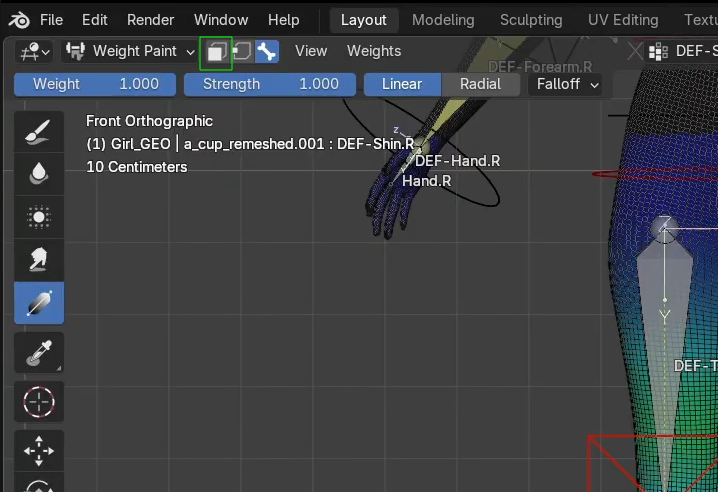
When I paint from the other side, the weight on the other side disappears?

Forum Archive When I paint from the other side, the weight on the other side disappears?

Viewing 5 posts - 1 through 5 (of 5 total)
  • Author
    Posts
  • #21502
    Joshua Alcober
    Participant

      Hi Wayne!

      thanks for the great teaching! I still have to go back and forth but I really learned a lot. I went ahead and try this out on my base mesh and encountered a problem. TLDR, when I paint one side, the weight on the other side disappears and it won’t mirror the painted weight at all Recording in Google Drive

      I got:
      1. X symmetry turned off (same issue even if itts turned on)
      2. Vertex group mirror on
      3. No mirror modifier
      4. I got my namings right afaik (.L, .R etc) 
      5. Automatic weights

      The issue happens as soon as I use gradient. The weight on the other side just disappears. – but if I manually paint it, the issue is the other side is not mirrored – what could I be doing wrong? I’m using the latest version of Blender. Thank you!

      #100073
      Grady Pruitt
      Participant

        We’ll see what Wayne says… but my first thought is that the brush size might be too big and the weight paint is fighting itself.

        #100074
        Wayne Dixon
        Participant

          Hi Joshua,

          Thank you for such a thorough explanation of your issues.  This is 1 million times better than the usual “it’s not working”.
          We may have to hold this up as an example to others as a really effective way to describe the issue.

          I doth my cap to you sir.

          Now onto your actual issue.
          What I am seeing is expected behaviour on how the Gradient tool works.
          This will project a plane from the point you click -> drag and fill the gradient based on your settings (it’s actually perpendicular to the view where you click – if that makes sense).
          In this mode, anything on the positive side of the the projection plane will be affected.
          To see this in action, click in the middle or model and then drag in any direction, you will see this perfect line where the gradient starts.

          There is a radial mode which emits a sphere from the point you click, but that is based in view space so will affect everything under cursor regardless of the distance (ie – it will always project through to the other side)

          In simple terms – The gradient tool isn’t useful for what you are trying to do.

          Fun Fact, I’m actually trying to rework that radial mode to be in world space which will mean it won’t always project through to the other side of the mesh and will stay purely where you click.

          #100075
          Joshua Alcober
          Participant

            Thank you! I’m the one asking, so I want to make sure it’ll be easy for the person who’ll be answering!

            I figured that might be the case – but I kind of was able to remove the weight on the other side of the bone I’m editing by slowly adjusting the gradient at weight 0 (still, it totally removed the weight on the other bone lol)… Do you think automatic weights has something to do with it? I find it really helpful since my weight adjustments don’t always ends up even across the mesh lol. I left the idea for now but would be helpful for future advance weight painting/rig 😀

            #100076
            Martin Bergwerf
            Participant

              Hi Joshua,

              I’m not sure if it would fit in your workflow, but you can enable Face (or Vertex) Selection Masking in Weight Paint Mode:

              bONES.png

              (that disables the Bone Selection, but you can Select those in the Vertex Groups list):

              You can then, for instance Box Select one leg in Edit Mode, and then you only Paint in those Faces. Youu can also Select the Faces you want to Paint on in Weight Paint Mode, but then you’d have to be aware that, for instance Box Select, only Selects what you see.

            Viewing 5 posts - 1 through 5 (of 5 total)
            • The topic ‘When I paint from the other side, the weight on the other side disappears?’ is closed to new replies.