
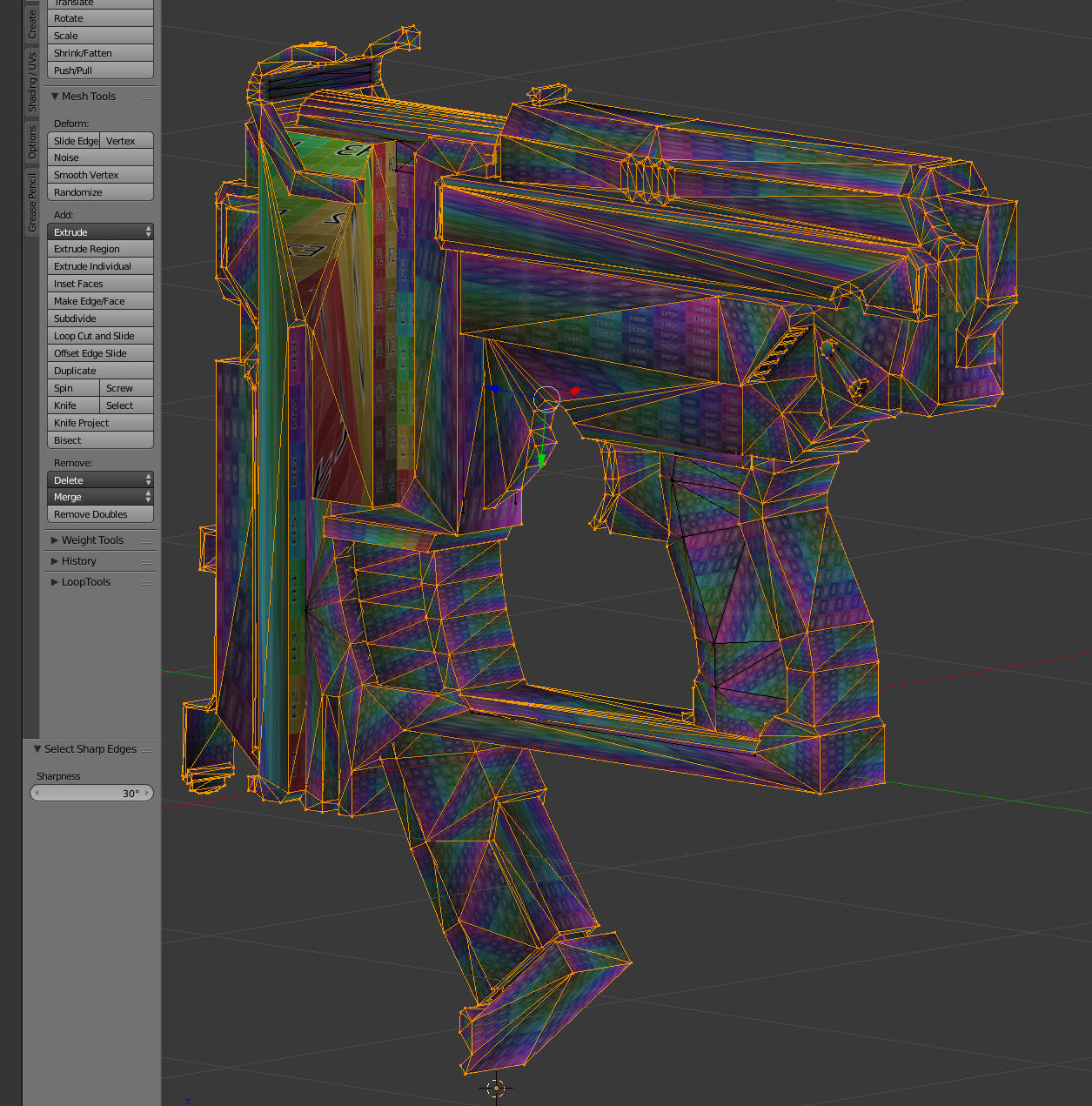
When I do “Select sharp edges” it appears that almost 100% of my edges are selected, which can’t be right. Any tips?

Forum Archive When I do “Select sharp edges” it appears that almost 100% of my edges are selected, which can’t be right. Any tips?

Viewing 4 posts - 1 through 4 (of 4 total)
  • Author
    Posts
  • #6701
    Suchaaver Chahal
    Participant

      #25825
      Suchaaver Chahal
      Participant

        Check that, I figured it out. If you are in vertex mode it selects all the vertices on the sharp edges, which then highlights all the edges, even if they technically weren’t intended. Using edge mode solves the problem.

        #25826
        Jonathan Lampel
        Participant

          Hey Suchaaver, that’s happening because you’re in vertex select mode, so any edges between sharp edges are also selected if the vertices are connected. Switch to edge select and you should be good to go! 

          #25827
          Jonathan Lampel
          Participant

            Just saw you already found that. Keep it up, it’s looking great so far 👍

          Viewing 4 posts - 1 through 4 (of 4 total)
          • The topic ‘When I do “Select sharp edges” it appears that almost 100% of my edges are selected, which can’t be right. Any tips?’ is closed to new replies.