what’s wrong with this bugreport?

Forum Archive what’s wrong with this bugreport?

Viewing 12 posts - 1 through 12 (of 12 total)
  • Author
    Posts
  • #17251
    sheila5
    Participant

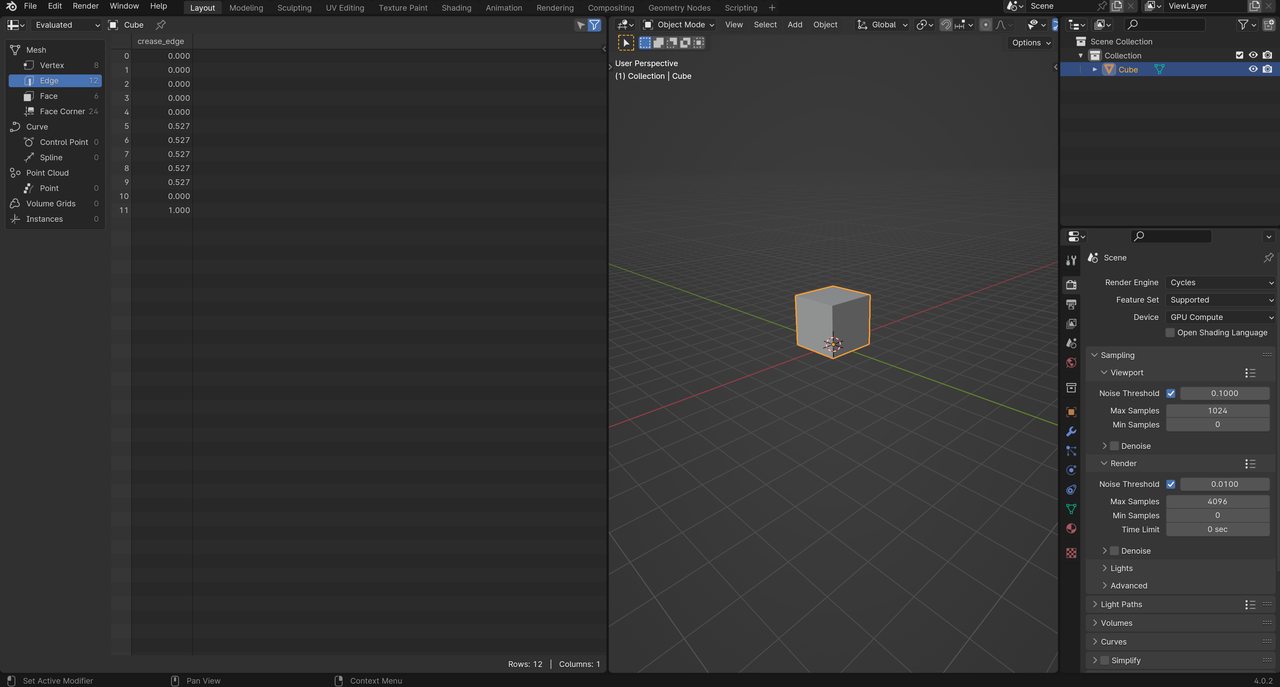
      I’ve put in a bugreport about blender and they immediately closed it because they said information is missing. I really don’t get what information is missing. I’ve put in my sytem information and specifically told the error is in a newly created blend file. What else do they want?

      https://projects.blender.org/blender/blender/issues/116479https://projects.blender.org/blender/blender/issues/116479

      #83041
      Martin Bergwerf
      Participant

        Hi Sheila,

        Don’t know what’s wrong with the bug report, but that is definitely not a bug. Just less information being displayed. As soon as they becomes relevant, Attributes will show up in the Spreadsheet. For instance:

        Spreadsheet.png

        #83042
        sheila5
        Participant

          It is not displayed in my blenders

          In my second attempt she also said it’s not a bug

          https://projects.blender.org/blender/blender/issues/116488#issuecomment-1090245

          But in the geometry course Jonathan shows that information. Because it was missing in mine i tried with a fresh project with a factory reset blender, without addons. In blender 3.3.0 the information is displayed. So i don’t really understand how you do have it. What version is that,?

          #83043
          Dwayne Savage
          Participant

            So after playing around I figured out what you were talking about. You need to point out to the Devs that the crease info on the edges isn’t displaying right away. If you select an edge and adjust the edge crease to anything, then set it back to 0, then click the filter icon in the spreadsheet the info will show up. Same with vertex crease, and both bevel weights. I think it may be by design to limit the amount of data in the spreadsheet? I don’t know if that’s the case or if it’s really a bug. 

            ***Edit*** Just read Martians answer. So, it sounds like it is to reduce the amount of information. 

            #83044
            sheila5
            Participant

              I’ll try that, but i think someone else has mentioned that crease thing before. As I wrote in 3.3.0 you can just select a cube and the info is available. In the blender versions after that it is not

              ***EDIT*** tried it and yes after creasing the info of the edge is available. Thanks. So I was wrong it wasn’t a bug, it’s a feature (that I don’t like)

              #83045
              sheila5
              Participant

                I wouldn’t even have noticed it before if it weren’t for this lesson: https://cgcookie.mavenseed.com/lessons/fields-attributes-and-data-types

                #83046
                sheila5
                Participant

                  But how will I get the face information? When will that become available? 

                  #83047
                  Dwayne Savage
                  Participant

                    Just doing some research and it appears that this starts with 3.4 and has something to do with a viewer node in the geometry nodes editor. Apparently it can now be used or is shown in the 3D Viewport. Sorry, I haven’t done much with geometry nodes and I’m not familiar with this viewer node, but the information that isn’t displaying in the spreadsheet is linked to the development of this node and linking it to the 3D Viewport. Now I’m off to read the blender manual about this node. 

                    #83048
                    sheila5
                    Participant

                      haha you’re way more invested then me into this problem. I think I’ll just use 3.3.0 for this lesson lol

                      #83049
                      sheila5
                      Participant
                        #83050
                        Dwayne Savage
                        Participant

                          Yeah, I spend more time studying 3D animation and the blender software then I do actually using Blender. I joined CGCookie hoping I’d actually start doing something. Then I checked out the community and kind of got addicted to it. The thing is there is huge difference between knowing the techniques/blender and actually using blender. 

                          #83051
                          Martin Bergwerf
                          Participant

                            TLDR:

                            It’s not a Bug, it’s Progress!

                          Viewing 12 posts - 1 through 12 (of 12 total)
                          • The topic ‘what’s wrong with this bugreport?’ is closed to new replies.