
What to do if SubSurface Modifier causes holes in mesh?

Forum Archive What to do if SubSurface Modifier causes holes in mesh?

Viewing 5 posts - 1 through 5 (of 5 total)
  • Author
    Posts
  • #8874
    Gary Wright II
    Participant

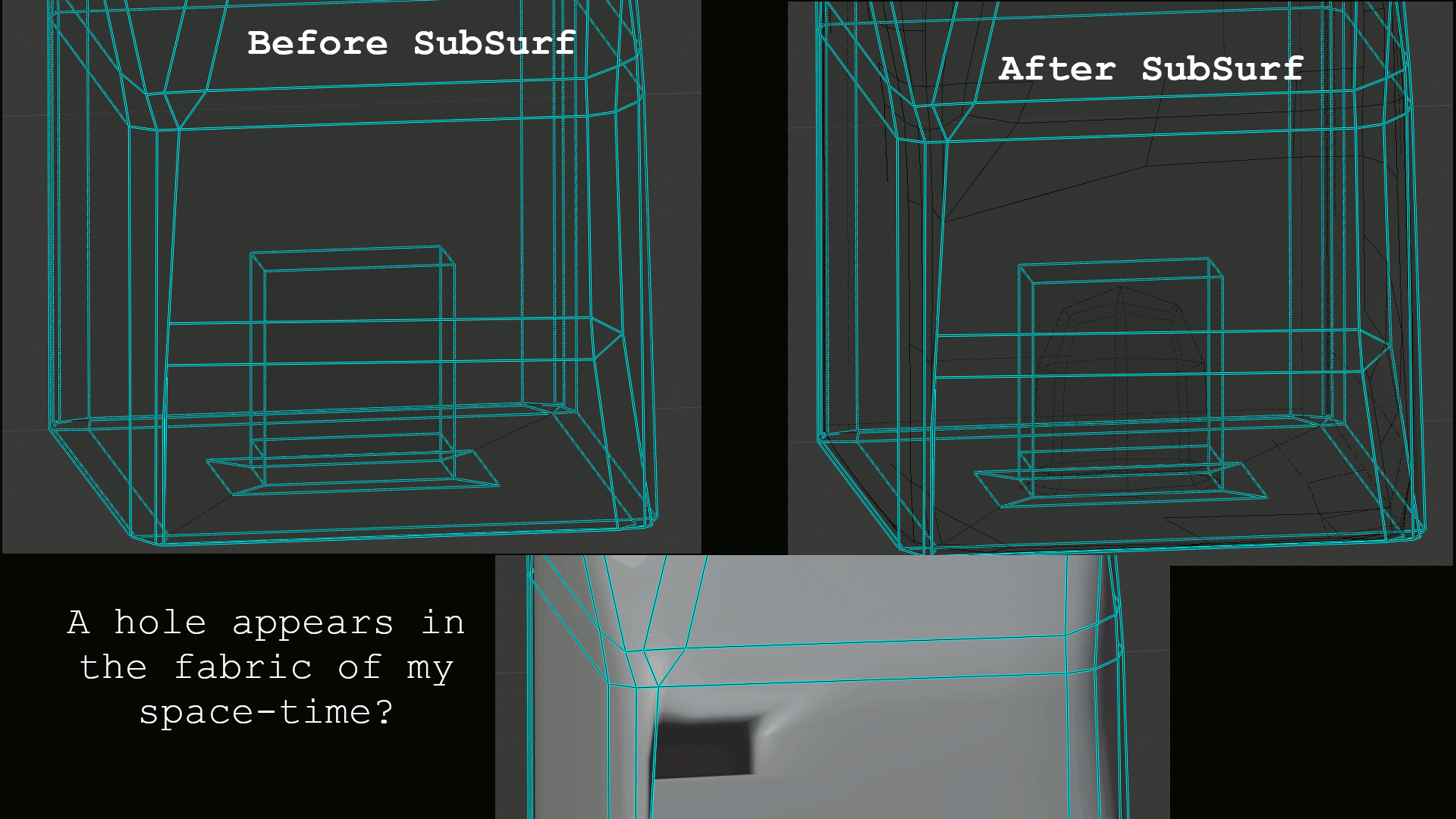
      When I added the subsurface modifier (around 5:50 in video) there are two holes opening up in my mesh, and I’m not sure about how to fix them. The only difference I see between our settings is yours has a Quality value set to 3, and I’m using v7.80.75 final release that doesn’t appear to have a Quality setting. Later in the video, you APPLY the modifier – so I’m thinking I should go ahead and apply my modifier and then try to fix the geometry – but I’m not sure what to change. I’ve looked for duplicate vertices or edges and didn’t see any. Can I just delete some of the geometry that subsurf added around the holes or did I mess something else up in my original geometry? I’m not sure why the holes are appearing where it is….  I did create an inset for the lock on my mesh (which is different from the lesson) and the second hole is showing up there which doesn’t really matter. But the first hole is showing in the front of my mesh. Here’s a screenshot:

      #29537
      Gary Wright II
      Participant

        I think I made another newbie mistake! I forgot that there are two settings for Subsurface Modifier (one for viewport and one for render). Once I applied the modifier, it closed the holes up which solved the problem. But when this happens, does it point to a problem with my underlying geometry?

        #29538
        Kent Trammell
        Participant

          If subsurf casuses a hole, that must mean there’s 2 verts on top of each other or something else erroneous about the base mesh. Did you try Vertex > Merge > By Distance?

          If you provide a download link to your .blend file (with dropbox, google drive, or equivalent service) I’ll take a look.

          #29539
          Gary Wright II
          Participant

            Ah! That fixed it – there were duplicate vertices in several places…. I would have never found those! Thank you so much for this tutorial and for answering all of my questions! I had completed the Blender fundamentals course, but this treasure chest project really brought everything together for me. I learned so much from what you taught me, but also from all of the mistakes I made along the way. It was an outstanding course!!!

            #29540
            Kent Trammell
            Participant

              I’m so glad to read your positive feedback. Thanks for sharing and happy blending! 🙂

            Viewing 5 posts - 1 through 5 (of 5 total)
            • The topic ‘What to do if SubSurface Modifier causes holes in mesh?’ is closed to new replies.