What about Reducing Topology for Easier UV Work?

Forum Archive What about Reducing Topology for Easier UV Work?

Viewing 5 posts - 1 through 5 (of 5 total)
  • Author
    Posts
  • #17734
    Chris Le Fave
    Participant

      The past 3 lessons in UV work have been world changing for me, however, what do we do when we can’t even begin the UV work because the mesh we imported comes with topology that is far too complex for even the Smart UV unwrapping to make use of the topology?

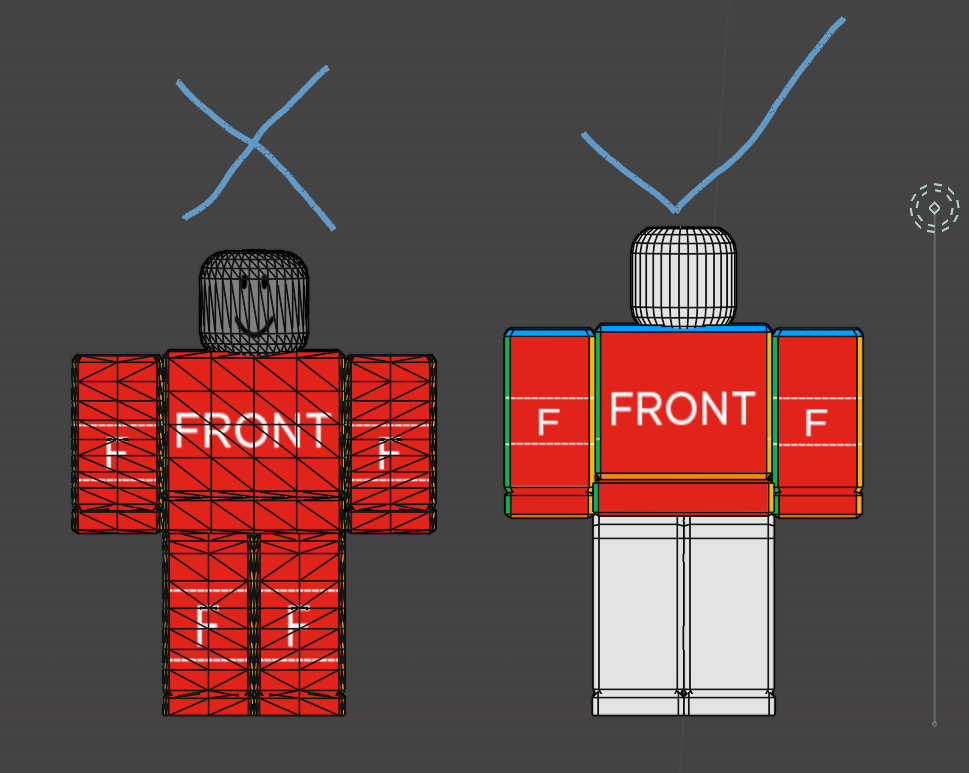
      As my example, I’m struggling trying to figure out how to simplify the topology of this mesh here. As you can see from my link below, it’s got far too many diagonal edges and only needs the edges that border each face of each body part. When I Smart UV unwrap it, there are far, far to many tiny pieces to work with. It’s like trying to paint a model, one atom at a time.

      I looked at Un-Subdivide in both the Edge menu and the Decimate Modifier, but both begin removing random faces when iterated or applied, which isn’t the desired result. I was tempted to look at the knife tool or begin deleting edges one by one, using “F” to create faces as edges are deleted, but 1) I know that would be an ungodly amount of work 2) I’m new to blender but am still sure that there is a time-saving way to do this as this seems to be the case with all tasks in blender.

      What is the simple solution that I’m missing here since I’ve gotten into studying UVs first and haven’t gotten to topology yet? My desire is to automatically re-do the topology in a way where it’s only complex enough to convey the faces for efficient UV work.

      https://drive.google.com/file/d/17WsuDBVK-e0ujuLMi_agor6RJ46Eeqmt/view?usp=sharing

      #85113
      Martin Bergwerf
      Participant

        Re-topology is what that is called.

        Here’s a ‘must watch’: https://cgcookie.com/courses/introduction-to-retopology

        It’s mostly a manual process, some people love it and some hate it.

        There are Addons (like Retopoflow), that can help speedup the process and there are also ones that sort of automate it (haven’t used them). But the first thing is, to learn how to do it by hand.

        #85114
        Omar Domenech
        Participant

          There’s also this old trick to reduce poly count, it is very manual though:

          https://www.youtube.com/watch?v=Yptda_yKQIU&t=18s

          #85115
          Chris Le Fave
          Participant

            Thank you so much @MartinBergwerf and @Omar Domenech! Between your guiding me to the courses and videos you’ve recommended, as well as the course I was directed to within those courses, I was able to reduce the topology to something I can now work with when skinning models within blender in a WYSIWYG way. It was tedious but I just put on some music and didn’t stop until it was done. It taught me a lot about Dissolve and Limited Dissolve when it comes to Vertices, Edges and Faces. I also picked up using the alt key, shift key, and L hotkeys to select things that are linked to save time. The H and Alt + H hot keys to hide and unhide were also time savers! Just wow! Check out the before and after you both helped me achieve. Now THIS I can UV unwrap and work with.
            024-04-05 191836.png

            #85116
            Martin Bergwerf
            Participant

              Yes, that looks much better now; definitely worth the trouble!

            Viewing 5 posts - 1 through 5 (of 5 total)
            • The topic ‘What about Reducing Topology for Easier UV Work?’ is closed to new replies.