Weird normal map details on some edges

Forum Archive Weird normal map details on some edges

Viewing 3 posts - 1 through 3 (of 3 total)
  • Author
    Posts
  • #12788
    Warren
    Participant

      Hi,

      I’m noticing some weird rendering issues on some of my edges, it looks like the raycasts are missing? I’ve tried both with the displace modifier and also alt+s on the cage with the same result. I’ve also played around with the ray distance but nothing seems to improve it. I’m using 2.90.1
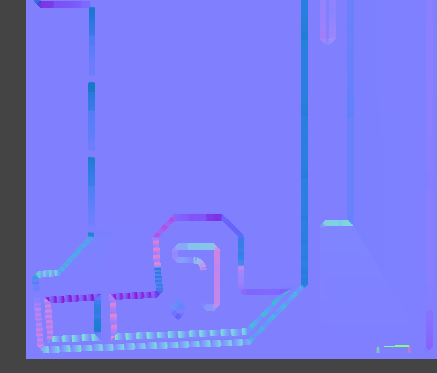
      From the shaded view it looks like it’s happening on the internal edges of the door frame. I also noticed that I’m getting some skewed bevels on the outside edge of some of the faces (I think that would most likely be cage related?)
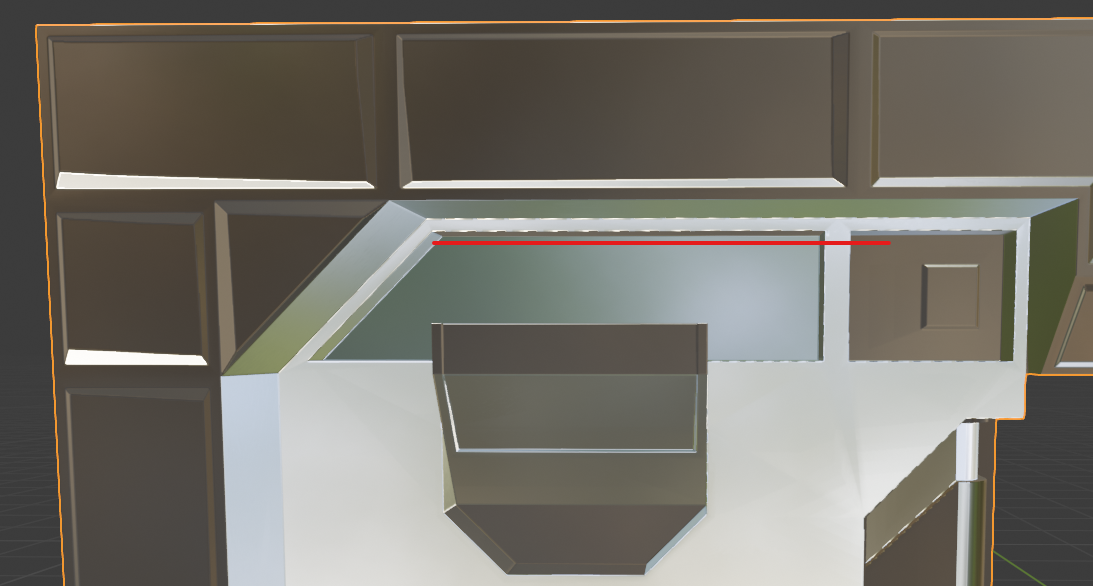
      I don’t think it’s bit depth related, I tried both having the 32-bit flag checked on the texture, and just saving it as a 16-bit PNG.

      I set up a test blend file with just the door frame which can be found here.

      Any assistance would be greatly appreciated.

      #60492
      Warren
      Participant

        Actually, it turns out I’m a bit silly. So I switched from using the bevel node in the high-poly shader and used a bevel modifier on the high-poly. I had the bevel amount on the modifier set to something like 0.001 – 0.008 which I believe is too small to capture for the ray casts to capture edge detail on the high poly. Once I set it to 0.025 (like was in the original video) the results are a lot better.

        #60493
        Jonathan Lampel
        Participant

          Great, glad it worked out! 

        Viewing 3 posts - 1 through 3 (of 3 total)
        • The topic ‘Weird normal map details on some edges’ is closed to new replies.