Weight paint issues.

Forum Archive Weight paint issues.

Viewing 8 posts - 1 through 8 (of 8 total)
  • Author
    Posts
  • #18137
    Xavier Baldwin
    Participant

      Would anyone know why, when I weight paint one leg, and try to move it, parts of the other leg move as well?

      https://drive.google.com/file/d/1vVTaD5iqwrOGsZW2dfwHW_5erWjGjH6_/view?usp=sharing

      #86753
      Martin Bergwerf
      Participant

        Hi Xavier,

        I am an absolute noob when it comes to Rigging and I haven’t watched this course yet either (but I will !), but when you Rotate the Foot Bone, the Toe Bone also moves, so maybe it’s the Weight Painting of the Toe, that’s wrong…could that be?

        #86754
        Omar Domenech
        Participant

          I’d put my money on that as well, there’s a little bit of weight on those vertices on the other foot. 10 bucks it is.

          #86755
          Xavier Baldwin
          Participant

            I checked to see if there were weights on there so I tried to I subtract them all off. But these few vertices still move. https://drive.google.com/file/d/1X2eZkdiLR1NiqpyPsvfs0IfSCKAyKU4r/view?usp=sharing

            #86756
            Martin Bergwerf
            Participant

              Sorry, I don’t know…but anyway, Shin is not Toe…

              #86757
              Wayne Dixon
              Participant

                HI Xavier,
                You are just rotating the Shin, but don’t forget that the children also move.
                The rogue weights are likely lower in the hierarchy (ie – the DEF-Foot or the DEF-Toe)

                Try rotating the Shin but then select the Foot and subtract from the other leg
                Then do the same for the Toe.

                The reason you can’t subtract those weights is that they aren’t a part of the group you are trying to subtract them from.
                (Hope that makes sense)

                Let us know if you’re still stuck – and post your file.  I will show you.

                #86758
                coyo
                Participant

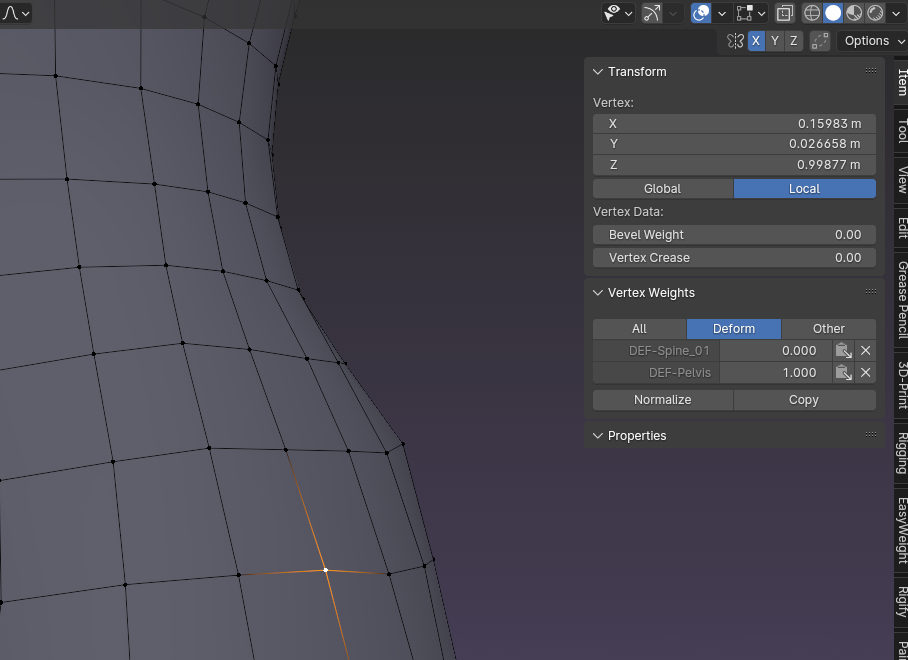
                  I struggled with issues like this so often! One way to hunt down rogue weights is by checking the mesh in Edit Mode. Note the vertex that is pulling strangely. With the mesh in Edit Mode select the vertex. On the side panel choose Item> Vertex Weights – This will show you all the Vertex Groups that have influence on that vertex and to what degree. If something seems wildly off you can remove the group completely via that panel as well.

                  Here is an example:

                  GC RIG - Luna_#M.png

                  #86759
                  Xavier Baldwin
                  Participant

                    Fixed! Thanks for all the help! They were rouge weights from the foot. Not the shin. Just subtracted those and it’s all good now.

                  Viewing 8 posts - 1 through 8 (of 8 total)
                  • The topic ‘Weight paint issues.’ is closed to new replies.