Weight Paint Issues in Blender

Forum Archive Weight Paint Issues in Blender

Viewing 5 posts - 1 through 5 (of 5 total)
  • Author
    Posts
  • #9750
    Krysten Weatherman
    Participant

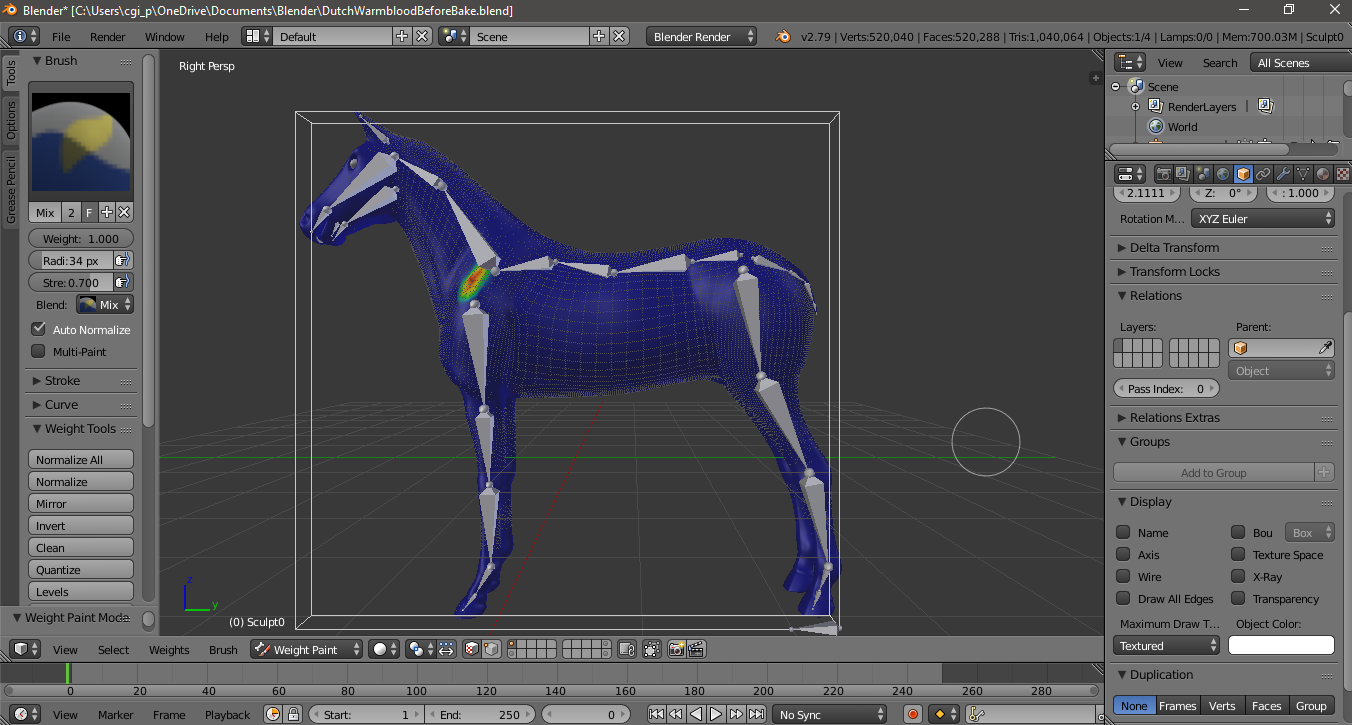
      I don’t understand why, but I started to weight paint my model and up pops a little hole in the shoulder of the horse. Please someone help.

      #36861
      plasmavoyage
      Participant

        It might help to post a screenshot of it in weightpaint mode so we can actually see what you did.

        Or just upload the .blend file.

        #36862
        Jonathan Lampel
        Participant

          Hmm, if it’s not effecting the displacement and there’s no armature, I’m really not sure why weight painting would change the mesh in any way. 

          #36863
          Krysten Weatherman
          Participant

            I tried seeing if using add would fix the problem in WP but it still proceeds and now I have a spot on the shoulder where the hole is..it also shows up in the weight paint. I just opened blender so the mix brush is showing.

            #36864
            plasmavoyage
            Participant

              @cgipaint It looks like that Vertex or those few vertices are either in a group that got auto-weighted to a bone or the rig

              or

              you assigned those vertices to a bone by weight-painting them.

              Turn down the Weight from 1 to 0 in the toolbar on the left and paint over that area until it’s blue. That should remove your dent.

            Viewing 5 posts - 1 through 5 (of 5 total)
            • The topic ‘Weight Paint Issues in Blender’ is closed to new replies.